
Windows service
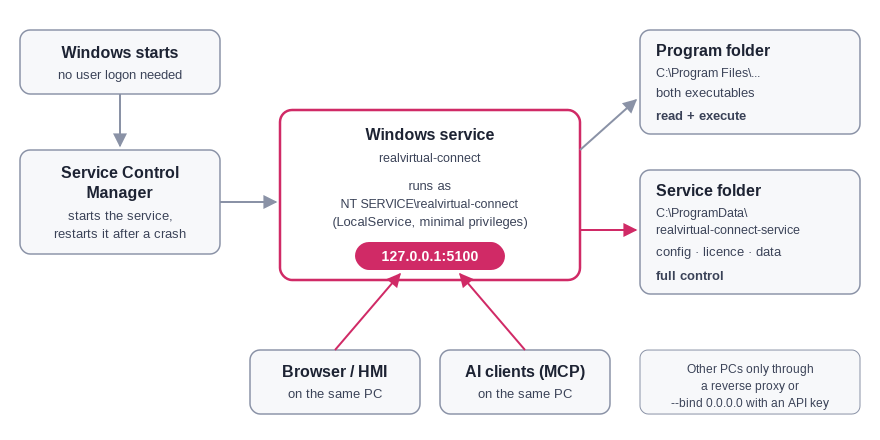
CONNECT can run as a Windows service: it starts with the PC, needs no logged-in user and no tray icon, and the Service Control Manager restarts it after a crash. Use it for an edge PC, a server or a customer machine that nobody logs on to.
Overview
Section titled “Overview”| Tray app | Windows service | |
|---|---|---|
| Starts | When a user starts it | With Windows, before any logon |
| Needs a logged-in user | Yes | No |
| Runs as | The logged-in user | NT SERVICE\realvirtual-connect (account LocalService, minimal privileges) |
| Configuration and licence | %PROGRAMDATA%\realvirtual\CONNECT | C:\ProgramData\realvirtual-connect-service\config |
| Self-update | Yes | No - you replace the files, see Update |
| Headless mode, tray menu, dialogs | Yes | Not available |
The service has its own folder and shares nothing with a tray installation on the same PC. A tray CONNECT keeps working beside it, but not on the same port.
Requirements
Section titled “Requirements”-
Windows 10 or 11, 64-bit.
-
An elevated terminal (Run as administrator) for
installanduninstall.statusworks without elevation. -
Both executables from the same delivery, side by side in one folder:
realvirtual-Connect.exeandrealvirtual-connect-cli.exe. The installer refuses a mismatched pair.For the tray app one file is enough. The service needs the second one:
realvirtual-connect-cli.exeis a small console program through which theserviceandlicensecommands print their output and exit codes in the terminal. Download both files of the current release:The update button inside the app does not help here: it only replaces the program file of a tray installation in a writable folder and does not bring the console file.
-
A program folder that only administrators can write to, for example
C:\Program Files\realvirtual CONNECT. Do not run the service from Downloads or a user profile. -
A free port,
5100by default. -
A licence for the machine, see Licensing under the service.
Install
Section titled “Install”-
Create the folder and copy both executables into it.
Terminal window New-Item -ItemType Directory "C:\Program Files\realvirtual CONNECT"Copy-Item .\realvirtual-Connect.exe, .\realvirtual-connect-cli.exe "C:\Program Files\realvirtual CONNECT" -
Install the service from an elevated terminal.
Terminal window & "C:\Program Files\realvirtual CONNECT\realvirtual-Connect.exe" service installThe installer checks the folders, creates the service folder, unpacks the converter tools, registers the service with automatic start and starts it. It reports success once the service is RUNNING. The start can take up to two minutes.
-
Check the result.
Terminal window & "C:\Program Files\realvirtual CONNECT\realvirtual-Connect.exe" service statusInvoke-RestMethod http://127.0.0.1:5100/health
Install options
Section titled “Install options”| Option | Default | Meaning |
|---|---|---|
--name <name> | realvirtual-connect | Service name. Letters, digits, _, ., -; up to 80 characters; starts with a letter or digit |
--port <port> | 5100 | Gateway port, 1 to 65535 |
--bind 127.0.0.1|0.0.0.0 | 127.0.0.1 | Listener address. Only these two values are accepted. 0.0.0.0 makes the gateway reachable from the network |
--config-dir <dir> | C:\ProgramData\realvirtual-connect-service\config | Folder of connect-config.json |
--license-dir <dir> | the default config folder | Folder of the activated licence. If you set --config-dir, set --license-dir too unless you want the licence in the default folder |
--data-dir <dir> | C:\ProgramData\realvirtual-connect-service\data | Models, converted CAD, logs |
--allow-writable-binary-dir | off | Accept a program folder that non-administrators can write to. See Security |
--json | off | Machine-readable output for install, uninstall and status |
The directory options must point to a folder on a local fixed drive; UNC paths and device paths are refused. Choose dedicated folders, not system folders and not the tray folder %PROGRAMDATA%\realvirtual.
Example for a second instance on another port, reachable from the network:
realvirtual-Connect.exe service install --name realvirtual-connect-line2 --port 5101 --bind 0.0.0.0With --bind 0.0.0.0 the installer prints a firewall rule suggestion. It does not create the rule; review it and run it yourself. Read Remote access before opening the gateway to the network.
Install again
Section titled “Install again”Running service install again with the same values changes nothing. If the service exists with different values (another port, another folder, another executable), the installer refuses with GATEWAY_SERVICE_CONFIG_CONFLICT and leaves it untouched. To change settings, uninstall and install again - your configuration, licence and data stay.
Configuration
Section titled “Configuration”The installed settings (port, bind address, folders) live in the service definition and are fixed at install time. Everything else works as for the tray app.
| What | Where |
|---|---|
| Plant configuration (interfaces, signals, bridges, profiles) | connect-config.json in the config folder |
| Licence | the licence folder (by default the config folder) |
| Models, converted CAD, history | the data folder |
| Diagnostic log | <data folder>\logs\service-<name>.log |
| Allowed browser origins | AllowedOrigins in connect-config.json (recommended) or in appsettings.json |
Host settings (ApiKey, log level) | appsettings.json next to realvirtual-Connect.exe |
Defaults: C:\ProgramData\realvirtual-connect-service\config and C:\ProgramData\realvirtual-connect-service\data.
connect-config.json is written the first time CONNECT saves a setting. On a fresh service without a licence it does not exist yet; you can create it yourself (see Allowed origins and API key).
Edit and restart
Section titled “Edit and restart”Without a tray icon, you change the configuration in the viewer (the CONNECT panel of web.realvirtual.io) or in the files:
- Stop the service:
sc.exe stop realvirtual-connect - Edit
connect-config.jsonin an elevated editor. Only administrators and the service can write to the folder. - Start the service:
sc.exe start realvirtual-connect
Do not edit while the service runs; CONNECT rewrites the file on every viewer change and would overwrite your edit. Field names, defaults and which changes need a restart are in the configuration file reference.
Port and bind address
Section titled “Port and bind address”Port and bind address come from the installed service and override Urls and Kestrel settings in the configuration. To change them, uninstall and run service install with the new --port or --bind.
AI and MCP switches
Section titled “AI and MCP switches”There is no tray menu, so the MCP switches are fields in connect-config.json: McpEnabled (needs a restart), McpAllowWrite and McpClientRemoteAllowed (applied immediately). AI control is switched per browser tab in the viewer settings, as before. See AI clients.
Allowed origins and API key
Section titled “Allowed origins and API key”There is no tray, so you allow the address of a web page (for example your own web server that hosts the viewer) in the configuration file:
-
Stop the service:
sc.exe stop realvirtual-connect -
In
connect-config.jsonin the config folder, set"AllowedOrigins": [ "https://your-server.example" ](exactscheme://host[:port]). If the file does not exist yet, create it with only this content:{ "AllowedOrigins": [ "https://your-server.example" ] }CONNECT completes the file with its defaults on the next start.
-
Start the service:
sc.exe start realvirtual-connect
Origins in connect-config.json survive an update, because the file lives in the service folder. AllowedOrigins in appsettings.json beside the executable is read as well, but that file is replaced when you unpack a new delivery over the program folder.
ApiKey is set only in appsettings.json. The tray app generates an API key for you; the service does not, so create your own key before you bind to 0.0.0.0, and keep a copy of appsettings.json when you update. See Remote access.
Licensing under the service
Section titled “Licensing under the service”The licence belongs to the service, not to a user. Manage it from an elevated terminal with the license commands; they find the service installed under the default name realvirtual-connect automatically and use its licence folder. The folder is readable only by the service, SYSTEM and administrators, so a terminal without elevation gets a permission error.
realvirtual-Connect.exe license statusrealvirtual-Connect.exe license activate <code>realvirtual-Connect.exe license activate <code> --offlinerealvirtual-Connect.exe license import <file>- Activate while the service is running. The licence survives service restarts and reboots without a logon.
- Until a licence is activated, the gateway answers every request with
LICENSE_REQUIRED. The free registration is described in Licensing. - A licence activated for a tray installation is not shared with the service. Activate it for the service separately.
- For a service installed with another name or licence folder, add
--license-dir <dir>(the licence folder shown byservice status); the automatic lookup only knows the default name. Add--port <port>as well when the service does not use port 5100.
Status, start, stop
Section titled “Status, start, stop”| Task | Command |
|---|---|
| Show state, account, folders, port | realvirtual-Connect.exe service status (no elevation needed) |
| Start | sc.exe start realvirtual-connect or Start-Service realvirtual-connect |
| Stop | sc.exe stop realvirtual-connect or Stop-Service realvirtual-connect |
CONNECT has no service start or service stop command; use the Windows tools above (elevated) or the Services console.
service status returns exit code 6 and GATEWAY_SERVICE_NOT_INSTALLED when the service does not exist. A clean stop does not restart the service. If the process crashes, Windows restarts it after 5, 15 and 60 seconds.
Update
Section titled “Update”The service does not update itself. To update:
- Stop the service:
sc.exe stop realvirtual-connect - Replace both
realvirtual-Connect.exeandrealvirtual-connect-cli.exein the program folder with the files of the new delivery. - Run
realvirtual-Connect.exe service installagain. With unchanged settings it keeps your configuration, refreshes the converter tools and starts the service.
Configuration (including origins in connect-config.json), licence and data stay in place. If you unpack the whole new delivery into the program folder instead of replacing only the two executables, appsettings.json is replaced too; copy back your ApiKey before you start the service.
Uninstall
Section titled “Uninstall”realvirtual-Connect.exe service uninstallThis stops and removes the service. The configuration, licence and data folders are kept, so a later install resumes where you left off. To remove everything, delete C:\ProgramData\realvirtual-connect-service afterwards. uninstall refuses to remove a service of the same name that CONNECT did not create.
Security
Section titled “Security”- Account. The service runs as
NT SERVICE\realvirtual-connect(account LocalService) with a per-service SID and a reduced privilege list. It needs no administrator rights at run time. - Program folder. The installer does not change its permissions; it only checks them. Because the service runs these files, it refuses a folder where accounts other than administrators, SYSTEM and TrustedInstaller could write or replace them:
GATEWAY_SERVICE_BINARY_DIRECTORY_UNSAFE. The check covers both executables and their folder chain.C:\Program Filespasses as it is. - Config, licence and data folders. SYSTEM and Administrators have full control; the service has full control on the
configanddatafolders and only read and execute on the service root folder itself; the owner may read the permissions but not change them; everyone else has no access. The installer creates the service folder with these permissions from the start and checks existing folders and their contents before it uses them. - Refused locations. UNC and device paths, drives that are not local and fixed, system folders and the tray folder.
- Secrets in the configuration. Passwords and client secrets of interfaces are stored in plain text in
connect-config.json. They are protected by the folder permissions only. Do not copy the file to places with wider access, and enter secrets directly in the CONNECT panel. - Log. Secrets are redacted before they are written to the log file.
- Network. The default bind is
127.0.0.1. Opening it with--bind 0.0.0.0needs a firewall rule and anApiKey.
--allow-writable-binary-dir overrides the program folder check for that one installation, and the installer prints a warning. Use it only for a lab machine; the better fix is to move the executables to C:\Program Files.
Troubleshooting
Section titled “Troubleshooting”Start with service status and the log file <data folder>\logs\service-<name>.log; the same folder holds the diagnostic log diag-*.ndjson. CONNECT writes no entries of its own to the Windows Event Log yet; Event Viewer only shows the Service Control Manager’s messages (for example event 7045 when the service is installed, and start or crash events). If the service fails very early, C:\ProgramData\realvirtual-connect-service\data\logs\service-shim-startup.log may hold the reason.
| Code | Meaning | What to do |
|---|---|---|
CLI_ELEVATION_REQUIRED | The terminal is not elevated | Open PowerShell with Run as administrator |
CLI_SHIM_MISSING | realvirtual-connect-cli.exe is not beside realvirtual-Connect.exe | Copy it into the same folder |
GATEWAY_SERVICE_SHIM_OUTDATED | The two executables come from different deliveries | Replace both from the same delivery |
GATEWAY_SERVICE_BINARY_DIRECTORY_UNSAFE | Normal users can write to the program folder | Move both files to C:\Program Files\... or another admin-only folder; as a last resort --allow-writable-binary-dir |
GATEWAY_SERVICE_CONFIG_CONFLICT | A service with this name exists with other settings, another executable or another account | Run service uninstall, then service install with the settings you want. Inspect it with sc.exe qc <name> |
GATEWAY_SERVICE_BIND_UNSUPPORTED | --bind is not 127.0.0.1 or 0.0.0.0 | Use one of the two |
GATEWAY_SERVICE_DIRECTORY_FORBIDDEN | A folder is on a network or non-fixed drive, or in a system or tray folder | Choose a dedicated folder on a local fixed drive |
GATEWAY_SERVICE_DIRECTORY_UNTRUSTED | An existing folder has unsafe owners, permissions, links or contents | The message names the path; remove or rename it, or choose another folder. Nothing was changed |
GATEWAY_SERVICE_DIRECTORY_CREATE_FAILED | A folder could not be created | Check the path and the disk, then retry |
GATEWAY_SERVICE_TOOLS_IN_USE / GATEWAY_SERVICE_TOOLS_INVALID | The converter tools could not be unpacked | Stop programs that use the tools folder and retry; restore the executable from the delivery |
GATEWAY_SERVICE_START_FAILED | The service stopped before it reached RUNNING | Read service-<name>.log; typical causes are a port that is taken or a folder the service cannot write |
GATEWAY_SERVICE_START_BUDGET_EXCEEDED | The service did not reach RUNNING within 120 seconds | Read the log, then retry service install |
GATEWAY_SERVICE_STOP_TIMEOUT | The service did not stop, so it was not removed | Wait for shutdown, check service status, retry service uninstall |
GATEWAY_SERVICE_NOT_INSTALLED | status found no such service (exit code 6) | Check --name |
CLI_WINDOWS_REQUIRED | The command ran on a non-Windows system | On Linux use the systemd unit |
LICENSE_REQUIRED from the gateway means the service has no licence yet - see Licensing under the service. A port conflict shows up as a failed start; stop whatever uses the port, for example a tray CONNECT.
See also
Section titled “See also”- Installation - the tray app
- Configuration file - fields, defaults, restart rules
- Remote access - API key and network exposure
- Licensing - registration and commercial licences
- Updates - self-update of the tray app
- License server - another CONNECT component that runs as a Windows service