
Troubleshooting
The gateway does not start
Section titled “The gateway does not start”Another program holds port 5100. CONNECT refuses to start on an occupied port because clients use that specific port to connect. It does not automatically choose another port. Free the port, or set another one with the environment variable REALVIRTUAL_CONNECT_PORT and point this instance’s clients there.
A second CONNECT is already running. Check the tray. A running gateway already owns the port.
Windows blocked the file. SmartScreen may hold the first start of a freshly downloaded executable. The build is signed by realvirtual GmbH; the confirmation is behind More info.
The browser shows nothing
Section titled “The browser shows nothing”Check the address. http://localhost:5100 on the gateway PC, http://<host>:5100 from another machine.
From another machine, check the key. With an API key configured, a remote browser has to be introduced once with http://<host>:5100/?apikey=<key>. Without that step it gets a 401 for everything, including the page itself. See remote access.
Check the firewall. A Windows firewall rule for port 5100 is needed for access from other machines.
The AI assistant sees no web_* tools
Section titled “The AI assistant sees no web_* tools”The browser tools exist only while a viewer tab with AI control on is attached to the gateway. The tray line MCP server shows the count: eight tools means no browser offers tools.
AI control is off in the viewer. Calls fail with an error that starts with AI_DISABLED:, and web_status reports aiEnabled: false. Open Settings ▸ AI in the viewer and switch AI control on. It stays off until you enable it separately in each browser profile. The CONNECT channel row above it can read Connected while AI control is off. The channel also serves SolidCraft and the server log, which need no AI.
Another tab owns the bridge. With several viewer tabs open, one tab owns the CONNECT channel and a tab with AI control on takes precedence. Use that tab, or close the others.
The viewer is not looking at this gateway. A viewer opened from the gateway itself (http://localhost:5100) finds it on its own. The hosted viewer on web.realvirtual.io, or a viewer on any other origin, needs the port in its address: ?mcpPort=5100, or the port you set with REALVIRTUAL_CONNECT_PORT. The Port row of the AI Bridge panel shows what the tab is talking to.
The origin is refused (403). CONNECT rejects a viewer served from a domain that is not in AllowedOrigins. This is the DNS-rebinding defence described under remote access. realvirtual’s own origins (web.realvirtual.io, realvirtual.io, www.realvirtual.io) are always allowed; add your own domain in the tray (Details ▸ Allowed origins, applies at once) or to AllowedOrigins in appsettings.json (restart).
The MCP client was started before the tab attached. Some clients do not pick up tools that appear later. Restart the client once Settings ▸ AI shows Connected and AI control is on.
SolidCraft says “another tab owns the CONNECT channel”
Section titled “SolidCraft says “another tab owns the CONNECT channel””Only the tab that owns the CONNECT channel can connect SolidCraft. Another viewer tab owns it — usually one with AI control on, which takes precedence. Connect SolidCraft from that tab, or close the other tab and try again. Connecting SolidCraft never switches AI control on. If the message is Too many viewer tabs, CONNECT already serves eight tabs; close the ones you no longer need.
An interface will not connect
Section titled “An interface will not connect”Read the reason on the interface card first. It names the failing step. Check these common causes for each protocol:
| Protocol | Check |
|---|---|
| S7 | PUT/GET communication enabled on the CPU; optimized block access disabled for the addressed data blocks |
| PLCSIM Advanced native API (Windows only) | PLCSIM Advanced installed on the CONNECT PC; instance name matches. Softbus is fine; no virtual Ethernet adapter, PUT/GET or absolute addresses needed. For an instance on another PC, set Remote address to host:50000 and allow remote connections in its Runtime Manager. |
| Siemens S7 to PLCSIM Advanced (S7comm) | Network adapter switched to PLCSIM Virtual Eth. Adapter; PUT/GET enabled; absolute addresses and non-optimised DBs. |
| TwinCAT | An AMS route on the PLC pointing back to the gateway PC and its Net Id |
| OPC UA | Endpoint reachable, and the security policy accepted by the server |
| MQTT | Broker URL and port, credentials, and whether the topic actually publishes |
| EtherNet/IP | Path — 1,0 for a backplane, and no path at all for Micro800 |
| Festo | Only one Festo interface per gateway is possible |
| ctrlX (bridge mode) | The bridge snap installed and running on the device |
| ABB RobotStudio, shared memory | Gateway and the other program on the same PC |
You choose the PLCSIM Advanced route through the interface type; CONNECT does not switch automatically. See PLCSIM Advanced protocols.
A failing interface retries by itself with a growing backoff of up to 30 seconds. There is no need to restart the gateway after fixing the cause.
Connected, but no values arrive
Section titled “Connected, but no values arrive”Check the direction. A signal the PLC is supposed to supply must be PLCOutput; a signal realvirtual supplies must be PLCInput. A wrong direction produces no error — the value simply never moves. See configuring interfaces.
Check the address. The interface card shows an amber badge for signals whose address could not be parsed or that point outside the received data.
Check the signal count against your license. Signals beyond the licensed limit are listed by name rather than silently dropped. See licensing.
Values arrive, but the model does not move
Section titled “Values arrive, but the model does not move”Names must match. The viewer binds signals to model components by name; the CONNECT panel marks bound and unbound signals. A typo shows up there.
Commands need write access. Writing from the HMI to the controller requires Allow web to PLC on that interface. It is off by default.
Only some signals update
Section titled “Only some signals update”For an MQTT process image, an out of bounds badge means the payload is shorter than the tag table expects — usually a tag table from a different PLC program version. It clears by itself once a matching payload arrives.
CAD import fails
Section titled “CAD import fails”Over the limit: the message names whether the license limit or this gateway’s configured capacity applied. See CAD conversion.
Unreadable JT: a shattered JT, whose parts live in separate files, is not reliably detected. Export a monolithic file.
No “via CONNECT” option: the gateway reports whether it can convert at all, and the viewer offers only what is available. An older gateway build may not have the feature.
Diagnosis answers nothing useful
Section titled “Diagnosis answers nothing useful”No documents: the documentation folder is empty; the answer says so explicitly.
No model key: the feature reports that it is not configured rather than guessing.
Too many requests: requests are rate-limited per minute so a flapping error signal cannot trigger a storm.
Use Test AI Query… in the tray menu to check the pipeline without going through the HMI. See AI diagnosis.
Nothing here matches
Section titled “Nothing here matches”GET /health on the gateway answers without any authentication and reports version, build and capability flags. It is the fastest way to tell “the gateway is not running” from “the gateway is running but refusing me”.
Reporting a problem
Section titled “Reporting a problem”If none of the checks above help, send us two diagnostics files. Together they let us follow the problem from the browser to the controller. Neither contains geometry.
1. Browser diagnostics from the viewer
- Open Settings in the left sidebar and select the Help & diagnostics tab. It shows the viewer version and the version of the connected CONNECT.
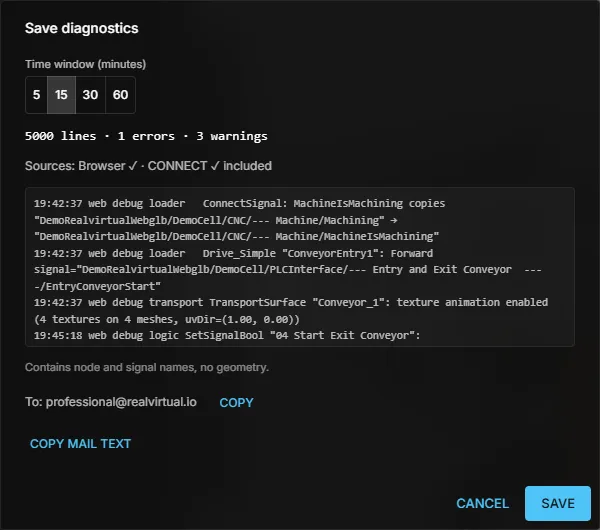
- Click Save diagnostics….
- Choose the Time window (minutes) that covers the problem — 5, 15, 30 or 60 — and click Save.
The ZIP contains the browser logs of that time window. When the viewer is connected to CONNECT, the dialog shows CONNECT ✓ included and adds the recent gateway log as well. The file contains node and signal names, but no geometry.
2. Gateway diagnostics from the CONNECT tray
- Right-click the realvirtual CONNECT icon in the Windows taskbar notification area.
- Choose Save diagnostics… and save the file
rv-connect-diagnostics-<date>-<time>.zip.
The ZIP contains the buffered CONNECT log, the environment (CONNECT version, operating system, uptime, machine name, data folder) and the license status. The license key itself is never included. This menu item requires realvirtual CONNECT 1.7.0 or newer.
Send both ZIP files to professional@realvirtual.io, with a short description of what you did and what you expected to happen.