
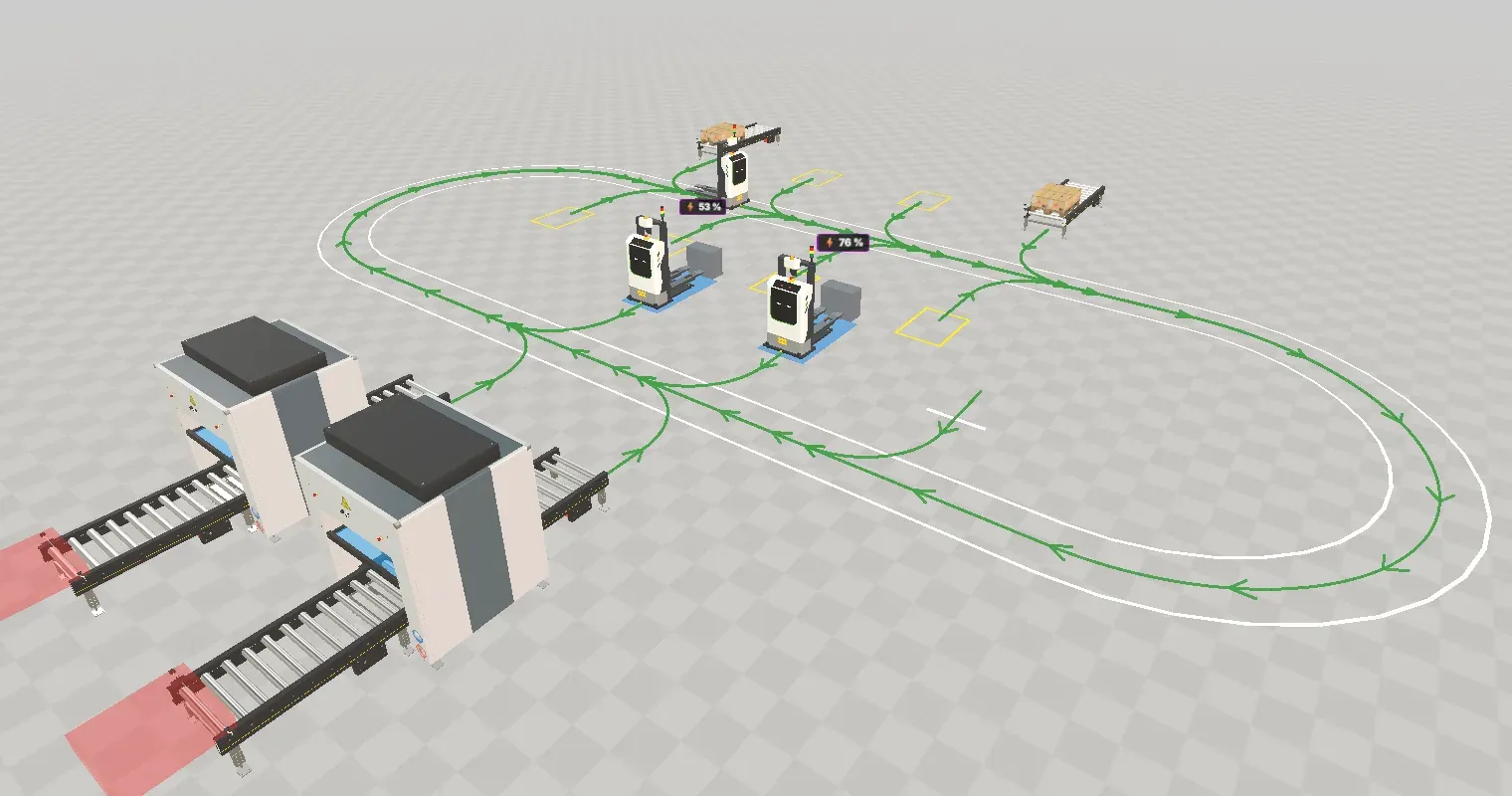
The forklift demo is the Pallet Yard (DES) document of the public demo project. Three autonomous forklifts (AGV stackers) take pallets from two production lines, buffer them on floor slots, deliver them to two shipping lanes and recharge on their own. It is the reference example for discrete event simulation with vehicles: you can run it, change it in the planning window and compare variants in the experiment manager.
The demo combines three kinds of building blocks, and this page shows which one does what: standard components in the GLB, a model script in the GLB, and a TypeScript plugin that holds the forklift logic.
Opening the demo
Section titled “Opening the demo”Open web.realvirtual.io/demo/?doc=doc_palletyard_hzmdb6&mode=des. The document id is doc_palletyard_hzmdb6, the file PalletYard.glb, and it opens in the DES workspace.
- Press Play. The forklifts start picking, buffering, shipping and charging.
- Use Fast Forward to run a whole shift in seconds.
- Open Statistics and Event Queue in the side toolbar to see what happens.
- Open Experiments (flask icon in the DES toolbar) and press Run all to compare the prepared variants.
The process
Section titled “The process”- Production. Two production outputs, A1 and A2, each release one pallet every 90 s, offset by 45 s (80 pallets per hour together). A pallet runs to the end of its output conveyor.
- Pick order. A pallet that arrives at the end of an output conveyor becomes a transport order.
- Destination. When the order is assigned, the dispatcher picks the destination: a free shipping input that is not paused, otherwise the floor slot that has been free the longest.
- Shipping. The two shipping inputs, V1 and V2, pause regularly: every 1200 s for 300 s, offset against each other. During a pause, pallets go to the six floor slots P1 to P6 and are fetched again later.
- Charging. Below 30 % state of charge a forklift drives to one of the chargers L1 and L2 and charges to 80 %. A wait point W in front of the chargers holds one vehicle that queues for a charger.
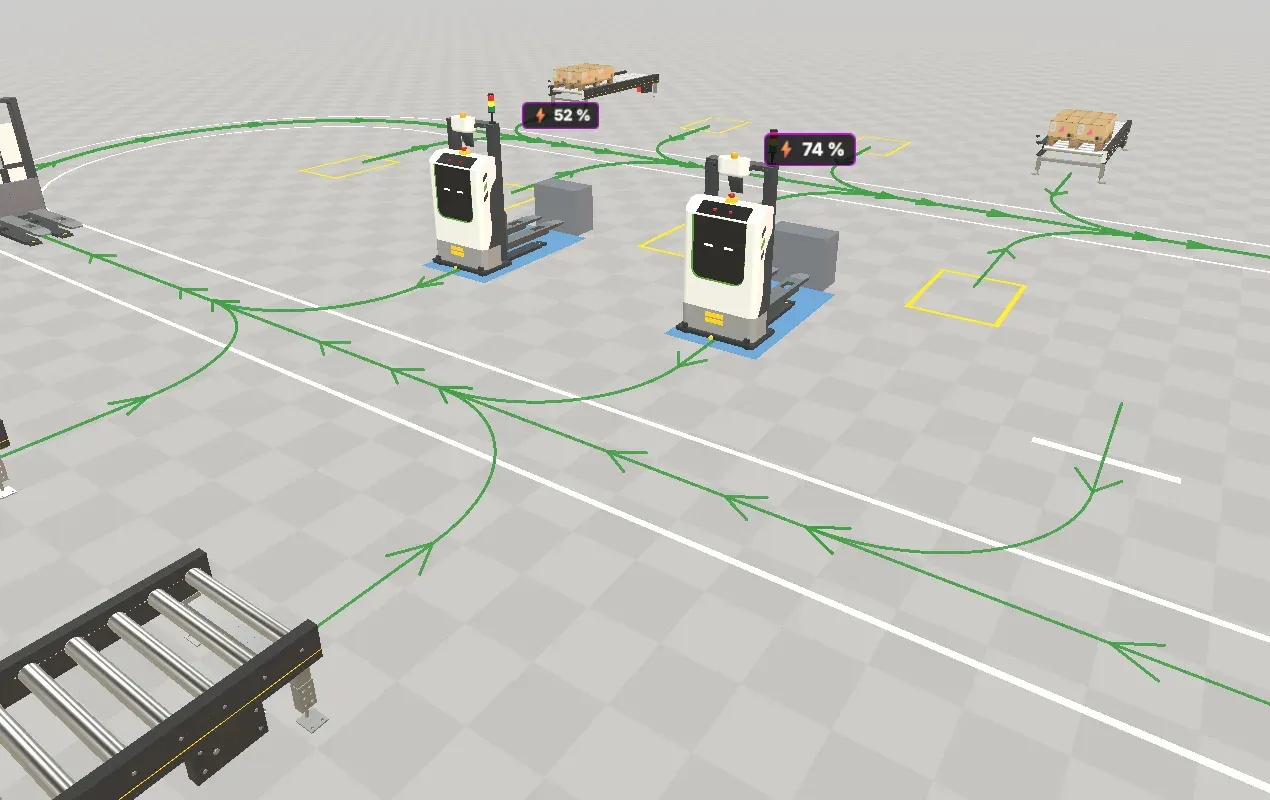
Every station sits at the end of a short stub off the loop. A forklift backs into the stub fork first, the dock holds it while the fork lifts or sets down, and it leaves forward. The loop is one-way, so vehicles cannot overtake each other.
Model structure
Section titled “Model structure”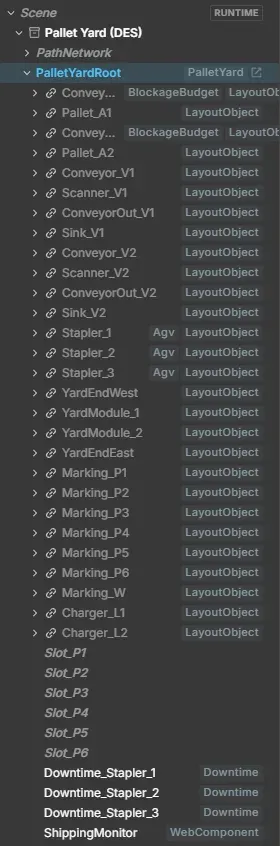
The document carries almost no own geometry. Conveyors, scanners, sinks, the forklifts and the chargers are placements of library assets (Pallet Handling, Mobile Robots), materialised when the scene loads.
| Node | What it is |
|---|---|
PathNetwork | The one-way loop and the station stubs as path segments with zones, see Path network |
PalletYardRoot | Root of the yard. Its PalletYard component holds the yard configuration and the experiment fields VehicleCount, AgvMtbf, AgvMttr and AgvDowntimeStochastic |
Conveyor_A1, Conveyor_A2, Pallet_A1, Pallet_A2 | Production outputs: conveyors and the pallet sources (Source with automatic generation switched off; the plugin’s takt releases each pallet) |
Conveyor_V1/V2, Scanner_V1/V2, ConveyorOut_V1/V2, Sink_V1/V2 | Shipping lanes, ending in a Sink each |
Stapler_1 … Stapler_3 | The forklifts: AGV stacker placements with the AGV component |
Charger_L1, Charger_L2, Slot_P1 … Slot_P6, markings | Chargers, floor slots and their floor markings |
Downtime_Stapler_1 … _3 | One Downtime per forklift: breakdowns with MTBF 1 h and MTTR 10 min, drawn randomly from the seeded stream |
ShippingMonitor | The model script described below |
The document also carries the three experiment variants (2 AGVs, 4 AGVs, No downtime) in its scene data, so the experiment travels with the GLB.
How a forklift gets its tasks
Section titled “How a forklift gets its tasks”The forklift logic is built on the fleet layers of realvirtual WEB:
- The path network and the AGV component do the driving: shortest route to a destination segment, zone claims at junctions and stubs, distance keeping to the vehicle ahead, reversing into a stub.
- Tasks are the low-level command to one vehicle: drive to the end of a segment, optionally backwards, stay there, and call back on arrival and when the stay ends.
- Docks bind a station to the end of a stub segment and own the stay: the forklift is held until the fork has finished.
- The dispatcher keeps the order pool, chooses the destination and the vehicle, checks the battery and reserves the station.
- The job runner executes each job as a fixed sequence: fork to approach height, back in, take or set down, drive out, fork to travel height once the stub is clear.
None of this is in the GLB. The plugin creates a dispatcher and a job runner for the yard and connects them to the scene.
The model script: ShippingMonitor
Section titled “The model script: ShippingMonitor”ShippingMonitor is a small model script on its own node under PalletYardRoot. It only observes: it listens to both shipping sinks and publishes two values, Late shipments and Longest shipping gap. A shipment counts as late when the gap since the previous one is longer than twice the target takt of 60 s. It never changes the yard.
// ShippingMonitor - teaching example: counts late shipments of the PalletYard.// Observes both shipping sinks; changes nothing in the model.function setup(self) { // All state in self.persist: snapshots and continuation restore it. const st = self.persist({ last: null, late: 0, longest: 0 }); // Publish initial values so the KPI picker finds both rows. self.statValue('Late shipments', 0); self.statValue('Longest shipping gap', 0, 's'); function onShipment() { const targetTakt = 60; // seconds between shipments we aim for if (st.last !== null) { const gap = self.now - st.last; if (gap > 2 * targetTakt) st.late++; st.longest = Math.max(st.longest, gap); self.statValue('Late shipments', st.late); self.statValue('Longest shipping gap', st.longest, 's'); } st.last = self.now; } // Subscribe in setup() only, by placement name. Outside a DES run there is no sink to hear: stay idle. const sinkV1 = self.sink('Sink_V1'); if (sinkV1) sinkV1.on(onShipment); const sinkV2 = self.sink('Sink_V2'); if (sinkV2) sinkV2.on(onShipment); return {};}- Where it is attached. A WebComponent (language JavaScript) on the empty node
PalletYardRoot/ShippingMonitor. Open it with the Script Editor in the side toolbar. - Which event.
self.sink('Sink_V1').on(...)fires each time a pallet reaches that sink, at its simulated timeself.now. The script subscribes insetuponly, because DES restarts the script for every run. - State. Everything it counts lives in
self.persist, so a restored snapshot continues with the right numbers. - Result.
self.statValuepublishes the values in the Scripts tab of the Statistics window. In the experiment manager, Late shipments is one of the KPI rows, so the variants are compared on it.
Like every model script, it runs after Enable scripting. See Scripting in DES for the events a script can react to and Your own KPI for turning a value into an experiment KPI.
The TypeScript plugin
Section titled “The TypeScript plugin”The forklift logic itself is a model plugin in TypeScript, named after the model: the viewer build contains it under the name PalletYard, and the document PalletYard.glb loads it because its row in project.json names no scriptRef. It registers when the document opens. Model plugins are switched off in the authoring workspaces such as the layout planner; this one opts into the DES workspace, so it keeps running there. Outside DES it drives the same orders in the continuous simulation.
The entry point declares the plant: the takts of the two outputs, the shipping pauses, the retrieval rule for the floor slots, and the planning parameters.
const definition = definePlantPlugin({ apiVersion: 1, id: 'pallet-yard', config: { takts: cfg.stations.filter(s => s.kind === 'pick').map((s, i) => ({ station: s.id, intervalSec: intervalOf(cfg.production, i), startSec: cfg.production.phaseSec[i], })), pauses: cfg.shippingPauses, lamps: {}, }, retrieval: RETRIEVAL_RULES[cfg.retrieval ?? 'legacy-fifo'], lampMap: DEFAULT_LAMP_MAP, parameters: yardPlanning,});export const { registerModelPlugins, unregisterModelPlugins } = plantPluginExports(definition, createYardBinder(yardPlanning));export const runInAuthoringModes = ['des'];The shared fleet plugin owns the lifecycle — binding at start, reset, snapshots, the switch between DES and continuous simulation. The yard adds only what is specific to it, through a binder:
| The plugin adds | What it does |
|---|---|
| Scene binding | Finds stations, forklifts, forks and docks in the scene and connects them to the DES kernel (or to the continuous simulation) |
| Dispatcher and job runner | Creates the yard’s dispatcher (stations, battery model, forklift energy use) and the job runner with the stub, turn point and wait point layout |
| Planning window | Declares the groups Size, Production load, Stations, Shipping and Fleet and applies changed values, see Planning window |
| Key figures | Shipped (Pal/h), Buffer peak, Blocked takts and Mean order time, under the model’s section of the Statistics window |
| Charger labels | The ”⚡ n %” labels above a charger while a forklift charges |
| Rebuild | Re-composes the yard when its size or the number of forklifts changes: forklifts and their breakdown nodes are placed or removed |
| Problems | Reports a scene that is incomplete for the yard in the Problems panel |
Why this part is TypeScript
Section titled “Why this part is TypeScript”Dispatching touches every station, every vehicle and every order at once, keeps reservations and plans the battery. That is project logic around many components, not the behaviour of one component, so it is written as project code:
- It runs natively in the browser rather than in the script sandbox, which matters for logic that searches and computes per event.
- The compiler checks it against the viewer’s types, and it is split into modules (layout, dispatch policy, planning, runtime).
- It reaches the full viewer API: the planning window, the Statistics window, scene rebuilds and labels in the 3D view.
Small, local behaviour that should travel with the model and take part in snapshots stays a model script, like ShippingMonitor. See Larger logic: TypeScript project code.
Changing the demo
Section titled “Changing the demo”You can change the demo without touching code.
- Number of forklifts. Set Fleet ▸ Vehicles in the planning window, or VehicleCount on the PalletYard component of
PalletYardRootin the Inspector. The value applies at the next reset: the yard is rebuilt, forklifts and their breakdown nodes are placed or removed. The maximum depends on the yard size. - One forklift out of service. Switch Active off on the AGV of a forklift and reset. At least one forklift must stay active.
- Load and shipping. Production load sets the rate of each output (0 to 120 Pal/h), Shipping the pause interval and duration. Both apply live, while the simulation runs.
- Charging. Fleet ▸ Charge threshold and Charge target apply at the next decision of a forklift.
- Breakdowns. AgvMtbf (0 = no breakdowns), AgvMttr and AgvDowntimeStochastic on the PalletYard component.
- Yard size. Size ▸ Module rebuilds the yard with more or fewer modules of stations and slots.
As an experiment
Section titled “As an experiment”The demo document already is an experiment. The Base column has 3 forklifts with breakdowns (MTBF 3600 s, MTTR 600 s); the variants change one thing each:
| Variant | Change |
|---|---|
| 2 AGVs | VehicleCount = 2 |
| 4 AGVs | VehicleCount = 4 |
| No downtime | AgvMtbf = 0 |
The prepared settings run 5 runs of 8 h per column. Open Experiments, press Run all and compare the throughput: the forklifts are the bottleneck, breakdowns cost about a fifth of the throughput, and a fourth forklift does not help, because the vehicles block each other on the one-way loop. To try your own fleet size, add a variant with + New variant, add VehicleCount as a property row and set a value. See Experiments and Runs.