
Updates
CONNECT can replace its own program file with a newer published build. There is no background download or silent update. You must confirm a specific build in the CONNECT options of the viewer before the gateway downloads it.
The gateway downloads the build itself rather than letting the browser do it. That keeps the request on the same origin as the HMI and uses the machine’s proxy settings instead of the browser’s.
Installing an update
Section titled “Installing an update”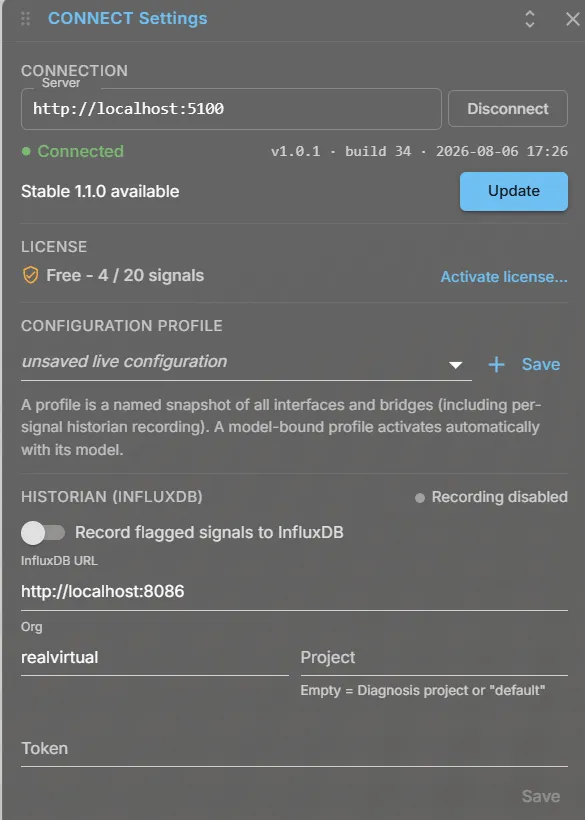
- Open the CONNECT settings in the viewer. The connection section shows the running version and build, plus the available build per channel if one exists. The panel marks an available update with an Update available badge.
- Confirm the build you want with Update.
- The gateway downloads it, verifies it, restarts into the new version and confirms its health.
The whole operation takes seconds; the browser reconnects on its own.
Channels
Section titled “Channels”| Channel | Meaning |
|---|---|
| Stable | The normal channel |
| Beta | Shown only when a beta build actually exists |
Beta is offered but never suggested: it is not emphasised and never becomes the default. Downgrading within a channel is refused. Switching channels is always allowed, including back from a beta to stable, and is labelled as installing an older version.
What is verified
Section titled “What is verified”The artifact is checked against the confirmed hash and then against its Authenticode signature. Trust depends on the signature, not the download URL or HTTPS. The certificate must name realvirtual GmbH, carry the code-signing usage and chain to a trusted root.
An expired certificate is accepted with a valid timestamp and refused without one. If the revocation status cannot be established, the artifact is refused rather than accepted by default. This commonly happens behind a corporate proxy.
Requirements
Section titled “Requirements”| Requirement | Why |
|---|---|
| The access rule | An operator at the machine updates it without any configuration; a caller from another machine needs the API key, as everywhere |
| A writable program directory | The program file is replaced in place. An installation under a protected directory reports this and offers no update. CONNECT never asks for elevation |
| No second instance from the same program file | Checked before the download and again immediately before the swap |
When updating is not offered
Section titled “When updating is not offered”| Situation | Reason |
|---|---|
| The executable carries an embedded customer project | Replacing the file would replace that project with the generic one. Such installations are updated by installing a new build |
| Linux | Not implemented |
If it goes wrong
Section titled “If it goes wrong”The gateway never replaces its own running file. It stages the verified artifact, starts a helper copy of itself and stops. The helper performs one atomic replacement with a backup, so there is no moment where the program path holds nothing startable. It then starts the new version and waits until it reports healthy twice, several seconds apart.
If the new version cannot start, or starts but never reports the expected release, the helper puts the previous file back and starts it again. Both cases are reported distinctly rather than as one generic failure.
An interrupted update is resolved on the next start, regardless of which version runs. A staged file is discarded if no replacement occurred. If replacement completed without confirmation, the running new version confirms it.
Switching it off
Section titled “Switching it off”Set Update.Enabled to false in the configuration to disable updates for an installation. This hides updates in the UI and makes the update endpoints refuse requests.
{ "Update": { "Enabled": true, "Channel": "" } }An empty channel means the channel of the running build.
See also
Section titled “See also”- Installation — why the program folder should be writable
- Remote access and security — who may confirm an update