
Licensing and Activation
realvirtual CONNECT is free to download and free to use in the Free tier. Activation is a one-time registration with an e-mail address; a commercial license lifts the limits and is bound to the machine it is activated on. The video walkthrough shows the free registration step by step.
The license is checked locally using a signed token stored on the machine. The gateway does not contact the licensing service while running or report anything about your signals, models or CAD files. A connection is needed only when you activate or release a license.
| Free | Annual | Lifetime | |
|---|---|---|---|
| Signals | up to 20 | unlimited | unlimited |
| STEP import | up to 25 MB per file | unlimited | unlimited |
| JT import | up to 12 MB per file | unlimited | unlimited |
| Protocols | all supported protocols | all supported protocols | all supported protocols |
| Binding | registration, machine-bound where possible | node-locked, one seat | node-locked, one seat |
| Validity | while registered | one year, renewable | permanent |
Prices for the Annual and Lifetime licenses are published on the realvirtual CONNECT product page.
The signal limit counts admitted signals across all interfaces. The license status lists signals beyond the limit by name, showing which ones are not being served.
Free registration
Section titled “Free registration”- Start the gateway. On the same PC, open web.realvirtual.io in Chrome or Edge.
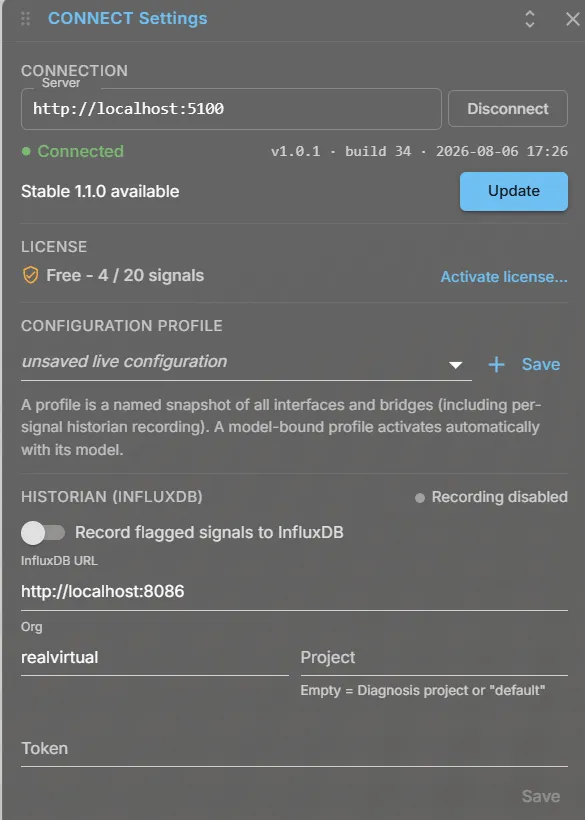
- Click realvirtual CONNECT in the left sidebar, then the gear icon (CONNECT settings), and press Connect with the server
http://localhost:5100. If the browser asks whether the page may access devices on your local network, allow it. - Under License, click Activate license…, enter your e-mail address and press Send confirmation link.
- Confirm the magic link in the e-mail you receive. No password is needed.
- The license now shows the free tier, and the gateway serves signals, the AI Bridge and the MCP tools. No restart is needed.
Registration uses the realvirtual community account, which also gives access to features in realvirtual. Registration is bound to the machine when a hardware fingerprint can be read. Otherwise, for example in a virtualised or restricted environment, registration continues without binding.
Commercial activation
Section titled “Commercial activation”A commercial license is issued through the realvirtual customer portal and activated in the gateway’s license dialog. You can activate it in two ways:
- Online — the gateway sends its fingerprint to the portal and receives the token.
- Offline — the dialog produces a request code. Exchange it in the portal for an activation code, then enter that code in the dialog. The machine itself needs no internet access, so this works on an air-gapped OT network. See offline activation.
Once activated, the token is checked locally. There is no heartbeat or contact with the licensing service.
Offline activation
Section titled “Offline activation”Use offline activation for a computer without internet access, for example a PC on an isolated OT network. It works for the free licence and for a commercial license key, and requires realvirtual CONNECT 1.7.0 or newer. You need a second computer with internet access; it does not have to be on the same network.
1. Create a request code on the offline computer
- In the viewer, click realvirtual CONNECT in the left sidebar, then the gear icon (CONNECT settings).
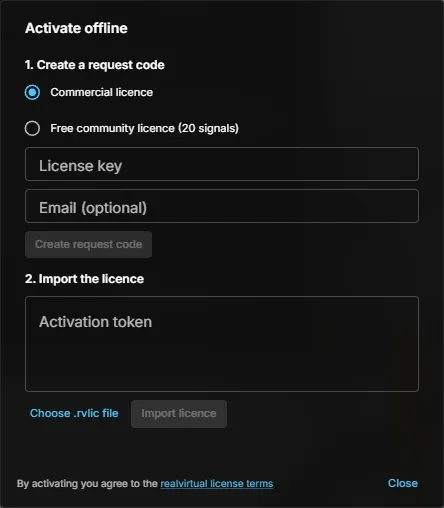
- Under License, click Activate license…, then No internet on this computer? Activate offline.
- In the Activate offline dialog, choose Free community licence (20 signals), or keep Commercial licence and enter your License key. The e-mail field is optional.
- Click Create request code.
- Click Copy, or Save as file to get
connect-activation-request.txt, and take the code to a computer with internet access — on a USB stick, for example.
2. Exchange the code in the customer portal
- On any computer with internet access, open portal.realvirtual.io/licenses and sign in with your e-mail address.
- Paste the request code under Offline activation.
- Copy the activation code, or download the licence file
realvirtual-connect-license.rvlic, and take it back to the offline computer.
3. Import the licence on the offline computer
- Open the Activate offline dialog again, as in step 1.
- Under 2. Import the licence, paste the code into Activation token and click Import licence, or click Choose .rvlic file and select the licence file.
- The dialog confirms Licence imported. CONNECT is now licensed. From then on the licence is checked locally on this computer. No restart is needed.
Moving a seat to another machine
Section titled “Moving a seat to another machine”A commercial license is one seat, bound to one machine at a time. Release the seat in the license dialog, then activate it on the other machine. For a computer without internet access, release the seat in the customer portal instead, as described under offline activation.
Do this before you decommission or re-image a PC. Otherwise, the seat stays bound to the old machine, and you must contact support to release it.
Expiry and the degraded state
Section titled “Expiry and the degraded state”An expired annual license enters a degraded state. The gateway keeps running with the free limits until the license is renewed. A late renewal therefore reduces capacity without stopping the gateway or its connection.
Included with a realvirtual license
Section titled “Included with a realvirtual license”The seat above is the engineering license — for building, commissioning and simulation work. For productive operation, CONNECT can already be covered by your realvirtual license:
- A licensed site includes the CONNECT runtime, with all protocols and no signal limit. The site license carries it; no separate CONNECT seat is needed for the machines at that site.
- A machine delivered with a live 3D HMI is covered by one combined, perpetual fee for viewer and gateway together, rather than by two separate licenses.
- Without a live PLC connection — a pure viewer, a sales demo, a planning study — no CONNECT license is needed at all.
The engineering seat stays separate and is not part of that bundle. Terms and prices: realvirtual product page and licensing the viewer.
CAD import limits
Section titled “CAD import limits”The CAD limits apply per file, not per session. You can import several files at once as long as each is under the limit. Oversize uploads are refused with a reason that names either the license limit or this gateway’s configured capacity.
A gateway’s own configuration can make the limit stricter but never more permissive. Details: CAD conversion.
See also
Section titled “See also”- Installation — download and first start
- Licensing the viewer — what the AGPL viewer requires and when it needs a commercial license
- CAD conversion — where the CAD limits apply