
What You Get
realvirtual’s core is open source. The viewer and its simulation runtime are licensed under AGPL-3.0 and form a complete product. You can open and operate a delivered twin, connect it to live signals and plan layouts without buying anything.
The commercial parts are the authoring tools, where you build a machine from raw CAD, and a few specialised calculation kernels. They create a twin rather than use one.
The public demo runs the full commercial feature set in your browser, free of charge and without a licence or installation.
Included in the open-source core
Section titled “Included in the open-source core”Every delivery of realvirtual, free or licensed, contains the Community (AGPL) edition. It includes the 3D viewer with HMI panels, overlays, camera views and linked documents. Transport simulation includes drives, sensors, conveyors, sources and sinks, grippers and LogicSteps. The edition also includes collision detection, signals and PLC connectivity, WebXR and multiuser sessions. It also includes the discrete event simulation core with the statistics of each run. It provides the plugin system, the MCP bridge for AI assistants and the USD live link to NVIDIA Isaac Sim.
The Layout Planner is part of the open-source core, not a commercial extension. It ships with every delivery.
Commercial extensions
Section titled “Commercial extensions”The Commercial edition adds the authoring tools: the Asset & Kinematics Editor and CAD import. It also adds specialised kernels: robot inverse kinematics, kinematic mechanisms, physics, smooth motion, machining and the virtual PLC, and the experiment manager for discrete event simulation studies. Other additions are cinematic rendering, virtual camera displays and USD export. Without the Editor you can open and run a machine, but not build one.
The complete, feature-by-feature comparison is on Editions. It is generated from the same catalog the product is built from, so it is always current.
Trying the commercial features
Section titled “Trying the commercial features”The public demo at web.realvirtual.io/demo runs the full commercial feature set without a licence, account or installation. It is free to use, including commercially, and provided as is, without support or warranty. Open the Asset & Kinematics Editor and import your own CAD files. You can try the IK solver, machining and physics, all in the browser.
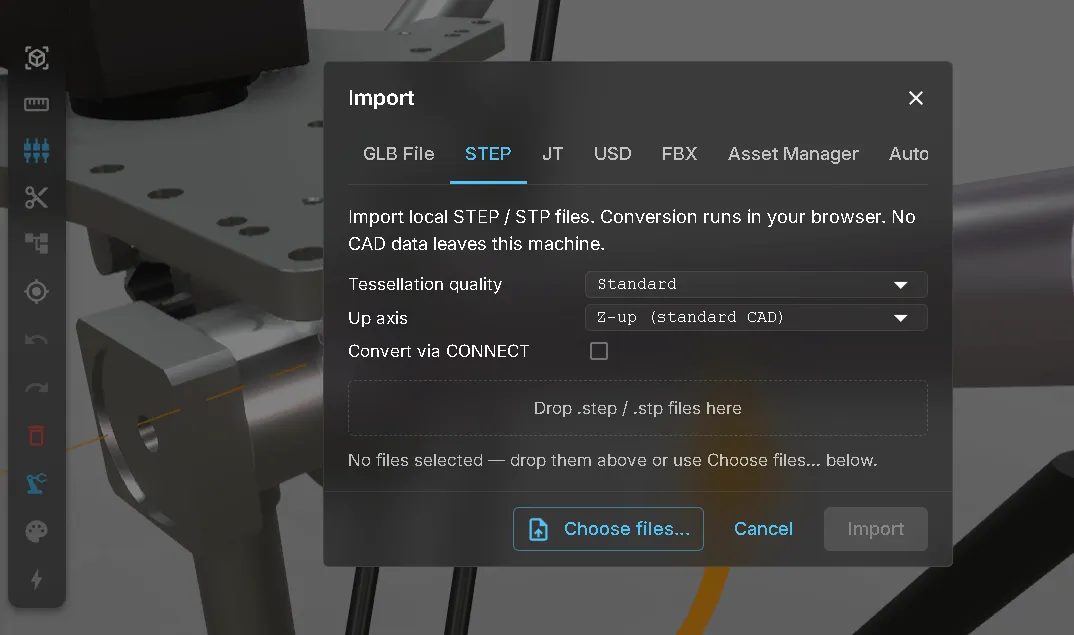
CAD conversion runs locally in your browser. Your geometry is never uploaded, so you can evaluate the importer with parts from your own projects.
Use the demo to test the features with your own data before contacting anyone or deciding whether to buy a licence.
Free-tier limits
Section titled “Free-tier limits”Two limits apply while you work without a licence:
| Limit | Free tier |
|---|---|
| CAD import file size | 25 MB per STEP file, 12 MB per JT file (JT is licensed separately from STEP) |
| Live signals | 20 signals through the free realvirtual CONNECT tier |
The import limit applies to each file, never to their total. Three 10 MB parts imported together are all within the limit. Only a single file larger than its limit is refused.
A commercial licence lifts both limits.
See also
Section titled “See also”- Licensing the viewer — what AGPL requires of your own delivery, and when a commercial licence becomes necessary
- Opening a twin — start with a link, a local file or the demo
- CONNECT licensing — the gateway tiers behind the live-signal limit