
Library and Catalogs
Everything you place in a layout comes from a library. The library window lists the available sources as tabs: the project, the standard library, catalogs you attach, and NVIDIA SimReady when CONNECT supports it.
Your project is the first library
Section titled “Your project is the first library”Your current project is the first and default tab. You can immediately place anything you or the Editor saved there, without publishing, registering or copying it.
The tab lists every document in the project, not just those in a designated library folder. Filter chips narrow the list by folder: scenes, models, library. These folders indicate location, not document type. Any document can be placed.
When a project document and a catalog entry are the same file, the project takes precedence. The duplicate is hidden in the catalog tab. If this leaves the catalog tab empty, it disappears from the list.
The standard library
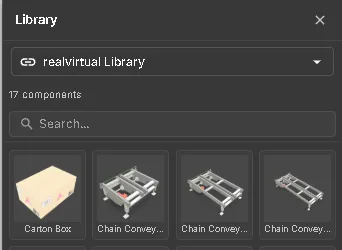
Section titled “The standard library”A standard parts library ships with every build and loads automatically at startup from assets bundled with the deployment. It does not load from a remote service. It appears as a catalog tab named realvirtual Library. Its entries show the thumbnails the library ships; an entry without one shows a placeholder.
Attaching your own catalogs
Section titled “Attaching your own catalogs”Additional catalogs are not loaded by default. Add one from the Catalog tab, or pass it on the URL (see below). Four kinds are supported:
| Source | What it is |
|---|---|
| Built-in | The catalogs bundled with the deployment, including the standard library. |
| Local Folder | A folder on your machine, picked once through the browser’s folder access. The planner scans library/ for .glb files and splats/ for .splat, .ksplat and .ply. |
| Remote URL | A catalog JSON hosted at a URL. |
| GitHub repository | A repository URL. The planner scans the repository tree through the public GitHub API and creates an entry for every .glb it finds. No manifest file is needed. |
Folders become filters
Section titled “Folders become filters”For a Local Folder catalog, subfolders become collection chips you can filter by. The first subfolder additionally maps to a category when it is one of conveyor, robot, machine, fixture or des. A GitHub scan does the same with the immediate parent folder of each file.
GitHub URL forms
Section titled “GitHub URL forms”https://github.com/<owner>/<repo>https://github.com/<owner>/<repo>/tree/<branch>https://github.com/<owner>/<repo>/tree/<branch>/<subfolder>
A URL pointing directly at a .json file, or at a /blob/ path, is treated as a catalog manifest or a single file rather than as a repository to scan.
Thumbnails
Section titled “Thumbnails”Thumbnails appear after you save. Saving a document, in the Editor or in the Layout Planner, stores a picture of it next to the project’s documents, and from then on its card in the library window and on the project dashboard shows that picture. A document you have just imported, or one that was never saved in realvirtual WEB, shows a No preview placeholder with a model icon until its first save. Browsing never renders a picture and never loads a model, so it stays fast in large projects too.
Every thumbnail shows the document from the same angle, from the front right and slightly above, on a transparent background, with the same lighting and a soft shadow underneath. It shows everything the document contains, including the objects placed into it; helpers such as the floor grid, gizmos and simulated parts are left out. Duplicating a document copies its thumbnail; renaming or moving it keeps the thumbnail.
To give every document of a project a fresh thumbnail at once, for example after importing many models or for a project made before thumbnails were saved, open the project list on the dashboard, click ⋮ on the project row and choose Regenerate thumbnails. realvirtual WEB opens each document of the project in turn, renders its picture exactly as a save would, and shows the progress (for example 3 / 12) with the name of the current document. Cancel stops after the current document; the thumbnails already made are kept. At the end a short summary lists how many pictures were written and names each document that failed. The command is available for writable projects only; for a read-only project, such as the bundled demo or a hosted project, it is disabled and its tooltip says why. Save or discard unsaved changes first; afterwards the document you had open is opened again.
A catalog can name a picture for each entry: either a full image URL (thumbnailUrl) or a saved preview file inside the catalog (thumbnail, relative to the catalog, for example PalletHandling/.thumbnails/belt.3fa9c2d1.webp). If the picture cannot be loaded, the card shows the placeholder.
NVIDIA SimReady (via CONNECT)
Section titled “NVIDIA SimReady (via CONNECT)”NVIDIA SimReady Central provides OpenUSD assets from vendor datasets on Hugging Face. CONNECT includes only assets licensed CC-BY-4.0.
The catalog picker shows NVIDIA SimReady (CC-BY-4.0) when realvirtual CONNECT is reachable and supports SimReady import. Otherwise, the source is hidden.
- Open Library and select NVIDIA SimReady (CC-BY-4.0). While CONNECT builds the first index, the source label shows
indexing n/m. - Search for an asset or narrow the list with the vendor filter chips. Entries without a preview show a placeholder.
- Click to place an entry or drag it into the layout. CONNECT downloads and converts the package; a toast at the bottom shows progress or errors. Hovering never starts an asset download or conversion, although preview thumbnails load as you browse.
- Place the object as usual. Later placements reuse the copy saved in your project.
The browser saves the GLB and its attribution file in the open project’s library/simready/ folder, normally as <asset>.glb and <asset>.LICENSE.md. Names are adjusted when needed to avoid overwriting existing files. Saved placements can be reopened without CONNECT.
The attribution file records the title, creator/vendor, source link pinned to a commit, licence and licence link, package id and SHA-256 hash, and the notice “Converted from OpenUSD to glTF/GLB by realvirtual”. Attribution is also included in the document description and inside the GLB. CC-BY-4.0 requires attribution: keep the credit, licence link and conversion notice when sharing the asset.
See SimReady / USD conversion for download limits and troubleshooting.
Agents / MCP: in Planner mode, call web_query("library.catalogList", {"source":"simready","query":"APM2","limit":20}). source and query can also be used independently; limit defaults to 200 results. Pass a returned catalogId to web_execute("layout.place", …) to place the asset.
Attaching a catalog from the URL
Section titled “Attaching a catalog from the URL”?library=<url> adds a catalog source alongside the standard library. You can repeat the parameter:
https://<your-deploy>/?mode=planner&library=<url-a>&library=<url-b>It accepts both catalog-JSON URLs and GitHub repository-scan URLs. A prepared planning link can therefore specify the workspace, document and catalogs in one address.
Pivots — where an object sits on the cursor
Section titled “Pivots — where an object sits on the cursor”The pivot decides where a placed object meets the floor and where the transform gizmo appears. It is recomputed when the object is loaded, in two steps:
- A
WebPivotmarker takes precedence. If the asset has one, its position becomes the object’s origin. Author it in Unity at the robot base, the flange or the corner you want to grab. - Otherwise, the origin is the centre of the object’s bounding box, projected down to its floor. A dropped object lands centred on the cursor with its lowest point on the ground.
The fallback uses the full bounding box, not the contact footprint. On an asymmetric object, this puts the pivot over empty floor. Examples include a robot with a long overhanging arm or an L-shaped fixture. Add a WebPivot if you need the pivot elsewhere.
Gaussian splat entries are excluded from the recalculation by default, since a splat has no meaningful bounding-box floor. A WebPivot marker still wins either way.
See also
Section titled “See also”- Layout Planner — the workspace and the planning workflow
- Snap points — how placed objects connect to each other
- Editor — authoring the objects you place
- Documents — projects, documents and how libraries are attached