
Where the Viewer Comes From
CONNECT serves signals. You can deliver the 3D HMI that shows them in three ways. The gateway works the same in all three; the viewer’s host and features differ.
| Where the viewer comes from | What you install | Typical use |
|---|---|---|
| Bundled in the gateway | A CONNECT build with the viewer embedded, delivered per project | Machine PC, service laptop, isolated network |
Hosted — your web server, a CDN, or web.realvirtual.io | The public gateway download (realvirtual-Connect.exe) | One viewer for many machines, updated centrally |
| Project-specific delivery | A CONNECT build with your project and viewer embedded | A machine handed to a customer with its own model, documentation and branding |
The bundled viewer
Section titled “The bundled viewer”A CONNECT build delivered per project with an embedded viewer serves the viewer, model and signals on port 5100. With that build, open http://localhost:5100 to use the viewer. No web server, Node.js, build step or internet connection is required. The public download does not include a viewer.
The embedded viewer is the open-source AGPL-3.0 core, whose source is on GitHub. It includes the 3D viewer, the HMI overlay with alarms, KPIs and machine information, and hierarchy and model browsing. It also includes standalone simulation of drives, transport and sensors, real-time material flow, the Layout Planner, and the CONNECT panel with live signals.
When you deliver the viewer, the recipients must be able to get the source of the delivered software under AGPL: your changes, tightly coupled plugins, and scripts only if they take over core code. Your model data (geometry, layout and parameters) is not part of it and stays yours.
The viewer shows the attribution notice “Powered by realvirtual WEB · AGPL-3.0”, an additional term under AGPL §7(b). It must stay reasonably visible and legible; you may adapt its position, size and style, and you may show your own brand next to it. Removing or hiding it ends your AGPL rights under §8, with the cure rules of that section. Only a commercial licence lets you remove or replace the notice. The full position is on licensing the viewer.
The Editor is a commercial feature, like every other feature marked Commercial on Editions. It is included in the public demo, but its source is not published. It is absent from a self-hosted deployment and therefore from an embedded open-source viewer. The DES core is part of the Community edition and ships with every delivery; its experiment manager is commercial. Live inverse kinematics and the virtual PLC are also absent from a self-hosted open-source deployment. They run on the hosted service or as code in a commercial delivery.
The public download (realvirtual-Connect.exe) is gateway only: it provides REST, WebSocket and MCP on port 5100 and serves no viewer. You use it with a viewer hosted elsewhere.
A hosted viewer with a local gateway
Section titled “A hosted viewer with a local gateway”The viewer does not have to come from the gateway. A realvirtual deployment on your own web server, on a CDN, or the public demo can talk to a CONNECT running on the operator’s machine. The browser loads the application from the web and the machine data from the local network — the machine data never travels to the host.
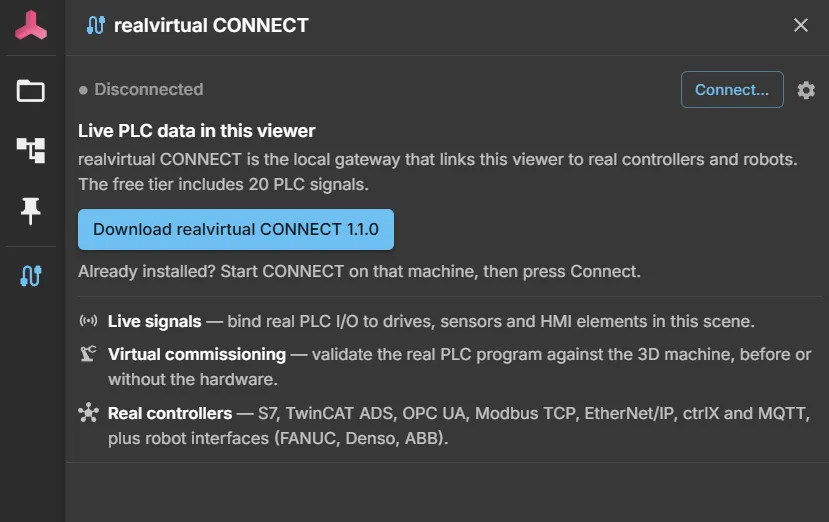
A viewer with no reachable gateway shows the CONNECT panel in its disconnected state. The panel offers the current CONNECT build for download. You can move from viewing a model to live PLC data with one download and one Connect click, without leaving the page.
On the operator’s own PC, this needs no configuration. The page reaches http://localhost:5100 directly. Browsers permit this even from an https:// page because they treat the local address as trustworthy. The public demo uses this connection to reach a gateway on the same machine.
There is one exception: confirming an FMU runs native code. CONNECT accepts that click only from known pages: localhost, the machine’s IP, https://web.realvirtual.io, and origins listed in AllowedOrigins. The * wildcard does not count. If your viewer is served from your own address, add it there, e.g. "AllowedOrigins": ["*", "https://hmi.example.com"], and restart CONNECT.
Two things change once the gateway is not on the same machine as the browser:
- The browser addresses the gateway by name or IP instead of
localhost, so the access rule applies: set anApiKeyand introduce the browser once withhttp://<host>:5100/?apikey=<key>. - The page and the gateway are then different origins. Restrict
AllowedOriginsto the host your viewer is served from instead of leaving it open.
For anything beyond the local network, put a reverse proxy with TLS in front of the gateway — see remote access and security.
A project-specific delivery
Section titled “A project-specific delivery”A project-specific delivery uses a CONNECT build with the viewer and your complete project embedded. It serves the viewer, model and signals on port 5100. The project includes the model, machine documentation, branding and interface configuration. If the project uses AI diagnosis, it also includes a prepared documentation index. The customer runs one file to open the finished HMI, with no hosting or setup.
These builds have two limitations:
- Such a build has no self-update. Replacing the program file would replace the embedded project with the generic one, so these installations are updated by installing a new build — see updates.
- It does not fetch product news from the portal. A build with an embedded project has that outbound path switched off entirely.
Which one to choose
Section titled “Which one to choose”- One machine, one operator, no infrastructure — a CONNECT build delivered per project with the viewer embedded. You do not need separate viewer hosting.
- Many machines, one HMI — host the viewer once, run a gateway per machine. Updating the HMI is then one deployment rather than one per machine.
- A machine you hand over — a project-specific delivery, so the recipient gets a single file that works offline and stays what it was on the day it shipped.
See also
Section titled “See also”- Installation — download and first start
- First connection — model, interface, signals
- Remote access and security — API key, origins, reverse proxy
- Deployment options — hosting the viewer itself