
MQTT
Overview
Section titled “Overview”Connects to any MQTT broker. Each topic is handled in one of three modes (single value, process image, JSON), and one interface may mix them.
Set up and parameters
Section titled “Set up and parameters”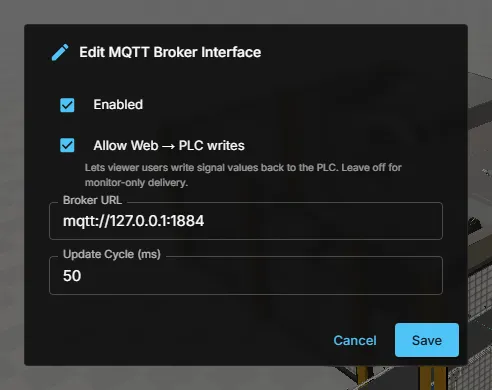
| Parameter | Example |
|---|---|
| Broker URL | mqtt://192.168.1.30:1883 |
An MQTT interface handles each topic in one of three modes, and one interface may mix them.
Single mode
Section titled “Single mode”The topic payload is one scalar value for one signal. This is the simplest form and is used when you create signals manually. Values written by the viewer are published back to the topic.
Process image mode
Section titled “Process image mode”The topic payload is a raw byte array, typically a Siemens process image. A tag table unpacks it into many named signals:
- Addresses use the Siemens notation
%I3.1(bit),%IW13(word),%IB,%ID,%M,%Q. The offset is a byte offset into the payload. - Types are decoded big-endian: Bool, Byte, Word, Int, DWord, DInt, Real.
- Only the bytes that actually changed are turned into signal updates; the first message after every reconnect resends everything.
Tag tables are imported in the browser from a Siemens tag export and pushed to the gateway.
Json mode (SEW MOVI-C)
Section titled “Json mode (SEW MOVI-C)”The topic payload is one flat JSON object holding the whole process image of that topic — {"ControlWord1": 6, "SpeedSetpoint": 2048, "DriveEnable": true}. There are no addresses: the signal name is the JSON key. This is the format a SEW MOVI-C station publishes through the Codesys MQTT libraries, and the same format the SEW interface in realvirtual for Unity uses, so an existing SEW simulation can be moved to the browser unchanged.
A station uses two topics, one per direction:
| Topic | Signals | Behaviour |
|---|---|---|
Receive topic, e.g. SEW/SimOUT | PLC outputs | The station publishes; the gateway decodes and updates the signals. |
Publish topic, e.g. SEW/SimIN | PLC inputs | The gateway publishes the complete object cyclically (default every 100 ms, adjustable per topic). |
The quickest way to set this up is the catalog row SEW MOVI-C (MQTT Json) in Add Interface. It is a signal interface, the browser counterpart of the SEW SimInterface in realvirtual for Unity: it exchanges the process image of a SEW MOVI-C controller (inputs, outputs, positions, any signal the controller publishes) over MQTT. It is not tied to a drive type and has nothing to do with the MOVILINK drive behavior. The row creates an MQTT interface with both topics already configured (SEW/SimOUT receiving, SEW/SimIN publishing every 100 ms as WString) and no signals yet; import the controller’s symbol table on that interface to fill them. Under the hood it is the same MQTT interface as the plain MQTT Broker row, so everything described here applies to both.
Two settings are specific to this mode:
- Encoding —
Utf8,WString(CodesysWSTRING, that is UTF-16LE without a byte order mark) orAuto.Autois the default and detects the encoding per message; set it explicitly when the station’s format is known. - Publish interval — cycle time of the outbound object in milliseconds, limited to 20…60000 ms.
Direction matters here: only signals marked as PLC outputs are read from an incoming message, so the gateway’s own cyclic publish can never overwrite a command the viewer just issued. Writing back also needs Allow Web → PLC writes on the interface. Signal lists are imported in the browser from a SEW symbol table (Name;Type;Direction), which creates both topics with the right directions and encodings in one step.
Per topic the gateway reports how many messages arrived, how many were rejected, how many publish cycles were skipped and which encoding was detected — visible in the interface status.
For a SEW station exchanging binary UDP telegrams, use SEW MOVI-C (UDP).
Create or import signals
Section titled “Create or import signals”- Manually. Signals created by hand use single mode: name the topic; the payload is one scalar value. The other two modes are filled by import: process image mode uses Siemens addresses such as
%I3.1,%IW13,%QD4into the topic’s byte payload, and JSON mode has no addresses (the signal name is the JSON key). - Browse. Yes. Browse (and the topic browser in the import dialog) discovers topics on the broker. It observes the broker for a short time, so a topic that publishes rarely may not show up. Discovered signals are single-value topics; JSON keys are not discovered.
- File import. Two imports, both read in the browser and pushed to the gateway. Import tag table… (⋮ menu of the MQTT card) takes a Siemens tag export for a process image topic. The SEW MOVI-C (MQTT Json) catalog row creates both JSON topics; importing the controller’s symbol table (
Name;Type;Direction) on that interface fills the signals and sets the directions and encodings. - From the model. When the model already has its PLC signals, Addresses → Fill from controller… in the signal-mapping section of the CONNECT panel previews matches by exact name against what Browse finds and then writes the addresses. Addresses → Import address table… takes a CSV or TSV with
name;address[;dataType[;topic]]rows. New signals take direction and type from the same-named model signal; signals that already exist keep their configured type. See Configuring interfaces.
How direction, data types and write access are decided is explained in Common concepts and Configuring interfaces.
See also
Section titled “See also”- UDP for a SEW station with binary telegrams
- Common concepts — text signals, direction, write access, tracking signals
- Configuring interfaces — adding signals, direction and write access
- All supported interfaces
- Troubleshooting — connection and signal problems