
Material Flow
Material flow in a twin uses a few components that work together:
- A Source creates a part called an MU (movable unit) and drops it onto the conveyor below.
- A Transport Surface carries the part at the speed of its drive.
- A Sensor along the way switches its signal while a part is inside it.
- A Transport Stopper or a Zone stops the part, or a gripper takes it.
- A Sink removes the part at the end.
The Laser Welding Assembly Station and the Layout Planner Demo use all of them.
Transport Surface
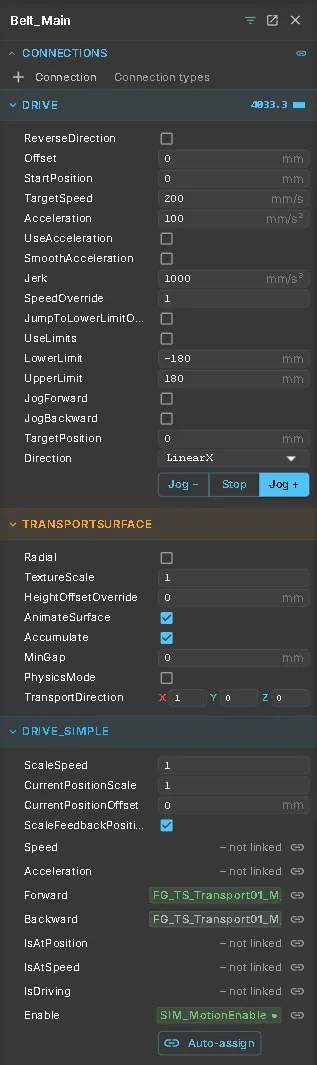
Section titled “Transport Surface”A Transport Surface carries parts across the node’s geometry at the speed of a Drive on the same node or a node above it. The drive turns the belt instead of moving its own node.
| Setting | What it does |
|---|---|
| TransportDirection | The direction parts travel in |
| Radial | Carries parts around the drive axis instead of along it, for turntables |
| Accumulate / MinGap | Parts queue up behind each other without overlapping; MinGap keeps a gap in mm |
| DriveReference | The drive to use when it is not on this node or above it, for example a conveyor on a lift |
| AnimateSurface / TextureScale | Moves the belt texture so the conveyor visibly runs |
Source and MU
Section titled “Source and MU”A Source creates parts by copying a node. By default, it copies its own node. Give this node the part geometry. The original node is hidden while its copies run.
Use ThisObjectAsMU to select another node to copy. The MU component marks a node as a part template.
| Setting | What it does |
|---|---|
| AutomaticGeneration / GenerateIfDistance | Creates the next part once the last one has moved this far (mm) away |
| Interval / StartInterval | Creates a part every few seconds instead, after a start delay. 0 switches it off |
| LimitNumber / MaxNumberMUs | Stops after a number of parts |
| PlaceOnTransportSurface | Drops new parts onto the conveyor below the source |
| Destination | Attaches each new part to this node: it starts at the source and then moves with the node, for example an axis |
| Mass | Mass of each part in kg, for physics |
| CollisionRoleForMUs | The collision role every new part gets |
Signals: SourceGenerate creates one part on a rising edge; SourceGenerateOnDistance switches automatic generation on and off.
A Sink removes parts that reach it. It acts on its footprint seen from above, at any height, and does not remove parts held by a gripper. DeleteOnlyTag limits it to parts with a given tag.
Sensor
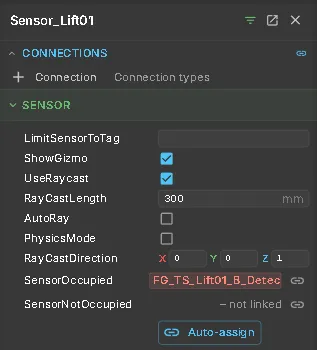
Section titled “Sensor”A Sensor reports whether a part is inside it. Sensors see parts only, never machine geometry.
| Setting | What it does |
|---|---|
| UseRaycast / RayCastLength | Detects along a ray (a light barrier) instead of inside the node’s bounds; length in mm |
| LimitSensorToTag | Detects only parts with this tag or name |
| ShowGizmo | Draws the detection area. Detection keeps working when it is hidden |
Signals: SensorOccupied is true while a part is detected. SensorNotOccupied is true while no part is detected. A sensor node without geometry needs a Box Collider to give it a size.
Transport Stopper
Section titled “Transport Stopper”A Transport Stopper stops parts where they touch its box on an accumulating conveyor. Move it out of the way to release the parts, using a drive such as a cylinder. It does not stop the conveyor itself. Center and Size set the box in mm.
A Zone is a box on a node that moves with it. It combines three effects:
- Detect — reports whether a part is inside. SignalOccupied writes the result to a signal.
- Block — stops conveyed parts at the box, like a stopper. SingleRelease lets exactly one part through each time the stopper is lowered.
- Hold — takes parts inside the box off the conveyor and carries them with the node, for example on a lift.
Activation sets when the effects apply: Always, while a signal is set (Signal), or while a drive is within a position window (Axis, with AxisFrom and AxisTo). The box handles in the 3D view resize the zone; Shift snaps to 5 mm.
An AGV is a vehicle that drives along the path network. It starts on the path named by PathId at StartPosition (mm) and drives at TargetSpeed (mm/s); with UseAcceleration it brakes and accelerates realistically and keeps its distance to the vehicle ahead. AllowReverse lets it back into a stub, for example to pick up a pallet. Vehicles take part in both the continuous simulation and DES.
Active takes a vehicle out of service. When it is off, the vehicle gets no orders, holds no zones, is no obstacle for the others and is hidden in the 3D view. The setting takes effect at the next Reset, not while the simulation runs, so the run starts cleanly with the fleet you chose. Switch it on again and reset to bring the vehicle back to its start position.
See also
Section titled “See also”- Drives — the drives behind conveyors and stoppers
- Gripping — picking parts off a conveyor
- Signals and Logic — sequences that wait for sensors and zones
- Physics — parts that fall, slide and stack