
Connecting signals
Section titled “Connecting signals”A program reaches the twin through a VAR_EXTERNAL block. By default the variable name is the signal name:
VAR_EXTERNAL SensorInFeed : BOOL; (* reads the signal SensorInFeed *) ConveyorStart : BOOL; (* writes the signal ConveyorStart *)END_VARTo use a short name in the program, or a signal whose name is not a valid ST name (for example FG01_P_Camera.bReady), add the signal name as a comment:
VAR_EXTERNAL ProbeDown : BOOL; (* @signal: FG04_Y_AxisZ_WorkPos *)END_VARInsert signal writes these lines for you. Search for a signal and select it. The editor adds a declaration with a short name and the @signal comment, then inserts the name at the cursor. The browser lists signals from the model and a connected realvirtual CONNECT interface. Each entry shows direction, type and address.
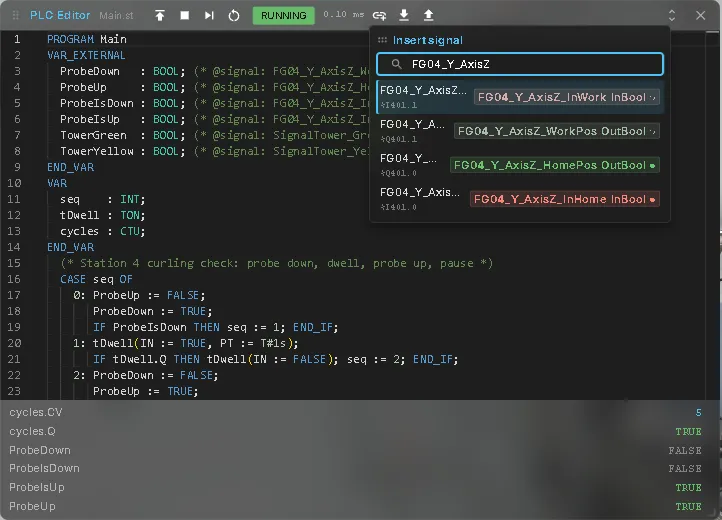
When you deploy:
- A signal the program only reads but that does not exist gets a warning and reads
FALSEor0. Usually the name has a typo. - A signal the program writes but that does not exist is created under
PLC/<name>.
Example: station 4 of the welding station
Section titled “Example: station 4 of the welding station”This program for the Laser Welding Assembly Station moves the probe of the curling check down and up and switches the yellow tower light on after five cycles:
PROGRAM MainVAR_EXTERNAL ProbeDown : BOOL; (* @signal: FG04_Y_AxisZ_WorkPos *) ProbeUp : BOOL; (* @signal: FG04_Y_AxisZ_HomePos *) ProbeIsDown : BOOL; (* @signal: FG04_Y_AxisZ_InWork *) ProbeIsUp : BOOL; (* @signal: FG04_Y_AxisZ_InHome *) TowerGreen : BOOL; (* @signal: SignalTower_Green *) TowerYellow : BOOL; (* @signal: SignalTower_Yellow *)END_VARVAR seq : INT; tDwell : TON; cycles : CTU;END_VAR CASE seq OF 0: ProbeUp := FALSE; ProbeDown := TRUE; IF ProbeIsDown THEN seq := 1; END_IF; 1: tDwell(IN := TRUE, PT := T#1s); IF tDwell.Q THEN tDwell(IN := FALSE); seq := 2; END_IF; 2: ProbeDown := FALSE; ProbeUp := TRUE; IF ProbeIsUp THEN seq := 3; END_IF; 3: tDwell(IN := TRUE, PT := T#2s); IF tDwell.Q THEN tDwell(IN := FALSE); seq := 0; END_IF; END_CASE; cycles(CU := seq = 3, R := FALSE, PV := 5); TowerGreen := TRUE; TowerYellow := cycles.Q;END_PROGRAMThe welding station’s own program Station04 drives these outputs too. To try the example there, pick Station04 in the program list and Stop it first, then deploy and run your program.
Global variable lists and AT
Section titled “Global variable lists and AT”A PLC Library containing VAR_GLOBAL is a global variable list (GVL). Set its Name
to a non-empty IEC identifier such as GVL_Cell. GVL names are case-insensitive;
duplicate names and unqualified variable names shared by two GVLs are errors.
Without {attribute 'qualified_only'}, count and GVL_Cell.count refer to the
internal signal count. With that attribute, only GVL_Cell.count is accepted, and
the signal is named GVL_Cell.count. The signal path is PLC/GVL/<signalName>.
VAR_GLOBAL CONSTANT creates a constant, not a signal. VAR_GLOBAL before PROGRAM
uses that PROGRAM’s name as its namespace. Globals must be scalars without AT;
AT is supported on scalar PROGRAM variables.
Every program has its own memory; GVL values travel through signals. Read-only and unused globals are registered too. Reset restores their declaration values once per signal, regardless of program deployment order. Editing an initializer in a library updates the value used by the next Reset. Removing the library, clearing the model or switching off the plugin releases its generated signals; signals owned by the model are retained. Multiple programs writing one global produce the existing conflict warning. Integer globals use the same width normalization as local variables.
sensor AT %IX0.0 : BOOL; binds to sensor, or the name in its
(* @signal: ... *) comment. The address is never used as a binding key, signal name,
signal metadata or CONNECT address. The editor reports
AT address %IX0.0 is not used for binding; the variable binds by name as information,
using the address you wrote. %I is read-only: assigning to it is a compile error.
%Q is an output and %M is an internal signal like a GVL. %I* and %Q* are also
accepted. X/B/W/D/L specify 1/8/16/32/64-bit widths; a mismatch with the variable type
produces a warning. GVL and %M signals have no PLC input/output direction type.