realvirtual
in the browser
Digital twin editor & CAD import · Virtual commissioning · Layout planning & simulation · Live 3D HMI · Machine Information System · DES (beta)
From CAD to the running machine: build the digital twin, commission it virtually against the real PLC, then run the same file as a live 3D HMI with documentation – in one browser link.
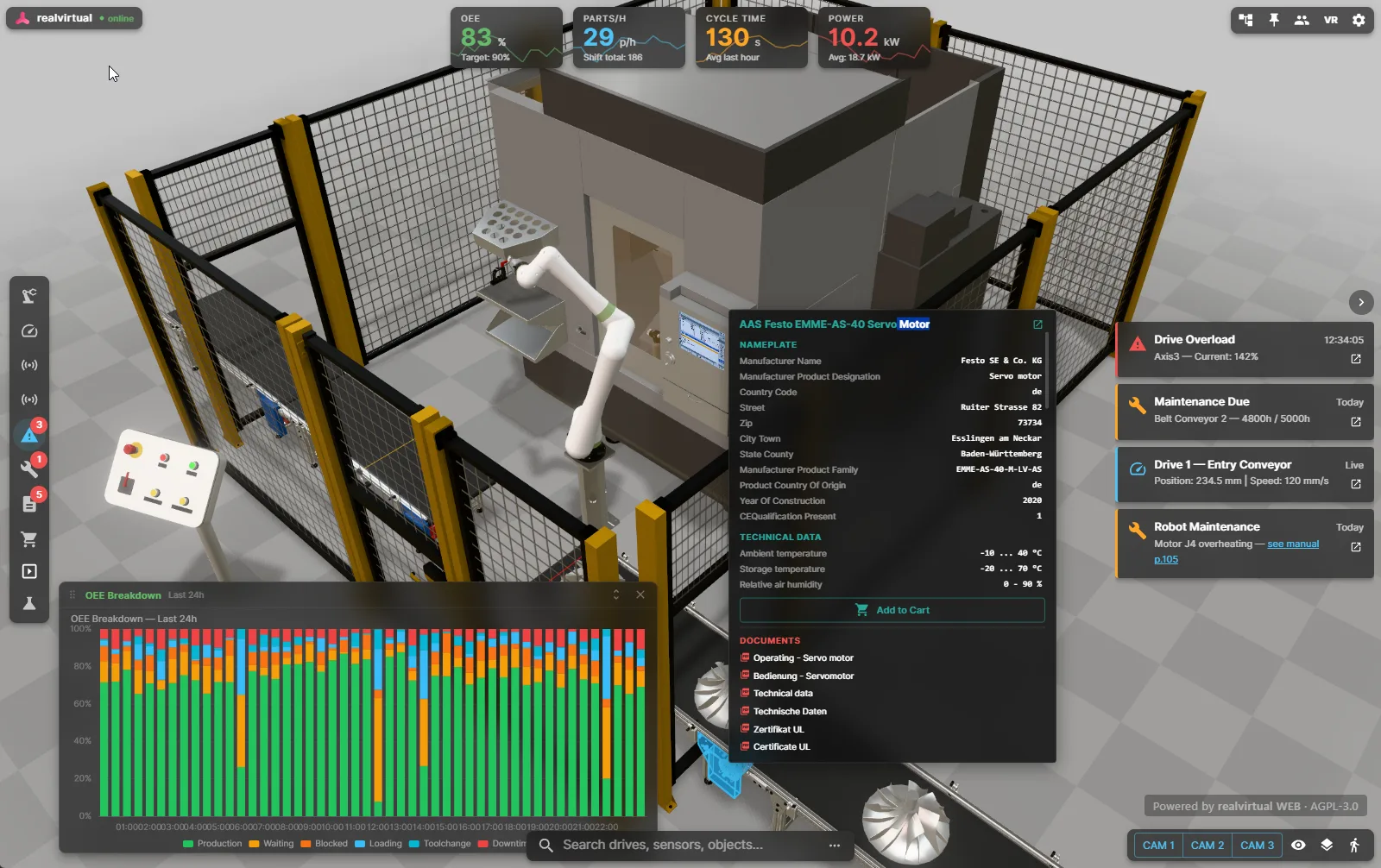
Your machine – live in the browser. realvirtual is the browser platform for the whole machine lifecycle: import CAD, define kinematics and size drives (beta) in the editor, plan layouts and simulate material flow, commission virtually against the real PLC through realvirtual CONNECT, then hand the same file over as a live 3D HMI and machine information system. Operators see drive positions, sensor readings, alarms and KPIs where they happen, not on a flat panel. Technicians click a part and get documentation, live status and signal history on any device, without installing anything. One GLB carries it all – from sales presentation to virtual commissioning to running operation.
What it does
One platform – editor, planning, simulation and virtual commissioning for engineering, interactive 3D for sales, 3D HMI for operations, Machine Information System for service. All browser-based.
CAD Import & Editor
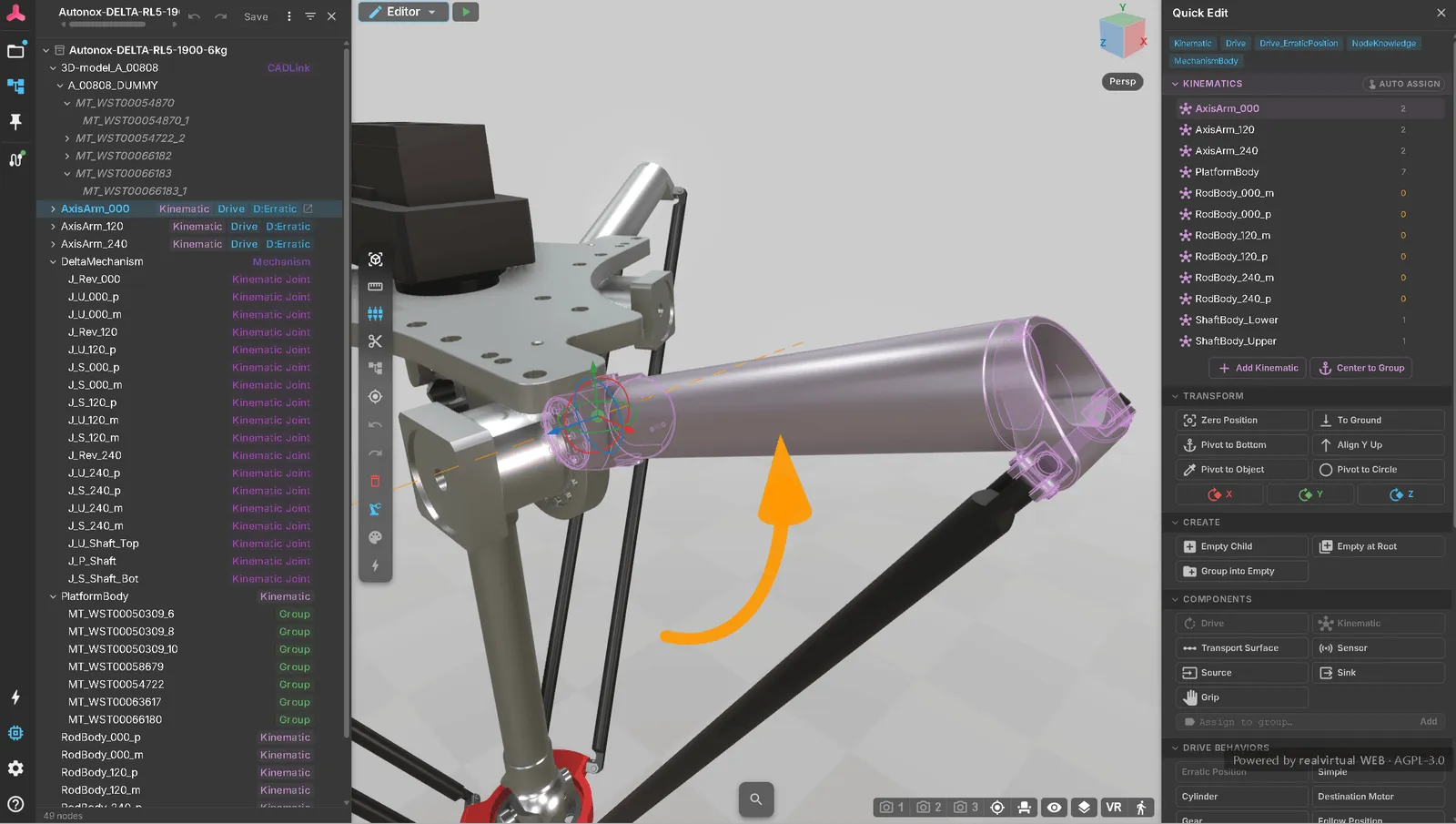
Import STEP, JT, USD and FBX directly in the browser – no Unity, no conversion step, no upload: the geometry is tessellated locally on your own machine. A JT brings its kinematics along from a PLMXML file (Siemens NX, Teamcenter) – joints, limits and gear couplers become movable axes. In the editor you set pivots, group parts, assign materials and build kinematics; a re-import updates a CAD revision in place. Part of the commercial license.
Virtual Commissioning
Test the PLC program against the simulated machine before the hardware exists: realvirtual CONNECT links the browser model to Siemens S7, Beckhoff TwinCAT, OPC UA and more, and drives, sensors and LogicSteps respond to the real controller's signals at 60 Hz. The same model then goes on to become the 3D HMI.
Live 3D HMI
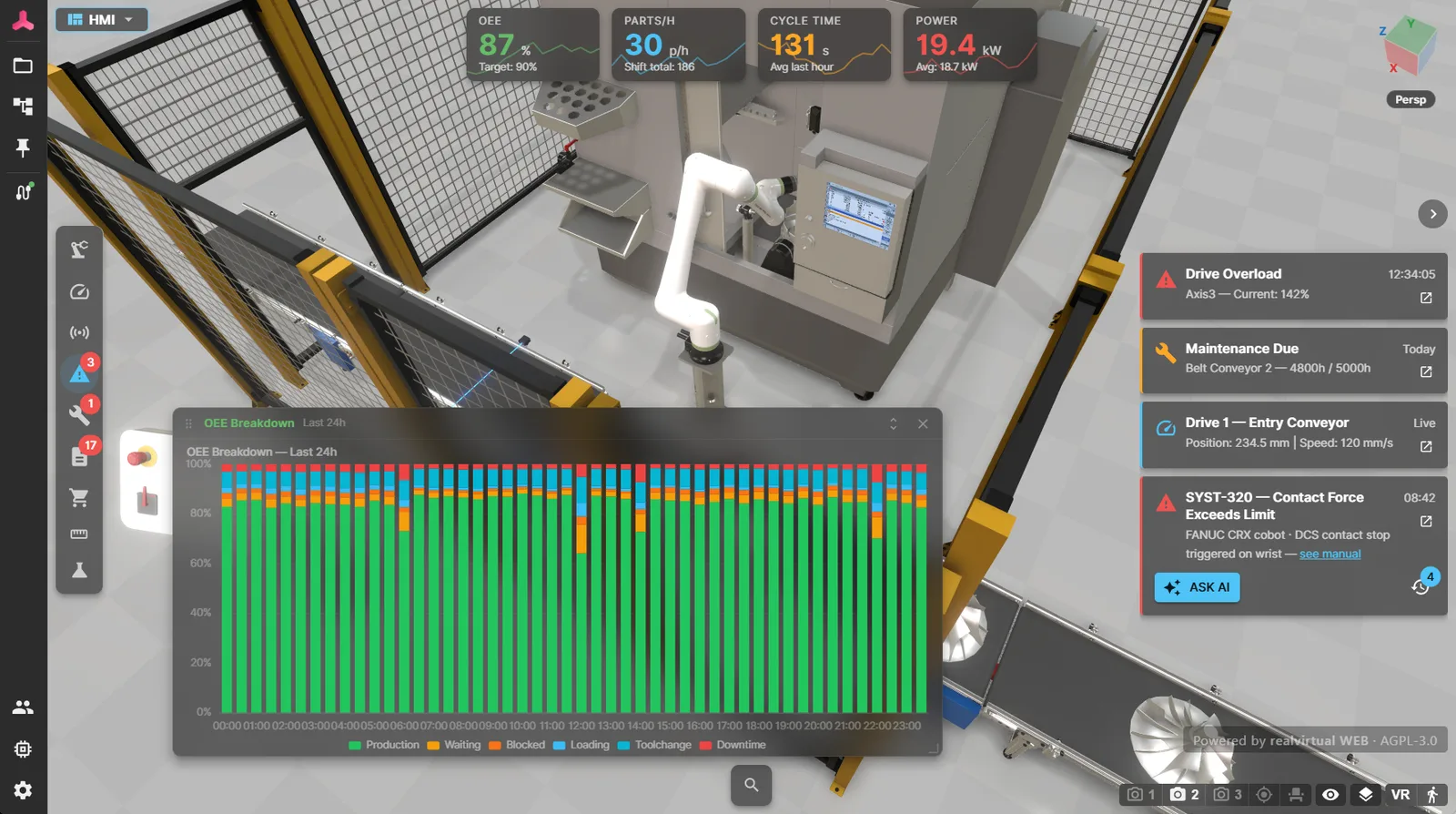
Replace desktop HMI applications with a browser link. Real-time PLC signal visualization via WebSocket. Drive monitoring, sensor states, KPI overlays, alarm dashboards, and production charts powered by Apache ECharts. Faster fault diagnosis, better situational awareness.
Machine Information System
Attach documents, maintenance guides, spare part lists, and manuals directly to 3D components. Technicians click a part and see its documentation in context. The EU Machinery Regulation 2023/1230 (effective January 2027) now enables fully digital machine documentation – realvirtual is ready.
Transport Simulation
Full in-browser simulation at 60 Hz: conveyor surfaces, sources, sinks, sensors with collision, grippers, and material flow.
LogicStep Sequencing
Serial/parallel containers, signal conditions, delays, drive commands – compatible with realvirtual for Unity Professional. Use it for interactive sales demonstrators or step-by-step maintenance instructions.
WebXR (VR/AR)
Runs on all AR and XR devices out of the box – Meta Quest, Apple Vision Pro, HTC Vive, Android/iOS AR – without native builds, app-store submissions, or device-specific compilation. One URL works everywhere.
Browser does not mean cloud
realvirtual is a static web application: the browser loads the application once – and you decide from where. Machine data takes a different path: it flows directly between browser and machine inside your local network. There is no cloud backend, no account and no lock-in – the source code is open, and so is the GLB format.
Your digital twin is a URL now
Eleven slides on what changes when the whole twin runs in a browser tab: no install, your own web server or none at all, no cloud contract, and your CAD stays on your disk.
Live PLC connections and very large CAD files go through the CONNECT app. Share links and cloud save are opt-in. The core is open source (AGPL). The editor, CAD import and discrete event simulation are commercial, and commercial licenses ship the full source too.
From editing to 3D HMI – in the browser
realvirtual grows beyond delivery: build kinematics in the editor, plan layouts, simulate material flow, commission virtually against the real PLC, and run the same model as a 3D HMI and machine information system – right in the browser.
CAD import & editor
Import STEP, JT, USD or FBX straight into the browser and build the mechanism there: set pivots, group parts, assign joints and drives – a delta robot's axis arms become movable kinematics without leaving the page. A re-import updates a CAD revision in place. Part of the commercial license.
Layout planning
Assemble plant layouts from library components – in the browser, no installation. Built for sales teams: give your customers planning transparency with a single link. And with a Commercial license, white-label the planner into your own product.
Want to license realvirtual as part of your own software product? Ask us about our OEM model.
Try the planner demo (opens in a new tab)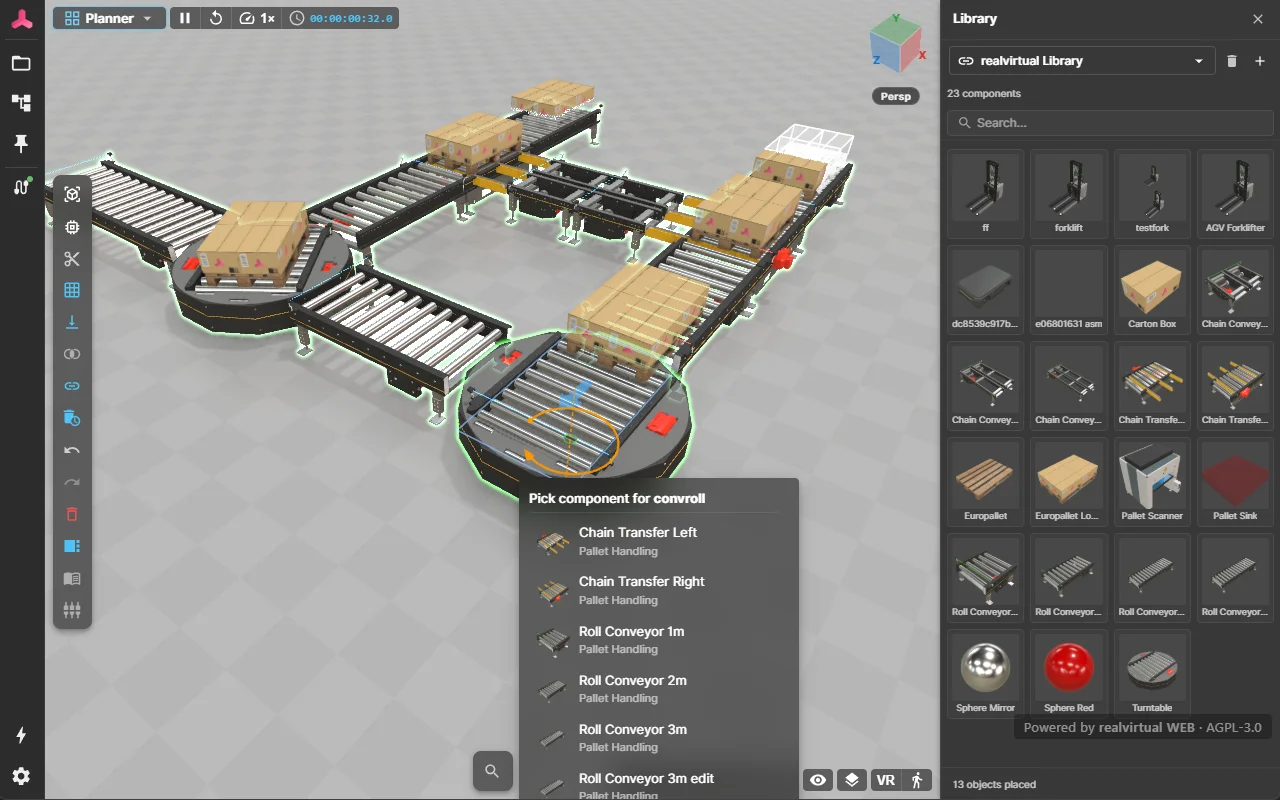
Discrete event simulation (DES) Beta
Simulate material flow and analyze throughput and cycle times – the simulation engine runs locally in the browser, your data stays with you.
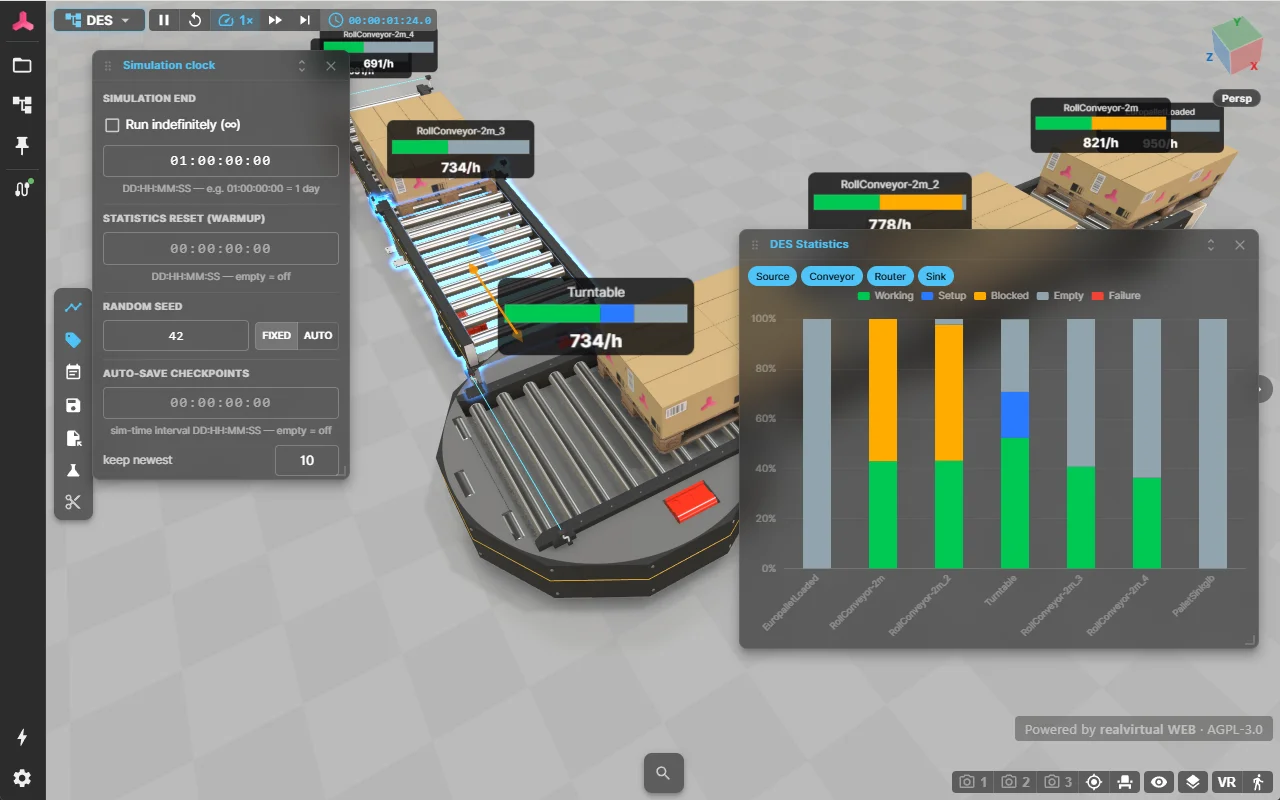
Virtual PLC in Structured Text Beta
Program the machine in IEC 61131-3 Structured Text right in the browser. The built-in virtual PLC runs the code against the live digital twin, operated from the Web Operator Panel like the real machine – with an online view of live values and the active step in the code.
When your real PLC connects, the virtual PLC steps aside automatically – the same model serves simulation and commissioning.
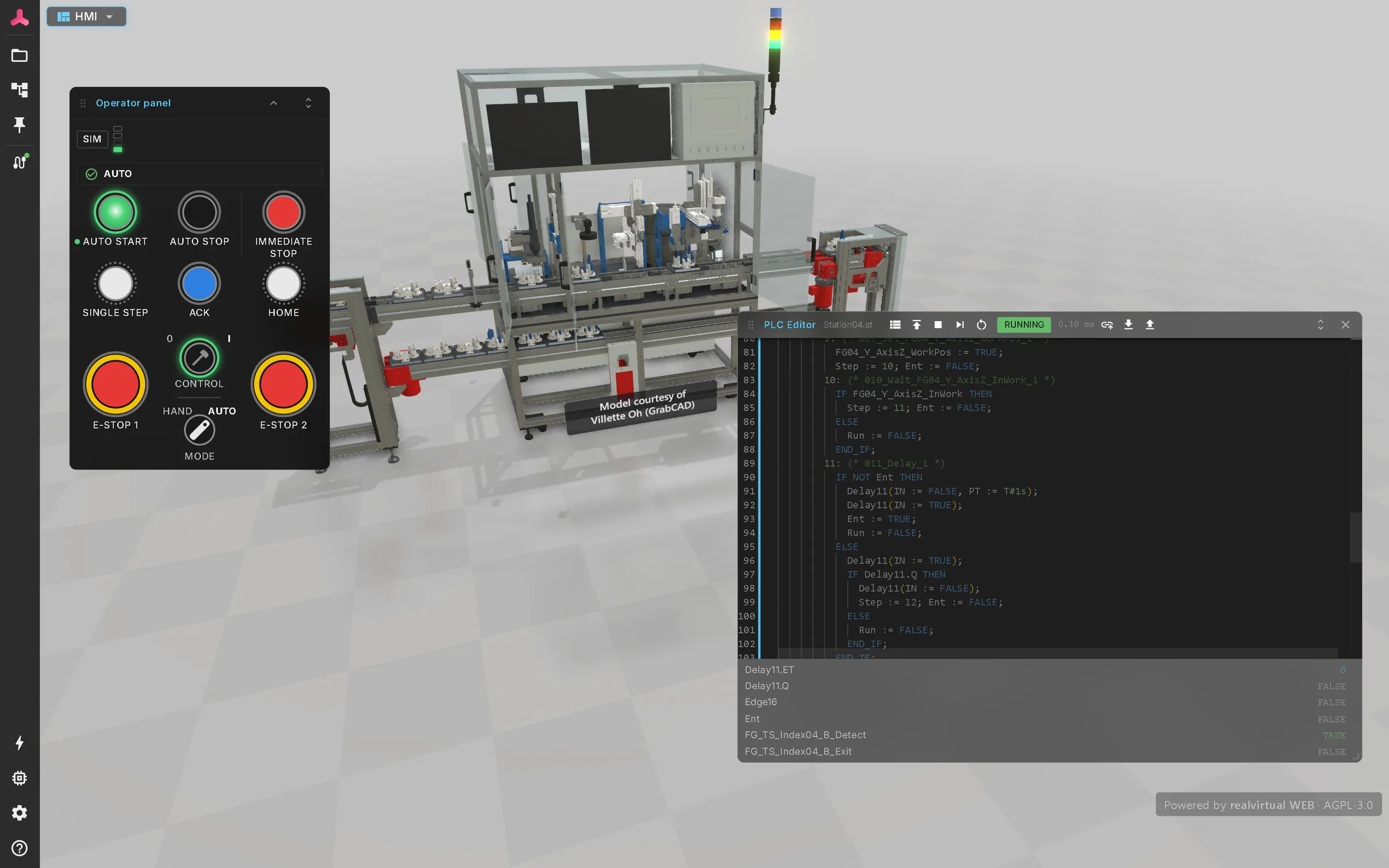
Virtual commissioning and live data via realvirtual CONNECT
Connect the simulated machine to the real controller and test the PLC program in the browser. CONNECT links realvirtual to real controllers: Siemens S7, Beckhoff TwinCAT ADS, OPC UA, MQTT, Modbus, EtherNet/IP, Bosch ctrlX, Keba, FANUC, Denso and more – for live 3D HMI and monitoring on the running machine.
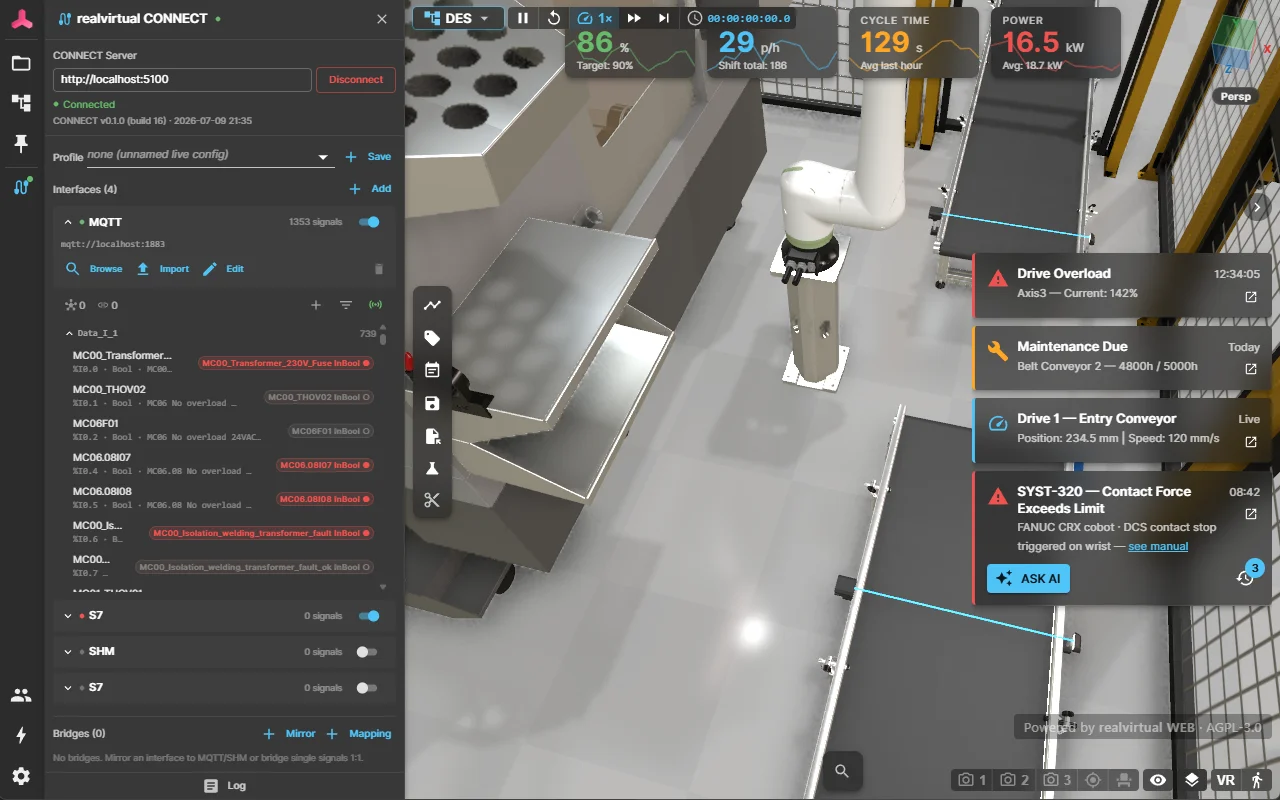
The digital twin moves to the start
Ten slides from the user side. CAD and the planning data you already have become the source of truth, and the twin is created or updated from them in under an hour. The slides go through what follows for libraries, unstructured data, AI layouts and the engineer’s job.
Send us your STEP file. Your digital twin in under an hour.Write to us
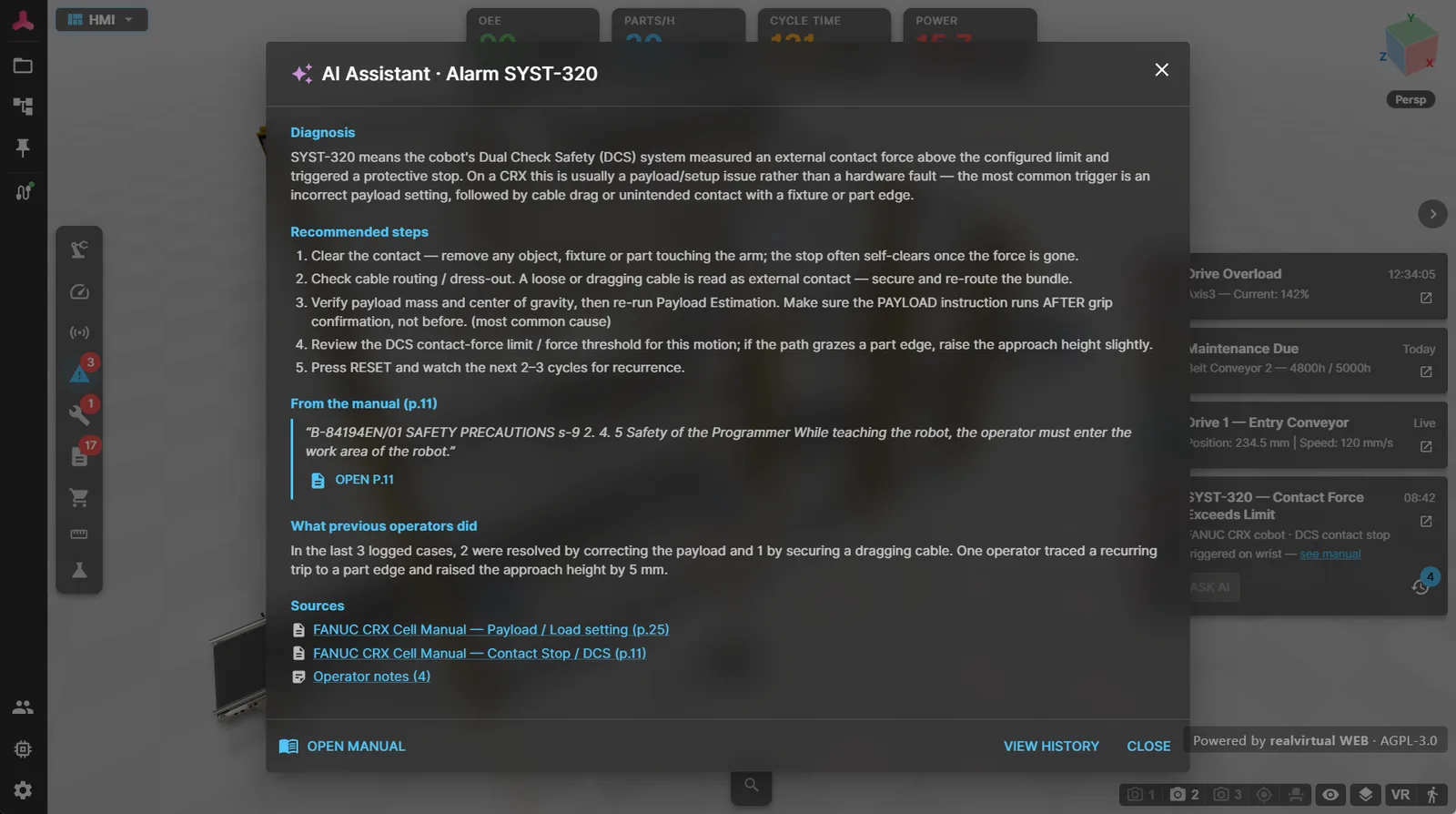
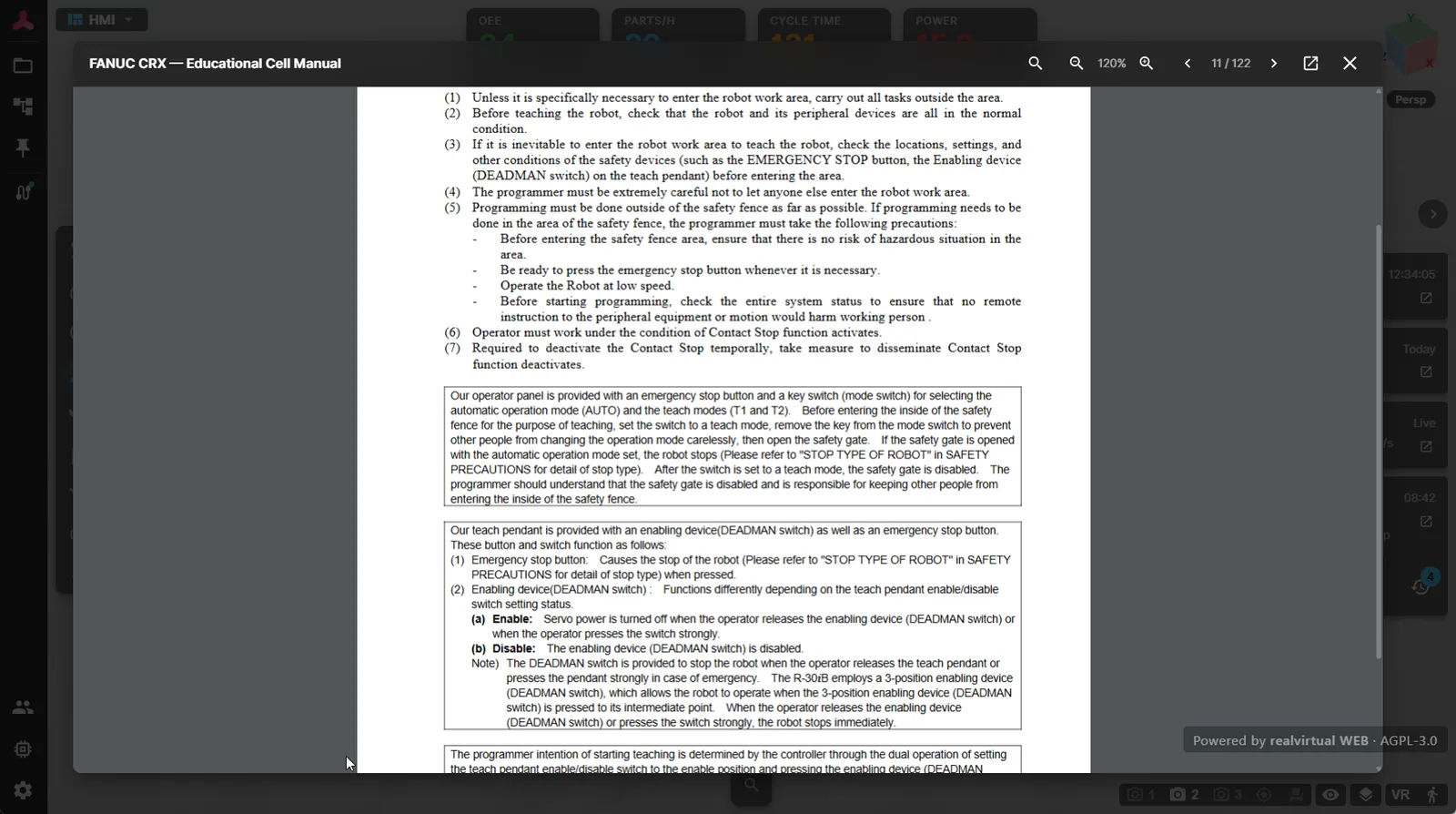
AI error diagnosis with your own manuals
A PLC fault signal, one click on “Ask AI” – and the operator sees cause and remedy, written from your own machine documentation, with a link to the exact PDF page.
RAG instead of guessing
Your manuals are indexed locally into a vector database. On an alarm, the search finds the matching passages first – only then does the language model write the answer, anchored in your real documents. The source reference opens the PDF at the cited page.
LLM freely selectable
Connected via the OpenAI-standard interface: an EU-hosted provider for data sovereignty, or a fully local model on your own hardware – pure backend configuration, no viewer update.
Your documentation stays on site
PDFs, search index, and embeddings live on your CONNECT backend. Only short text excerpts reach the model; the API key never reaches the browser. Operator comments are stored centrally and shared across shifts and devices.
AI-First Approach
realvirtual is fully AI-enabled through the Model Context Protocol (MCP). AI assistants can design, build, test, and debug digital twins end-to-end.
MCP Server Integration
The realvirtual MCP Server connects AI assistants to the running browser scene – list drives, read/write PLC signals, query the scene hierarchy, inspect sensor states, and automate testing through natural language.
Claude Code Ready
realvirtual includes a full Claude Code setup: CLAUDE.md with architecture guidelines, slash commands for common workflows (/dev, /debug, /test, /build), and MCP tools reference. Prompt your Web Digital Twin.
Built for industrial reality
Sales & Product Presentation
Interactive 3D models in the browser. More convincing than slides, more accessible than installed software. Share a link – done.
Product Configurators
Build browser-based 3D configurators where customers select options, variants, and accessories – rendered in real time.
Training & Onboarding
Operators learn machine behavior interactively before touching the real system – without software installation, VPN access, or involving the IT department.
Remote Acceptance & Support
Share virtual commissioning models with customers for review and sign-off – worldwide, instantly.
Three paths to your digital twin in the browser
Use realvirtual with or without Unity – every path is fully supported.
Same core. Same file. Two ways to work.
realvirtual in the browser and realvirtual for Unity are built on one realvirtual component model and read and write the same open digital-twin format – GLB with rv_extras. You choose by what you are doing, not by tier.
realvirtualThe twin has to travel
A link is enough – no installation, no account. Editor, CAD import, simulation and virtual commissioning in the browser; live controller signals through CONNECT.
For twins that are handed around – to sales, customers, operators, service
Only here: discrete event simulation (beta) and the machine information system
realvirtual for UnityYou are building an application
C#, the Unity ecosystem, PhysX, XR builds and standalone runtimes for Windows, Linux, macOS, mobile and headsets. 25+ native controller and robot drivers in-process.
For developers who ship an application of their own
Only here: standalone builds, PhysX and the Unity asset ecosystem
realvirtual for Unity in detailBoth do
- Author and edit the digital twin model – kinematics, drives, sensors, signals
- Virtual commissioning against real PLCs and robot controllers
- Simulation: drives, transport, sensors, logic steps
- Read and write the same GLB – hand a twin over in either direction
- Full source code – C# in Unity, TypeScript in the browser. No black boxes on either side.
realvirtual Commercial includes the realvirtual for Unity Starter and Professional plugins as downloads — an option, not a prerequisite: the digital twin is authored in the browser, so Unity is not required. realvirtual for Unity Professional is also available separately, without realvirtual Commercial. The Unity Editor licence is not included and must be obtained separately from Unity Technologies.
realvirtual for Unity Professional
Full Digital Twin Pipeline
- CAD import, behavior modeling, virtual commissioning
- 25+ native PLC/robot protocol drivers
- One-click GLB export with all metadata
- Simulation, kinematics, signal bindings included
Any GLB/glTF Source
No Unity License Required
- Blender, SolidWorks, Fusion 360, CATIA, NX, …
- Add signal bindings via open rv_extras schema
- Custom behavior via TypeScript plugins and loader components
- Standard 3D format – export from any CAD or 3D tool
CAD directly in the browser
Commercial license
- STEP, JT, USD, FBX and Unity Asset Manager
- Converted locally in the browser – no upload
- JT kinematics from PLMXML (Siemens NX, Teamcenter)
- Editor: pivots, groups, materials, kinematics, drive sizing (beta)
realvirtual
Editor · Virtual Commissioning · 3D HMI · Machine Information System
- Live PLC connection via WebSocket and realvirtual CONNECT
- 3D HMI with KPIs, alarms, documentation
- Plugin system for custom dashboards
- Runs on any device – desktop, tablet, VR/AR
Live connected to your machines
A complete infrastructure for live 3D HMI, historical data, and document management
realvirtual CONNECT
All interfaces through one gateway: Siemens S7, Beckhoff TwinCAT ADS, OPC UA, MQTT, Modbus, EtherNet/IP, Bosch ctrlX, Keba, Festo, FANUC, Denso and more.
WebSocket Realtime
Bidirectional PLC signal streaming – direct connection without Unity in the loop
InfluxDB Integration
Historical data storage for trends, KPI analysis, and predictive maintenance. Query and visualize machine history directly in the 3D HMI.
Gitea Revision Management
Version control for HMI configurations, machine documentation, and maintenance guides. Track changes, roll back, and audit all modifications.
Asset Administration Shell
Online AAS registry and local AASX file import. Industry 4.0 standard for interoperable digital twins and machine metadata.
PDM Metadata Import
Import component metadata from custom PDM systems. Link 3D components to your existing product data management.
PDF Document Management
Link your full machine documentation – PDFs, technical drawings, spare part lists – directly to 3D components and failure messages. Technicians click a part or alarm and see the relevant document instantly.
Built on open standards
Investment protection guaranteed
Your digital twin infrastructure is too important for vendor lock-in, surprise price hikes, or black-box dependencies.
Fully Open Source
Complete source code under AGPL-3.0. Audit every line – free of hidden telemetry, call-home mechanisms, and black boxes. Fork it if you ever need to.
Price Stability Guarantee
We guarantee: no license condition changes and no price increases beyond the official inflation rate – ever – for existing contracts.
No Discontinuation Risk
Even if we cease to exist – your investment is safe. The full source code is AGPL-licensed and publicly available on GitHub. You can always fork, maintain, and develop it further, without ever depending on a vendor.



Engineered in Germany
Developed by realvirtual GmbH in Baden-Württemberg, Germany – the heart of European machine and plant engineering. German engineering standards and EU data protection, with delivery and support worldwide.
Open source + commercial
Trying is free. You pay one developer seat – €1,920/year – plus exactly one fee as soon as the twin is served to others or delivered: from €300 one-time per machine.
No subscription lock-in: the seat runs only while you develop. What you deliver keeps running without a subscription – offline, 10+ years, fit for EU Machinery Regulation 2027 – and every annual license becomes perpetual after 12 paid months.
realvirtual Free
AGPL-3.0 · browser- 3D viewer, 3D HMI, simulation (60 Hz), real-time material flow, JS behavior logic, WebXR – full source code
- Copyleft: your complete project is AGPL-3.0 and its source must be offered to everyone you deliver it to — including the rv_extras behaviour in your models.
realvirtual Commercial
development licence · browser and Unity pluginsonly during active development
Or lifetime seat, updates for life – price on request.
+ exactly one deployment fee – from €300, one-time or per year depending on your use case (see below)
Everything in AGPL-3.0, plus:
- Keep your models, plugins, and configuration private
- Remove branding watermark
- Priority support
- CAD import and Editor
realvirtual Commercial includes the realvirtual for Unity Starter and Professional plugins as downloads — an option, not a prerequisite: the digital twin is authored in the browser, so Unity is not required. realvirtual for Unity Professional is also available separately, without realvirtual Commercial. The Unity Editor licence is not included and must be obtained separately from Unity Technologies.
Who uses the twin?
- Only you, locally on your own machine – engineering, virtual commissioning against the real PLC, studies, training, or a watermarked showroomNo deployment feedeveloper seat only
- Delivered with the machine or as a project€300 one-time – perpetual€600 with live PLC, incl. CONNECT runtime
- Served to others at your own site – internal server, production or 3D HMI€3,000 per yearincl. CONNECT runtime
- As a public app under your own brand, or with paid access€4,900 per year
Four worked examples
- Commissioning engineer – one developer, local, virtual commissioning against the real PLC€1,920€1,920 seat, no deployment fee
- Machine builder – 12 machines a year, each with a live PLC connection€9,120€1,920 seat + 12 × €600
- Plant planner – 5 simulation studies a year, each delivered to the customer€3,420€1,920 seat + 5 × €300 deployment fee
- Operator – one site, internal 3D HMI for any number of staff€4,920€1,920 seat + €3,000 site fee
All prices net; one developer seat each.
Lifetime for deployments, OEM or framework agreement – by arrangement.
Special cases and license rules
- Visibility is free: watermarked showrooms and demos carry no deployment fee, as long as they stay free of charge for end users and are not connected to a real machine.
- Exactly one deployment fee applies per deployment – for overlapping use cases, the highest applicable one.
- Developing and virtually commissioning triggers no deployment fee – not even with a live connection to a real PLC. You pay once the twin is served to others or delivered with a machine.
- The site fee and the machine fee with live connection include the realvirtual CONNECT runtime – all protocols, unlimited signals and internal users, signal history and AI diagnosis backend; the CONNECT engineering seat (virtual commissioning/simulation, €1,250/year) is separate.
- No subscription lock-in: every annual license – developer seat, site fee, internet app fee – becomes a perpetual license of the latest version after 12 paid months. Updates and support only with an active license.
Up and running in 30 seconds
git clone https://github.com/game4automation/realvirtual-WEB.git
cd realvirtual-WEB
npm install
npm run dev
Requirements: Node.js >= 20.19 or >= 22.12.
One Link. Any Device. Live Digital Twin.
See it in action
Try the live demo or clone the repo and start building