
LoadStack
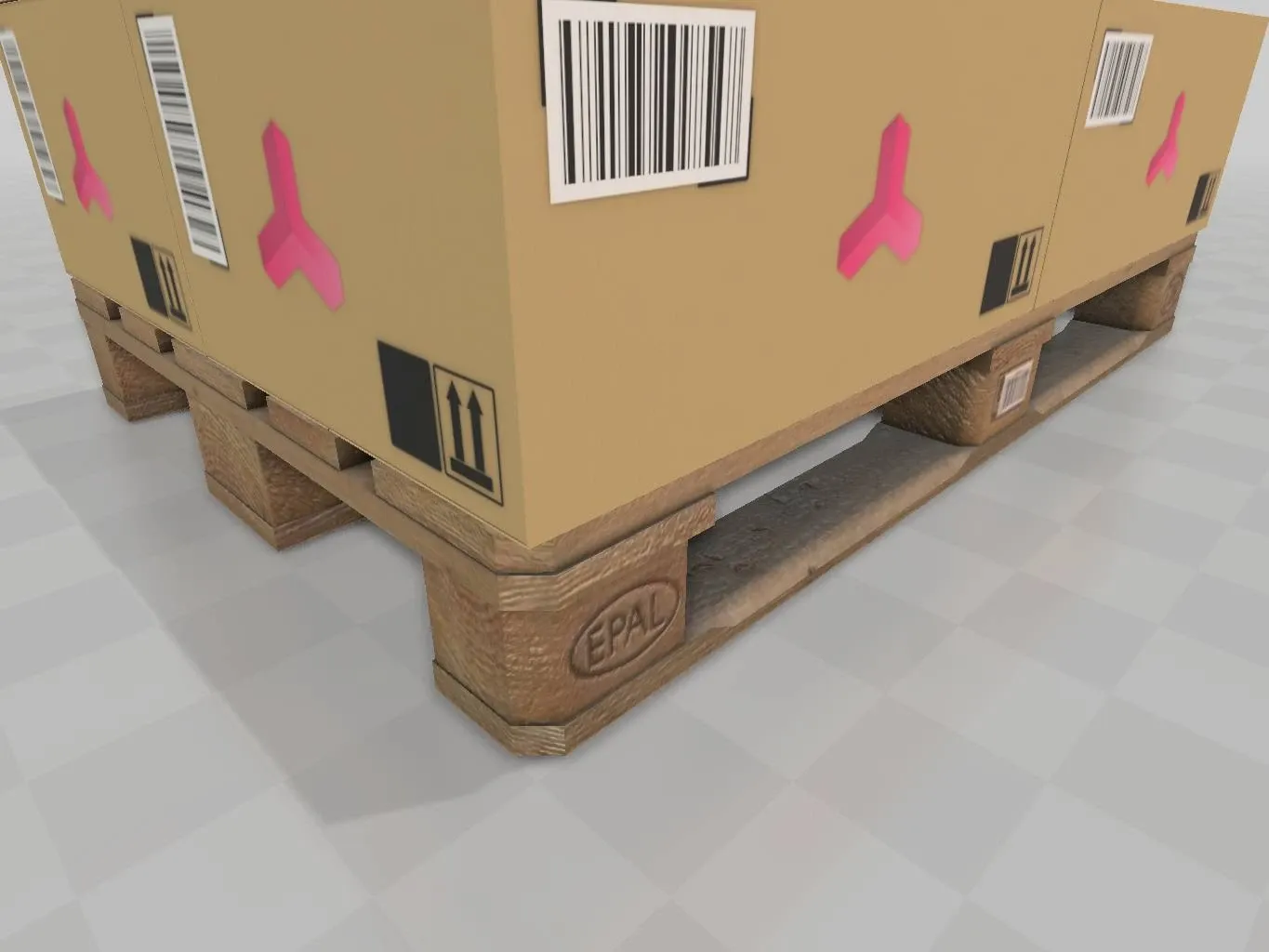
LoadStack draws the load of an MU from its MU data. One pallet carries the data; the cartons are a visual display, with no individual MU behaviour or signals. Use it for pallet quantities and article variants that travel together.
Data format
Section titled “Data format”With the default paths, a single article uses:
{ "sku": "A", "qty": 4 }A mixed pallet uses an ordered list:
{ "sku": "MIX", "qty": 4, "items": [ { "sku": "A", "qty": 3 }, { "sku": "B", "qty": 1 } ]}An array at ItemsPath takes precedence over the top-level quantity and key, even when the array is empty. If it is absent or is not an array, LoadStack reads the single article instead. An empty ItemsPath disables list lookup. CountPath and KeyPath are relative to each list entry, or to the document for a single article.
Cartons follow list order, bottom layer first, row by row, filling columns within each row. MaxCount clips the end of the load, including a partly filled final layer; it does not change the stored data. For example, at capacity 12, A × 10 followed by B × 5 draws A × 10 and B × 2.
Quantities must be finite numbers. Positive fractions round down; missing, invalid, zero or negative quantities draw no cartons. Numeric strings are not converted. An unknown or missing article key uses DefaultColor. Repeated keys keep their position in the list.
An empty pallet is valid: use "qty": 0 for a single article, or "items": [] for a mixed load. While an items array exists, changing only the top-level quantity has no effect.
Inspector settings
Section titled “Inspector settings”These are the component defaults; StandardPallet has its own prepared settings below.
| Setting | Unit / limits | Default | What it does |
|---|---|---|---|
| CountPath | Valid, nonempty MU data path | qty | Quantity in the document or each list entry |
| ItemsPath | Valid MU data path, or empty | items | Ordered article list; empty disables lookup |
| KeyPath | Valid, nonempty MU data path | sku | Article key in the document or each list entry |
| CartonSize | mm; 10–2000 per dimension | 400 / 300 / 250 | Length along local X / width along local Z / height along local Y (up). These are dimensions, not position coordinates |
| Rows | Integer, 1–20 | 2 | Rows per layer |
| Columns | Integer, 1–20 | 4 | Columns per row |
| Gap | mm; 0–200 | 5 | Horizontal space between cartons |
| LayerGap | mm; 0–200 | 0 | Vertical space between layers |
| Offset | mm; −5000 to 5000 per coordinate | 0 / 144 / 0 | Local X / Y / Z position of the bottom-face centre of the first layer, Y up |
| MaxCount | Integer, 1–500 | 24 | Maximum number of drawn cartons |
| Capacity | Cartons; read-only | Derived | Equals MaxCount; display only |
| CartonMesh | Mesh reference inside the load unit, or empty | Empty | Supplies carton geometry and material; empty uses a box sized by CartonSize |
| Colors | At most 32 entries | A: #4fc3f7, B: #e94078, C: #66bb6a | Add, remove or reorder entries with Key (article text) and Color (sRGB #RRGGBB) |
| DefaultColor | sRGB #RRGGBB | #b5895a | Colour for unknown or missing keys |
Each layer holds Rows × Columns cartons. The number of possible layers is capacity divided by this value, rounded up. The regular grid does not automatically fit the pallet or prevent overhang.
Carton source and appearance
Section titled “Carton source and appearance”Choose one mesh inside the load unit as CartonMesh. Centre its geometry at the load unit’s origin and save it hidden. LoadStack hides its source and repeats its geometry and material at the grid positions. Match the source’s dimensions to CartonSize, which controls spacing; a supplied mesh is not resized to fit that setting.
A colour tints the carton texture. White (#ffffff) preserves its original appearance. The Inspector offers a colour picker and an editable hex value for Color and DefaultColor.
The reference must point to a mesh node. For a Primitive that is its body _Shape/ShapeMesh, not the Primitive node itself; because changing a dimension or regenerating the Primitive rebuilds that body and loses the reference, ordinary geometry is the recommended lasting source. A reference to a node that is not a mesh produces the Problems entry load-stack-carton-source-not-mesh and uses a fallback box. If MU data is unavailable, the component draws nothing and reports load-stack-needs-mu-data.
The Load readout
Section titled “The Load readout”For a selected MU with LoadStack, the Load section appears at the top of the Inspector, directly below MU DATA when present. It is open by default and remembers its own collapse state. It shows Cartons as drawn count of capacity, followed by occupied layers of total layers. A coloured capacity bar follows stacking order. Articles shows totals for each key with colour swatches; an unmapped key is labelled (default) and an empty load shows None.
The section reads live data when available. Otherwise it shows the template’s start document and is marked Start data. If the requested quantity exceeds capacity, it also shows how many cartons are in the data and how many are drawn. A missing or nonnumeric quantity produces a no quantity at hint. The readout is display only.
Quick start with StandardPallet
Section titled “Quick start with StandardPallet”- Open the DiscreteEventSimulation project library and place StandardPallet (
library/StandardPallet.glb) in the layout. Use continuous simulation to display its data-driven load. - Select the StandardPallet load-unit node. It already has MU, MUData and LoadStack. Its start data is
{"sku":"A","qty":4}. - In MUData → Data, switch to JSON, change the start data and click Apply Data. Try the mixed example above. Start values apply to the next created part or after a simulation reset; the Inspector does not write live MU data.
- To generate pallets repeatedly, use the prepared pallet as the template copied by a Source. Use ThisObjectAsMU to select the node to copy.
- Run continuous simulation and select a pallet to inspect Load. For station or script changes to live quantities, follow Loaded pallets.
The prepared EuroPallet mesh measures 800 × 144 × 1200 mm (X / Y / Z). Its CartonBox/Box source supplies cartons sized 400 × 255 × 595 mm (length / height / width). LoadStack uses CartonSize 400 / 595 / 255, Rows 2, Columns 2, Gap 3 mm, LayerGap 0 mm, Offset 0 / 149 / 0 mm and MaxCount 12: four cartons per layer and three possible layers. Article A and the fallback are white; B (#9fd8f5) and C (#b9e3b0) tint the texture.
Known limits
Section titled “Known limits”- MU data and data-driven loads currently work only in continuous simulation, even though StandardPallet belongs to the DES project library. They are not active in a DES run yet.
- Rendering is verified with webgl. webgpu and webgpu-gl are untested.
- USD export omits the drawn cartons.
- Dissolve does not include the cartons’ shadow.
- A rough measured guideline is around 800 pallets with shadows at 8 ms per frame. This is not a guaranteed viewer frame time.
- Cartons are display geometry. For unloading or depalletizing individual carton MUs, use EuropalletLoaded; see Loaded pallets.
See also
Section titled “See also”- Loaded pallets — choose between content data and individual cartons
- MU data and barcodes — start documents, paths and runtime writes
- MU (Movable Unit)
- Material Flow