
Source

By using a Source script, new movable units (MUs) can be generated. MUs can be generated in intervals or automatically generated once the last generated MU has travelled a certain distance away from the source. This is useful to automatically generate MUs on a conveyor. The object with the Source script attached to, is like a template. Each time a MU is created, the Source creates a new instance of the object under the defined root Destination in the scene hierarchy.
This tutorial shows how to create a custom source:
The source can also manually create (MUs) when you press “C”. The source will delete all generated (MUs) when you press “D” on the keyboard.
This is the property window of the source:
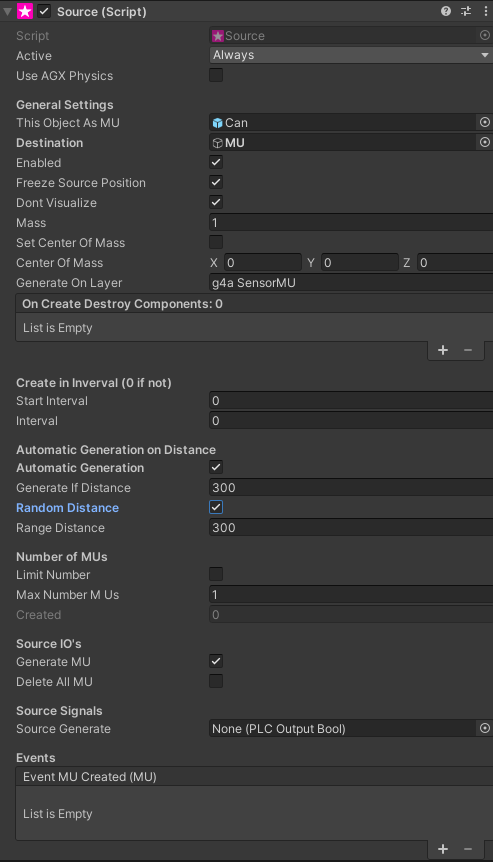
Properties
Section titled “Properties ”This Object as MU
Section titled “This Object as MU”Defines which part should be generated. Should normally point to the same GameObject where the source component itself is attached to. This is also the standard setting.
Note: Collider enabled/disabled states are preserved from this template when generating MUs. To disable specific colliders on generated MUs, simply disable them in the template prefab before starting the simulation.
Destination
Section titled “Destination”When the source is generating a new MU it can be placed as a sub Gameobject under the defined Destination Gameobject.
Enabled
Section titled “Enabled”Must be set to true for the source to work.
Freeze Source Position
Section titled “Freeze Source Position”Should be usually set to true - the source will not change its position.
Don’t Visualize
Section titled “Don’t Visualize”Hides the source so that only the created MUs are visible.
Sets the Mass of the created MUs.
Set Center of Mass
Section titled “Set Center of Mass”Sets the Center of Mass of the created MUs.
Center of Mass
Section titled “Center of Mass”The Center of Mass.
Generate on Layer
Section titled “Generate on Layer”Unity Layer where the MU should be placed to after creation.
On Create Destroy Components
Section titled “On Create Destroy Components”Maybe some scripts on the MU, which is a copy of the source, should be destroyed when the MU is created. You can define here the components to be destroyed.
Create in Interval
Section titled “Create in Interval”Creates MUs in a constant interval in seconds. If the value is 0 this option is not used.
Automatic Generate On Distance
Section titled “Automatic Generate On Distance”Automatically creates new MUs when the distance of the last created MU is greater than the defined value. Optionally the distance can be also randomly (equally distributed) between the defined Distance (“Generate if Distance”) plus / minus the “Range Distance”.
Number of MUs
Section titled “Number of MUs”Limits the number of generated MUs.
SourceIOs
Section titled “SourceIOs”Gernarate MU - should be turned on for making the source work.
Source Signals
Section titled “Source Signals”PLCOutputBool Signal (e.g. from a PLC) for generating MUs.
Events
Section titled “Events”Unity Event which can be used for custom scripts which are called when an MU is created.
Template Behavior
Section titled “Template Behavior”The Source GameObject acts as a non-physical template during simulation:
Collider Handling:
- All colliders on the template are automatically disabled when the simulation starts
- The initial enabled/disabled state of each collider is preserved from your prefab configuration
- When MUs are generated, each collider’s original state is restored
- This includes colliders on inactive child GameObjects
Practical Use:
- To have a collider disabled on generated MUs, simply disable it in the template prefab before simulation starts
- To have a collider enabled on generated MUs, ensure it’s enabled in the template prefab
- Inactive child GameObjects maintain their hierarchy state and collider configurations
Visibility:
- The template’s visual representation can be hidden using the Don’t Visualize property
- Even when hidden, the template remains in the scene as the blueprint for MU generation
Physics:
- The template does not participate in physics simulation
- Generated MUs have full physics interaction (collisions, rigidbodies, etc.)
- Use Freeze Source Position to prevent the template from moving
Public Interfaces
Section titled “Public Interfaces”If script is attached to the Gameobject of the MU, which implements the Interface “ISourceCreated” a Method “OnSourceCreated” is called on the MU when it has been created by the MU.
Public properties and methods
Section titled “Public properties and methods”Please check the Realvirtual.io Class Reference for more information about the properties and methods of this component.
© 2025 realvirtual GmbH https://realvirtual.io - All rights reserved. No part of this publication may be reproduced, distributed, or transmitted in any form or by any means, including printing, saving, photocopying, recording, or other electronic or mechanical methods, without the prior written permission of the publisher.