
Signal Importer Exporter
The Signal Importer Exporter is a tool that enables the import and export of signals in a standardized neutral format to facilitate seamless integration between different systems requiring signal interfaces. It stores the data in a JSON file, making it easy to exchange information between applications, controllers, and automation environments.
The Signal Importer Exporter can be attached to any GameObject that represents an interface in realvirtual.io. It automatically detects and imports/exports all signals located underneath that GameObject in the hierarchy.
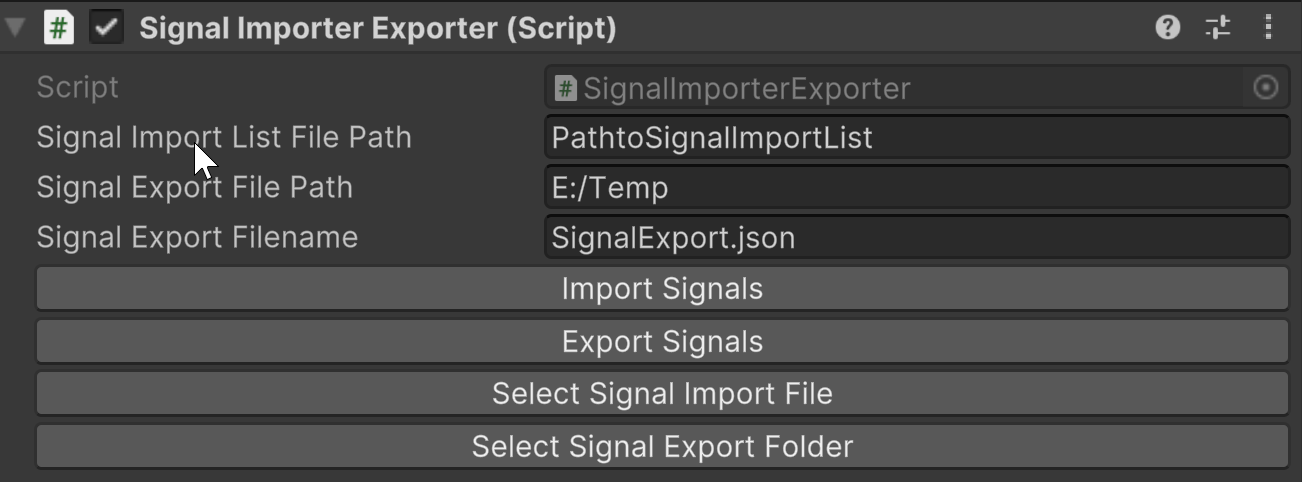
Properties
Section titled “Properties”Signal Paths
Section titled “Signal Paths”- Signal Import List File Path: Specifies the location of the import file.
- Signal Export File Path: Defines the folder where exported signals will be saved.
- Signal Export Filename: Name of the JSON file for exported signals (e.g.,
SignalExport.json).
Action Buttons
Section titled “Action Buttons”- Import Signals: Loads signals from the defined import file.
- Export Signals: Saves the current signals to the specified export file.
- Select Signal Import File: Allows the user to choose an import file.
- Select Signal Export Folder: Enables selection of an export folder.
Example Signal Export File
Section titled “Example Signal Export File ”Here’s a sample exported JSON structure showing how signals are organized:
{ "Signals": [ { "Name": "IO.Input.Robot.bStatusLoading", "Symbolname": "", "Comment": "", "Type": "BOOL", "Direction": "INPUT", "Folder": "--- Robot Overall Status ----" }, { "Name": "IO.Input.Robot.bStatusUnloading", "Symbolname": "", "Comment": "", "Type": "BOOL", "Direction": "INPUT", "Folder": "--- Robot Overall Status ----" }, { "Name": "IO.Output.Robot.bStartLoading", "Symbolname": "", "Comment": "", "Type": "BOOL", "Direction": "OUTPUT", "Folder": "--- Start Robot Programms ---" },Key Properties in the JSON File
Section titled “Key Properties in the JSON File”| Property | Description |
|---|---|
| Name | (Optional - Name or Symbolname must be filled) The readable name of the signal. If no Symbolname is provided, this value is also used as the unique ID (symbol name) of the signal. If a Symbolname is defined, this name is used only for display in realvirtual.io. |
| Symbolname | (Optional - Name or Symbolname must be filled) The actual symbol name (ID) of the signal. If left empty, the Name field is used as the symbol name. |
| Comment | (Optional) A description or note about the signal, useful for documentation. Can be empty. |
| Type | The data type of the signal. Possible values: "INT", "BOOL", "FLOAT", "TEXT". |
| Direction | The signal direction, indicating whether it is an input or output. Possible values: |
| Folder | (Optional) Defines a grouping folder for organizing signals in realvirtual.io. This allows signals to be structured under empty GameObjects in Unity for better organization. |