
Wandelbots Nova Fanuc CRX
This ModelZoo scene demonstrates the integration of a Wandelbots NOVA controlled robot in a virtual commissioning environment using realvirtual.io.
The robot model used in this scene is a Fanuc CRX-10iA/L. All PLC logic for the entry and exit conveyors is handled entirely inside the simulation, so no external PLC is needed.
To use this model, make sure you have:
- Access to Wandelbots NOVA (cloud or local installation)
- The robot controller configured for the Fanuc CRX-10iA/L
Interface Configuration
Section titled “Interface Configuration”To connect the simulation with a Wandelbots NOVA instance, the following parameters must be set. Open the ⚙️ Settings window in the top menu bar to access these fields:
| Field | Description |
|---|---|
WandelbotsNOVAInterface.WandelbotsServer | IP address or URL of your Wandelbots NOVA server (e.g. http://172.28.214.72) |
WandelbotsNOVAInterface.MotionGroup | The motion group identifier for the robot (e.g. 1@fanuc for a Fanuc CRX-10iA/L) |
WandelbotsNOVAInterface.Username | Username for NOVA login |
WandelbotsNOVAInterface.Password | Password for NOVA login |
WandelbotsNOVAInterface.AccessToken | Optional: Only required when connecting to a cloud-hosted NOVA instance |
After entering your connection data, activate the interface using the 🔌 connect switch in the menu bar. Once the connection is active, the plug icon will turn green.
💡 Note: The Access Token is not needed for local or offline installations—only for authenticated access to the cloud-based NOVA server.
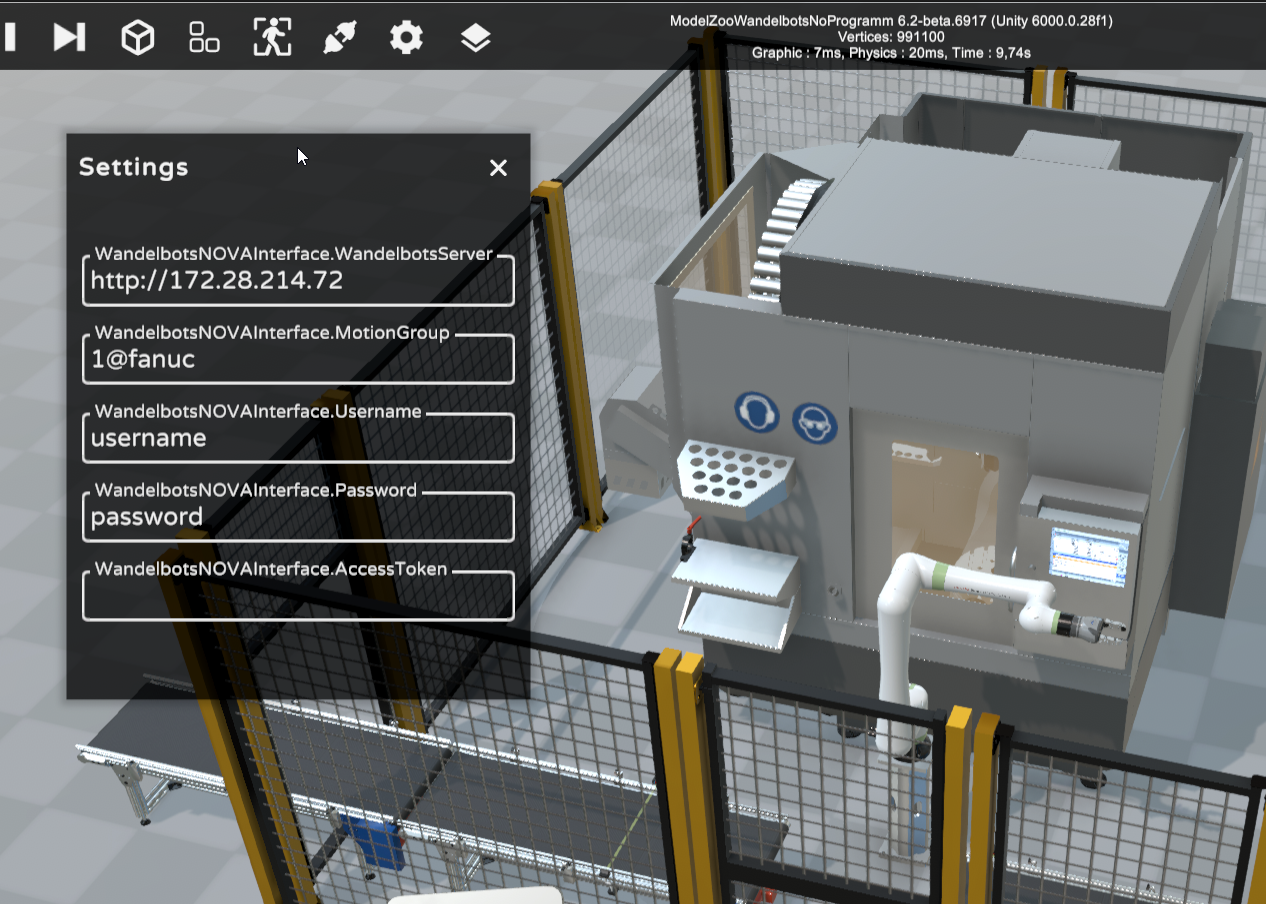
Wandelbots NOVA interface configuration
Signal Mapping
Section titled “Signal Mapping”The following digital signals are used for handshaking between realvirtual.io and the Wandelbots NOVA robot:
Inputs (realvirtual.io → NOVA)
Section titled “Inputs (realvirtual.io → NOVA)”| Signal | Type | Description |
|---|---|---|
di1 | Input | Load Cell – triggers robot to load |
di2 | Input | Unload Cell – triggers robot to unload |
di3 | Input | Gripper Closed – gripper status |
Outputs (NOVA → realvirtual.io)
Section titled “Outputs (NOVA → realvirtual.io)”| Signal | Type | Description |
|---|---|---|
do1 | Output | Robot Is Loading – robot has started loading |
do2 | Output | Robot Is Unloading – robot has started unloading |
do3 | Output | Close Gripper – command to close gripper |
Robot Programming
Section titled “Robot Programming”The robot behavior must be programmed in Wandelbots NOVA.
Use the signal mapping above to define your automation logic and synchronize the robot with the simulation scene.