
KinematicMU (Pro)
The KinematicMU component enables purely kinematic movement of Moving Unity (MUs) along a GuidedTransport. This is essential in scenarios where position-controlled transport surfaces are used (e.g., from a PLC), and traditional physics-based transport would violate physical constraints due to rapid or unpredictable position updates.
KinematicMU allows sensor interaction but disables collisions with other colliders or MUs during guided motion. This makes it ideal for precision transport systems or integration with external control systems like PLCs.
Use Case
Section titled “Use Case”Standard GuidedMU movement applies forces and obeys Unity physics. This works well in most guided transport scenarios but fails for position-driven conveyor belts that update positions in cycles. In these cases, using physics-based motion can lead to instability or incorrect behavior.
KinematicMU demo model
Setup Instructions
Section titled “Setup Instructions”- Prefab: Use the standard
TransportGuidedprefab
Path:Assets/realvirtual/TransportGuided.prefab - Scene: Try the demo scene to see it in action
Path:Assets/realvirtual/Professional/KinematicMU/DemoKinematicMU.unity - Material Unit (MU) Setup:
- Add the
KinematicMUscript to your MU GameObject. - Remove the
GuidedMUscript (if present). - Keep the
MUandSourcecomponents. - Ensure a
Rigidbodyis present (used for switching modes). - Assign appropriate layers to the Raycast Layer (typically
rvTransport,rvSimStatic).
- Add the
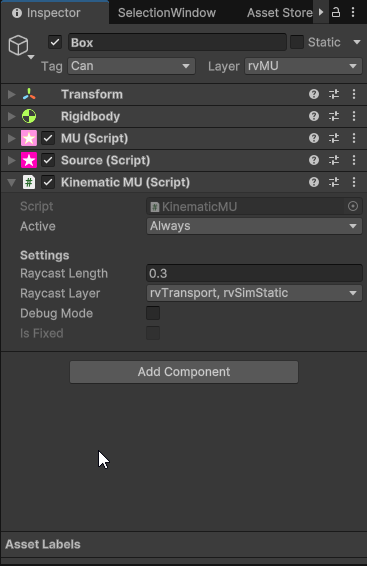
Inspector Properties
Section titled “Inspector Properties”| Property | Description |
|---|---|
| Active | Controls whether the MU should behave kinematically (Always, Never, or conditionally). |
| Raycast Length | Distance for downward raycast to detect the transport surface. Default is 0.3. |
| Raycast Layer | Layers that are considered for detecting transport surfaces. |
| Debug Mode | Enables debug visualization of raycasts. |