
HMI Value (Deprecated)
HMI Value is displaying values (PLCOutputFloats or PLCOutputInts) for example the number of produced parts, axis positions or temperatures.
Example HMI-Value moving with the tracked object.
Properties
Section titled “Properties”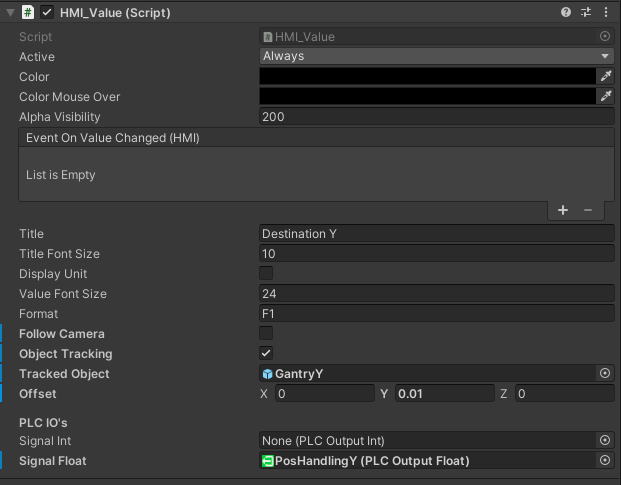
Title: short describtion or name of the valueTitle Font Size: font size of the titleDisplay Unit: true do display a unit right next to the valueUnit: user defined unit stringUnit Font Size: font size of the unitValue Font Size: font size of the valueFormat: number format-
Follow Camera:the orientation of the panel is always directed to the camera (only relevant if the canvas uses the render mode “Worldspace”) ObjectTracking: boolean wether the value object is placed next to a game object within the scene or notTrackedObject: game object within the scene which position is used to place the HMI value informationOffset: Offset position to the object in up direction.SignalInt: Connected PLCOutputInt SignalSignalFloat: Connected PLCOutputFloat Signal