
HMI DropDown (Deprecated)
The drop down can be used as a part of a HMI tab or as the main control for selecting the tabs. If you use it as a main control for selecting the tabs only one Tab can be opened at once. The value of a PLCInputInt is set according to the selected menu element (from 0 to n). Within the HMI-Demo-scene it is used to switch in between camera views. To use it with the render mode “Worldspace” you need the HMI-PanelWorldSpace as parent.
Properties
Section titled “Properties”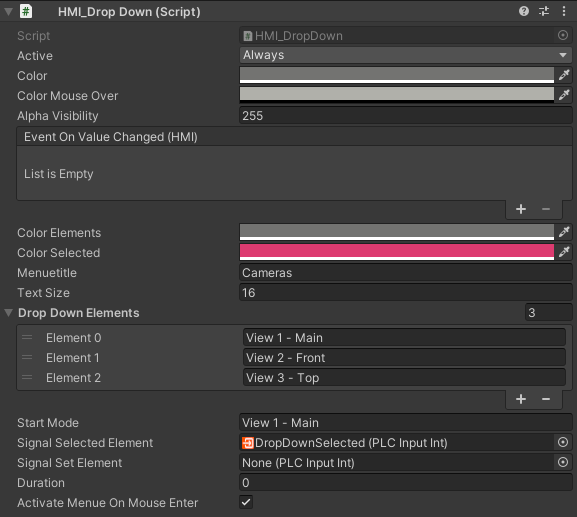
Color Elements: background color of the dropdown elements when inactiveColor Selected: background color of the selected (currently active) dropwodn elementMenue Title: title of the menueTitle Font Size: font size of the titleDropDown Elements: List of drop down elements as stringsStart Mode: mode/ menue item which is active when the game mode startSignalSelectedElement: PLCInputInt - Value of the selected Dropdown elementSignalSetElement: PLCOutputInt - Value to set the selected element from PLC side.Duration: duration in second how long the drop down appears- Activate On Mouse Enter: activates the dropdown when the mouse pointer enter