
Siemens S7 Training Model
Master Siemens S7 PLC programming with a complete industrial automation training environment featuring a realistic demo cell and comprehensive TIA Portal project.
This ModelZoo entry provides a complete S7 training experience, combining:
- Complete demo cell simulation with robot, CNC machine, and conveyor systems
- Full TIA Portal project (S7-1500 compatible) with structured programming examples
- Real-time PLC communication via TCP/IP (Put/Get) for authentic industrial experience
- Virtual commissioning setup compatible with PLCSim Advanced and real S7 hardware
Demo Cell Overview
Section titled “Demo Cell Overview”The training environment simulates a modern manufacturing cell featuring:
- Entry conveyor with part detection sensors
- 6-axis robot for pick-and-place operations with simulated kinematics
- CNC machining center with door control and machining simulation
- Exit conveyor for processed parts
- HMI control panel with operator interface elements
The automation sequence demonstrates typical industrial workflows: part arrival, robot loading, machining operations, robot unloading, and part discharge. All operations are coordinated through the S7 PLC program provided in the complete TIA Portal project.
Interface Configuration
Section titled “Interface Configuration”Before connecting to a Siemens S7 PLC, you need to configure the IP address, rack, and slot of the controller.
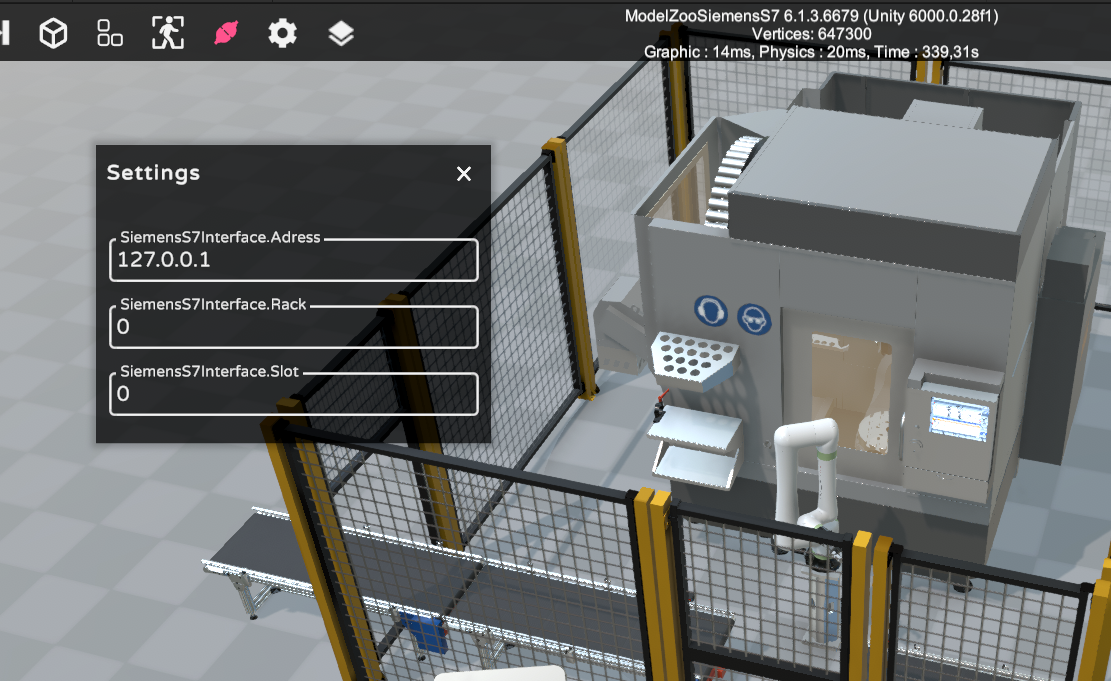
Configuring S7 Settings
To configure the connection:
- Click the Settings icon (⚙️) in the toolbar.
- Enter the following values based on your setup:
- SiemensS7Interface.Address → The IP address of your PLC (e.g.,
127.0.0.1for PLCSim Advanced). - SiemensS7Interface.Rack → Usually
0. - SiemensS7Interface.Slot → Typically
0for PLCSim Advanced,1for physical PLCs.
- SiemensS7Interface.Address → The IP address of your PLC (e.g.,
📘 Refer to your TIA Portal project or PLC documentation to confirm the correct rack and slot values.
TIA Portal Project
Section titled “TIA Portal Project”This complete TIA Portal project provides a fully functional S7-1500 program that demonstrates industrial automation best practices:
- Complete S7-1500 CPU configuration with optimized block access settings
- Structured function blocks demonstrating professional programming practices
- Comprehensive I/O mapping for all demo cell components
- Sequence control logic for coordinated multi-station operation
- Safety interlocks and emergency stop implementation
- HMI integration elements for operator interface training
This S7 TIA Portal example project is provided by Andreas Fast from Fast Automation. Thanks a lot for this valuable contribution to the realvirtual community!
🔗 Connect with Andreas Fast: LinkedIn Profile
Signals
Section titled “Signals”1.1 Robot Overall Status (Inputs)
Section titled “1.1 Robot Overall Status (Inputs)”| Address | Signal Name | Direction | Description |
|---|---|---|---|
I0.0 | IO.Input.Robot.bStatusLoading | Input | Robot is currently loading a part |
I0.1 | IO.Input.Robot.bStatusUnloading | Input | Robot is currently unloading a part |
1.2 Start Robot Programs (Outputs)
Section titled “1.2 Start Robot Programs (Outputs)”| Address | Signal Name | Direction | Description |
|---|---|---|---|
Q0.0 | IO.Output.Robot.bStartLoading | Output | Start the robot loading sequence |
Q0.1 | IO.Output.Robot.bStartUnloading | Output | Start the robot unloading sequence |
2. Machine Signals
Section titled “2. Machine Signals”| Address | Signal Name | Direction | Description |
|---|---|---|---|
Q1.0 | IO.Output.Machine.bStart | Output | Start the machine’s machining process |
Q1.1 | IO.Output.Machine.bOpenDoor | Output | Open the machine door |
I1.0 | IO.Input.Machine.bMachining | Input | Machine is currently machining |
I1.1 | IO.Input.Machine.bMachiningFinished | Input | Machining process is finished |
I1.2 | IO.Input.Machine.bDoorOpened | Input | Machine door is open |
I1.3 | IO.Input.Machine.bDoorClosed | Input | Machine door is closed |
3. Entry and Exit Conveyor
Section titled “3. Entry and Exit Conveyor”| Address | Signal Name | Direction | Description |
|---|---|---|---|
Q2.0 | IO.Output.EntryBelt.Motor.bStart | Output | Start the entry belt motor |
Q2.1 | IO.Output.ExitBelt.Motor.bStart | Output | Start the exit belt motor |
I2.0 | IO.Input.EntryBelt.Sensor.bOccupied | Input | Entry belt sensor detects an object |
I2.1 | IO.Input.ExitBelt.Sensor.bOccupied | Input | Exit belt sensor detects an object |
4. HMI (Buttons & Lights)
Section titled “4. HMI (Buttons & Lights)”4.1 Buttons (Inputs)
Section titled “4.1 Buttons (Inputs)”| Address | Signal Name | Direction | Description |
|---|---|---|---|
I3.0 | IO.Input.HMI.OnSwitch.bOn | Input | HMI main switch is on |
I3.1 | IO.Input.HMI.Emergency.bOn | Input | Emergency stop is activated |
I3.2 | IO.Input.HMI.AutomaticButton.bPressed | Input | Automatic mode button pressed |
I3.3 | IO.Input.HMI.EntryBelt.bOn | Input | Entry belt button is on |
I3.4 | IO.Input.HMI.Robot.bOn | Input | Robot enable button is on |
I3.5 | IO.Input.HMI.ExitBelt.bOn | Input | Exit belt button is on |
4.2 Lights (Outputs)
Section titled “4.2 Lights (Outputs)”| Address | Signal Name | Direction | Description |
|---|---|---|---|
Q3.0 | IO.Output.HMI.AutomaticButton.bLight | Output | Light for the automatic mode button |
Q3.1 | IO.Output.HMI.Robot.bLight | Output | Light indicator for robot status |
Q3.3 | IO.Output.HMI.EntryBelt.bLight | Output | Light indicator for entry belt |
Q3.4 | IO.Output.HMI.ExitBelt.bLight | Output | Light indicator for exit belt |