
Measure
Measure is measuring distances between the pivot point of the Gameobject, the Measure script is attached to and another pivot point of a referenced Gameobject.
You can also connect the result of the measurement to a PLCInput Signal. By doing this Measure is able to act as a distance sensor.
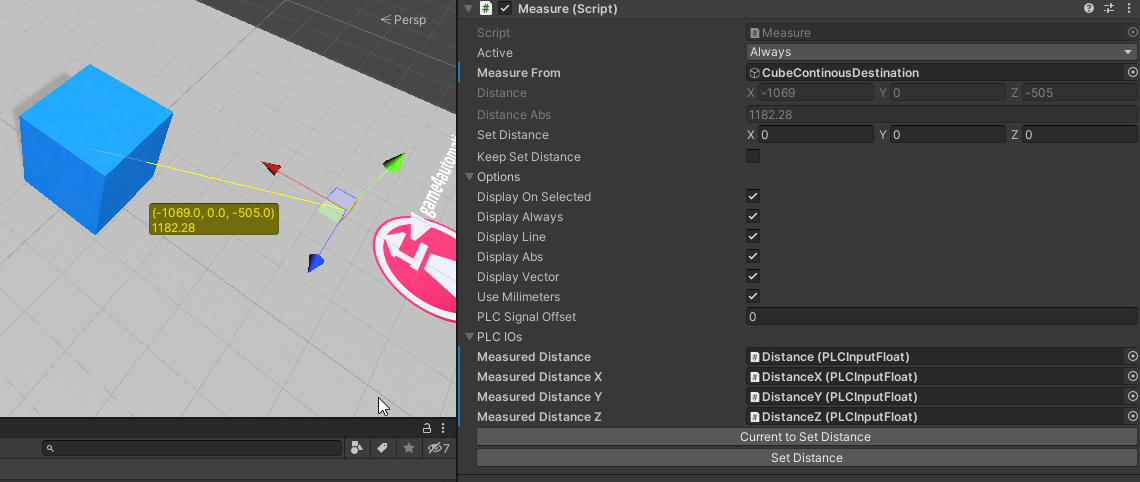
You can apply the following properties:
| Property | Description |
|---|---|
| Measure From | Gameobject the measurement should be performed from to this object. |
| Distance | (Readonly) The measured distance as a vector. |
| Distance Abs | (Readonly) The measured distance as an absolute value. |
| Set Distance | A distance that should be set by the button Set Distance |
| Keep Set Distance | If set to true the SetDistance value is always set to the related Gameobject so that the distance between the two objects always keeps the same. |
| Display On Selected | Display the measurement only when the measurement object is selected. |
| Display Always | Display the measurement always. |
| Display Line | Display a line between the Pivot Points in scene view. |
| Display Abs | Display the absolute value as a number in scene view. |
| Display Vector | Display the vector as numbers in scene view. |
| Use Millimeters | Display one Unity Unit as 1000. |
| PLCSignalOffset | Offeset to the MeasuredDistance. |
| Measured Distance | PLCInputFloat signal for the absolute distance. |
| Measured DistanceX | PLCInputFloat signal for the DistanceX part of the Vector. |
| Measured DistanceY | PLCInputFloat signal for the DistanceY part of the Vector. |
| Measured DistanceZ | PLCInputFloat signal for the DistanceZ part of the Vector. |
© 2025 realvirtual GmbH https://realvirtual.io - All rights reserved. No part of this publication may be reproduced, distributed, or transmitted in any form or by any means, including printing, saving, photocopying, recording, or other electronic or mechanical methods, without the prior written permission of the publisher.