
Tooltip (Pro)
The RuntimeTooltip system allows you to display contextual tooltips in your simulation, helping users understand the function or content of scene objects at runtime.
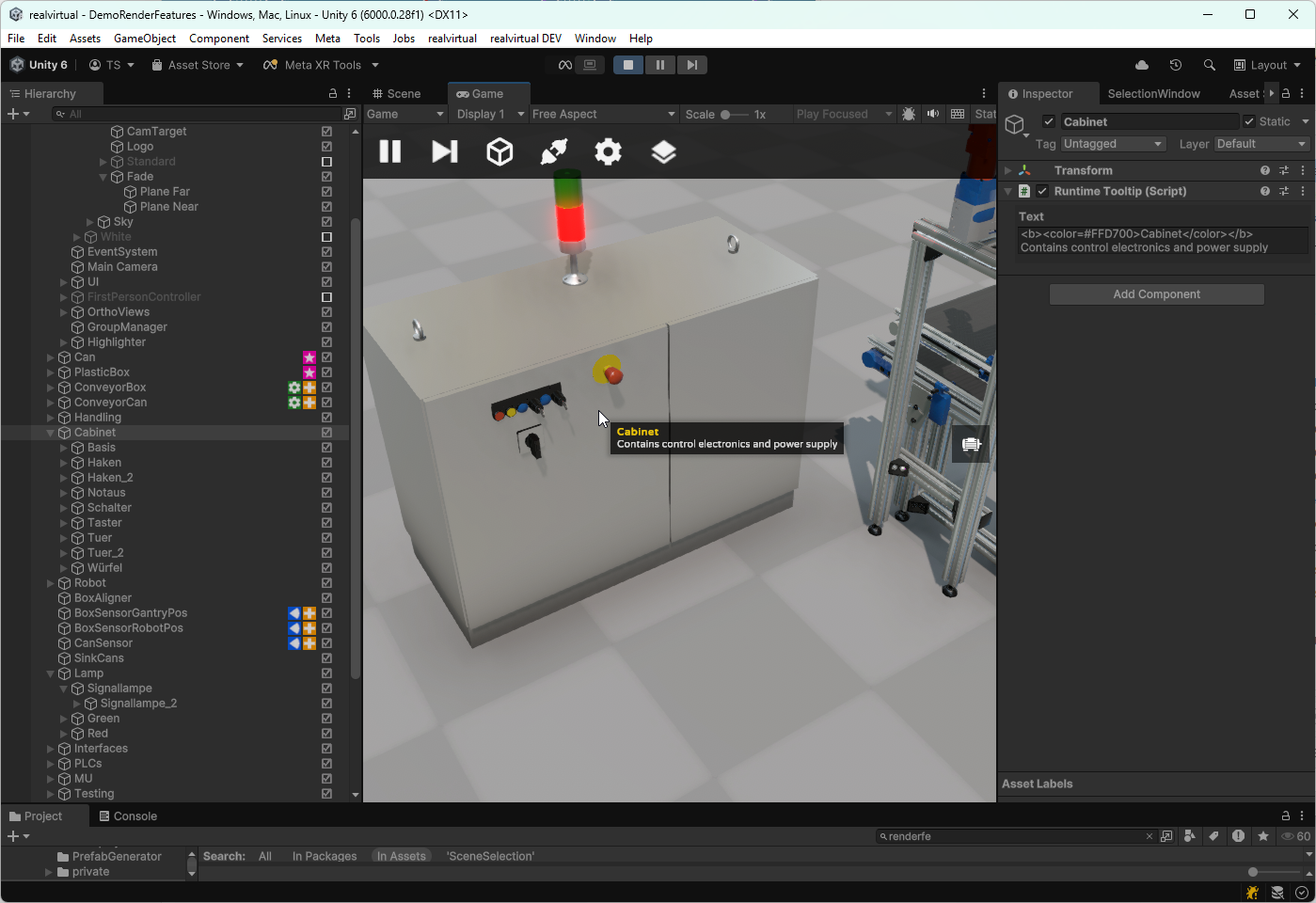
Runtime tooltip
Features
Section titled “Features”- Works with any 3D object in the scene
- Fully supports TextMeshPro rich text (bold, color, line breaks)
- Dynamically displayed on hover or selection
- Easy to integrate via prefab
Required Components
Section titled “Required Components”1. Tooltip Controller (Scene-Level)
You must add the Tooltip Controller to your scene. This controller handles the positioning and display of all tooltips.
📦 Prefab:
Assets/realvirtual/Professional/SceneSelection/TooltipController.prefab
Drag and drop this prefab into your scene to enable the tooltip system.
2. RuntimeTooltip Script (Object-Level)
Attach the RuntimeTooltip script to any GameObject you want to annotate with a tooltip.
Steps:
- Select the target GameObject (e.g., a cabinet).
- Add the component:
Runtime Tooltip (Script) - Enter your tooltip text in the Text field using TextMeshPro for formatting if needed.
Example:
<b><color=#FFD700>Cabinet</color></b>\nContains control electronics and power supply