
Robot Program Export (Pro, Beta)
Robot Program Export turns a robot path you teach in realvirtual (Robot Inverse Kinematics) into ready-to-paste controller code. It reads the targets of an IK Path, re-solves each one, and generates the axis angles and Cartesian poses as a program template for the major robot controllers.
This is an offline helper for virtual commissioning: there is no live connection and no automatic upload to the controller. You generate the text, copy it (or save it to a file), and paste it into the controller’s program editor.
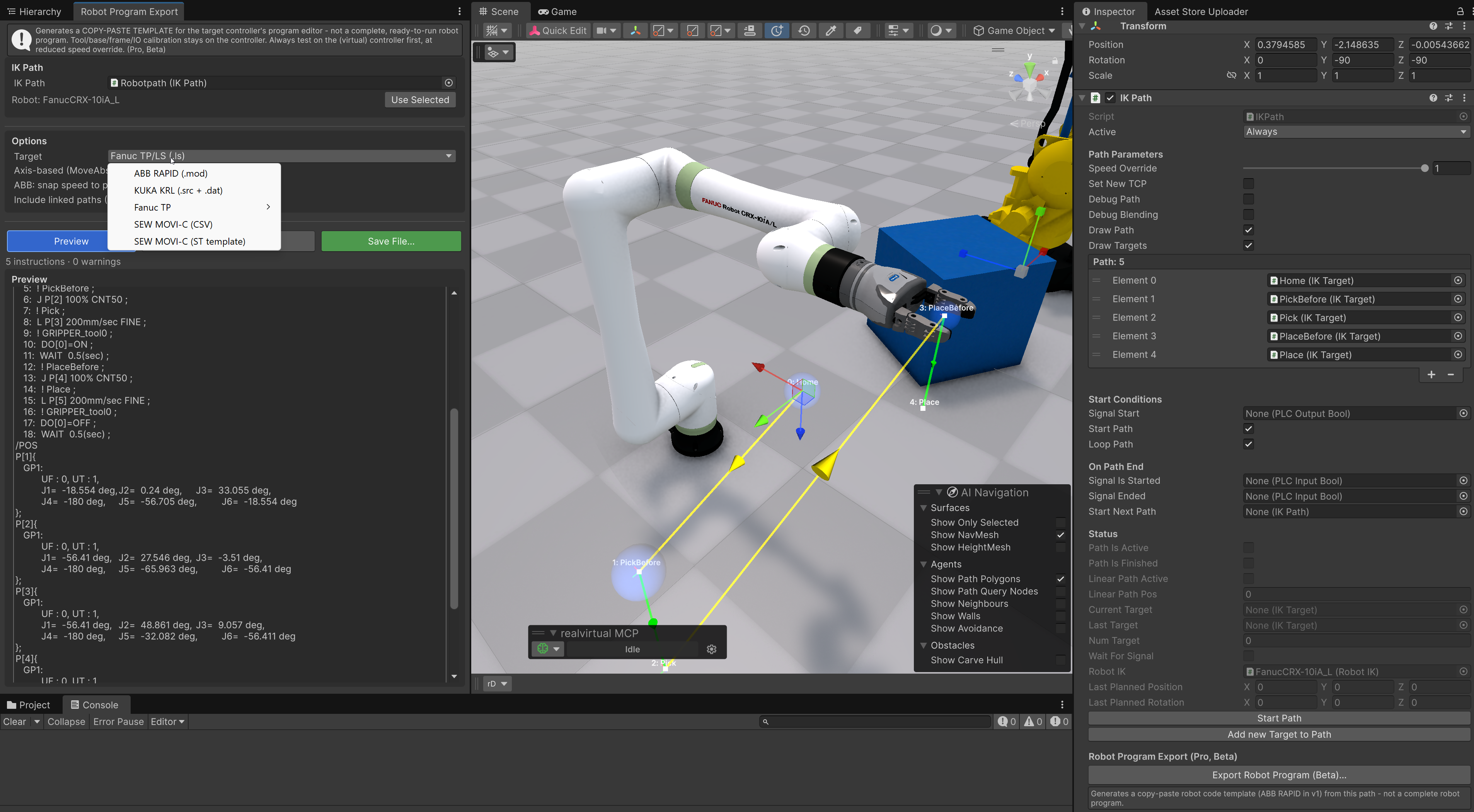
Robot Program Export window with live preview, next to the IK Path inspector button
Important: it is a template, not a finished program
Section titled “Important: it is a template, not a finished program”The export produces exactly one instruction per IK Target — it does not sample or interpolate the path between targets. The robot follows precisely the points and poses you defined.
What the template does not include (you complete this on the controller):
- Calibrated tool data, base / work-object and user frames (the export falls back to defaults such as
tool0/wobj0,TOOL_DATA[1]/BASE_DATA[1],UFRAME 0/UTOOL 1). - Real signal addresses. Signal names from the path are written as comments; for KUKA and Fanuc a placeholder index is used (remap it on the controller).
- Safety logic, program flow and external-axis values.
The chosen template character is also written into the header of every generated file.
Supported targets
Section titled “Supported targets”| Target | Output | Notes |
|---|---|---|
| ABB RAPID | .mod module | MoveAbsJ (axis-based) or MoveJ/MoveL (Cartesian), SetDO/WaitDI, WaitTime |
| KUKA KRL | .src + .dat | PTP {E6AXIS} (axis-based) or LIN/PTP {E6POS} (Cartesian), $APO.CDIS, $OUT[]/WAIT FOR $IN[] |
| Fanuc TP/LS | .ls (ASCII) | Joint or Cartesian positions with CONFIG string, J/L moves, DO[]/WAIT DI[]. Compile to .tp in RoboGuide / maketp.exe |
| SEW MOVI-C / MOVIKIT | .srlprg sequence program | Native MOVIKIT Robotics program: PTP_J (joint) / LIN (Cartesian X/Y/Z + RotZ/RotY/RotX), REALVAR I/O init, MotionSet/blending setup, signal writes and WAIT_TIME. Kinematic number and MotionSet are configurable. Copy-paste template — verify on the (virtual) MOVISUITE controller |
| Wandelbots NOVA | .py (NOVA Python SDK) or .ws (Wandelscript) | joint_ptp / cartesian_ptp / linear / io_write executed via plan_and_execute. Positions in mm, orientation as a rotation vector (rad), joints in rad. The Python SDK is the recommended path; Wandelscript is deprecated by Wandelbots but still runs during the transition |
Quick Start
Section titled “Quick Start”- Select your IK Path in the scene (the GameObject carrying the
IKPathcomponent). - Open the window via Tools > realvirtual > Robot Program Export (Pro), or click Export Robot Program (Beta) at the bottom of the IK Path inspector.
- Choose the Target controller from the dropdown.
- Pick the motion mode (see below) and adjust the options.
- Click Preview to generate the code and review it.
- Click Copy to Clipboard to paste it into the controller editor, or Save File… to write it to disk (KUKA writes two files into a folder).
The status line shows how many instructions were generated and whether any warnings (unreachable target, gimbal lock, missing kinematics) occurred.
Options
Section titled “Options”Target Selects the controller dialect: ABB RAPID, KUKA KRL, Fanuc TP/LS, SEW MOVI-C (.srlprg) or Wandelbots NOVA.
Axis-based (MoveAbsJ) – recommended When enabled, joint moves are exported as pure axis targets (ABB MoveAbsJ + jointtarget, KUKA PTP {E6AXIS}, Fanuc joint-representation positions, SEW PTP_J). This is unambiguous and avoids robot-configuration problems, so it is the recommended default. Turn it off for Cartesian output (robtarget / E6POS / X,Y,Z + W,P,R), which produces human-readable poses but requires correct configuration data. SEW emits joint moves as PTP_J and linear moves as LIN (Cartesian) independently of this toggle.
SEW: Kinematic number / MotionSet SEW MOVI-C only. The kinematic number is written to the // KINEMATIC: header line (the machine-specific controller kinematic id); MotionSet is emitted as MotionSet := <n>. Both default to 1 and match your MOVISUITE project.
ABB: snap speed to predefined v#### When enabled, the linear speed is mapped to the nearest predefined ABB speed value (v5 … v7000). When disabled, a custom speeddata is emitted with the exact speed. Applies to ABB only.
Include linked paths (StartNextPath) When disabled (default), only the selected path’s own targets are exported. When enabled, the export follows the StartNextPath chain and concatenates all linked paths into one program.
Output modes
Section titled “Output modes”- Axis-based (recommended) — exact solved axis angles, one move per target, free of configuration ambiguity. Best for getting a path onto the controller reliably.
- Cartesian — TCP poses (position + orientation) with the derived robot configuration. More readable and editable on the controller, but you must verify the configuration (ABB
robconf, KUKAS/T, FanucCONFIG) for your cell.
Validating the generated code
Section titled “Validating the generated code”Because there is no live connection, validate the output in the controller vendor’s offline tool before deploying:
- ABB — RobotStudio (Basic edition is free): create a virtual controller and load the
.mod. - KUKA — WorkVisual (free, syntax check) and KUKA.OfficeLite (trial, runs real KSS/KRL). The export targets classic KSS/KRL.
- Fanuc — RoboGuide (trial): compile the
.lsto.tpand run it in a virtual work cell. - SEW — load the
.srlprgsequence program in MOVISUITE / MOVIKIT Robotics and verify it on the (virtual) controller; check theKINEMATICnumber,MotionSetand theREALVARsignal mapping against your project.
A built-in forward-kinematics check inside realvirtual is the always-available first line of validation.
Limitations
Section titled “Limitations”- Beta — the Cartesian configuration derivation can be wrong in edge cases; the axis-based mode is the robust path.
- No live connection — offline copy-paste only; no program upload (use the robot interfaces for live coupling).
- 6 axes only — external axes / positioners and multi-robot programs are not exported; ABB/KUKA external-axis fields are written as “not in use” (
9E9/E1..E6 = 0). - No circular moves — only point-to-point and linear moves are produced.
- SEW is teach-in, not text-programmed — MOVIKIT Robotics computes the inverse kinematics on the controller and its
.srlprgsequence syntax is not publicly documented; the exporter reproduces the observed program form, so verify theKINEMATIC/MotionSet/REALVARmapping and dynamics against your MOVISUITE project.
Extending: custom postprocessors
Section titled “Extending: custom postprocessors”The export uses an open architecture so you can add your own controller dialect or adapt an existing one. It has two layers:
- Conversion —
IKPathToProgram.Convert(ikPath)re-solves the path and produces a vendor-neutralRobotProgram: a list ofRobotMoveInstructions where the joint angles, the right-handed Cartesian position (mm), the rotation quaternion, the ZYX Euler angles, speeds, blend radius, signals and configuration flags are already computed once. - Formatting — a
RobotPostProcessorsubclass turns that model into controller text. The built-in ABB, KUKA, Fanuc and SEW postprocessors all share this base class.
All files live in Packages/io.realvirtual.professional/Runtime/IK/Export/ (the base, model and converter) and Export/Vendors/ (the per-controller postprocessors) — the existing vendor files are the best templates to copy.
Create your own postprocessor
Section titled “Create your own postprocessor”Subclass RobotPostProcessor, set the identity properties, and override the hooks you need. The base class drives the generation order (header → tool → frame → one MoveJ/MoveL per target plus its signals/dwell → footer) and writes everything into a shared StringBuilder (AddLine(...)):
public class MyControllerPostProcessor : RobotPostProcessor{    public override string DisplayName => "My Controller";    public override string FileExtension => ".txt";    public override string GetFileName(RobotProgram prog) => prog.Name;
    protected override void Header(RobotProgram prog) => AddLine($"PROGRAM {prog.Name}");    protected override void Footer(RobotProgram prog) => AddLine("END");
    protected override void MoveJ(RobotMoveInstruction m) =>        AddLine($"PTP J=[{Fmt(m.JointAngles[0])}, ... ,{Fmt(m.JointAngles[5])}] v={Fmt(m.JointSpeedPct)}%");
    protected override void MoveL(RobotMoveInstruction m) =>        AddLine($"LIN X={Fmt(m.PositionMm.x)} Y={Fmt(m.PositionMm.y)} Z={Fmt(m.PositionMm.z)} " +                $"A={Fmt(m.EulerZYXDeg.z)} B={Fmt(m.EulerZYXDeg.y)} C={Fmt(m.EulerZYXDeg.x)} v={Fmt(m.LinSpeedMmS)}");
    protected override void SetDigitalOutput(string signal, bool value) => AddLine($"DOUT {signal}={value}");    protected override void WaitDigitalInput(string signal, bool value) => AddLine($"WAIT {signal}=={value}");    protected override void WaitTime(float seconds) => AddLine($"DELAY {Fmt(seconds)}");}
Useful fields on each RobotMoveInstruction: MoveType (PTP / LIN), JointAngles[6] (deg), PositionMm, RotationQuat, EulerZYXDeg (z=A/Yaw, y=B/Pitch, x=C/Roll), JointSpeedPct, LinSpeedMmS, LinAccelMmS2, BlendRadiusMm, EnableBlending, DwellSec, SetSignalName, WaitSignalName, PickPlaceSignalName and the Config flags (AbbConf, FanucTurns, Flip, Lower, KukaStatus, KukaTurn). The static RobotCoordConverter provides the shared coordinate helpers (right-handed conversion, ZYX Euler, configuration flags).
For more control you can override:
Emit(RobotProgram)— to produce multiple files (KUKA emits.src+.datthis way).Generate(RobotProgram)— to take over the whole layout (the ABB postprocessor collects declarations separately). The SEW postprocessor instead keeps the base generation order and only overridesHeader/Footerand the motion/signal hooks (MoveJ/MoveL/SetDigitalOutput/WaitTime) to emit its.srlprgform.
Register it in the window
Section titled “Register it in the window”Add your postprocessor to RobotProgramExportWindow (Packages/io.realvirtual.professional/Runtime/IK/private/Editor/): add an entry to the VendorNames array and a matching case in CreatePostProcessor().
Change an existing postprocessor
Section titled “Change an existing postprocessor”Edit the relevant file in Export/Vendors/ (ABBRapidPostProcessor.cs, KukaKrlPostProcessor.cs, FanucLsPostProcessor.cs, SewPostProcessors.cs, WandelbotsPostProcessors.cs) — for example to change speed mapping, the program header, frame/tool defaults or the signal-address convention for your cell.