
Interact3D
The Interact3D script alows you to define user interaction like pushbuttons, switches or opening of doors in the 3D scene. This script can be attached to any component with a collider. If the user is clicking on the object the status will change.
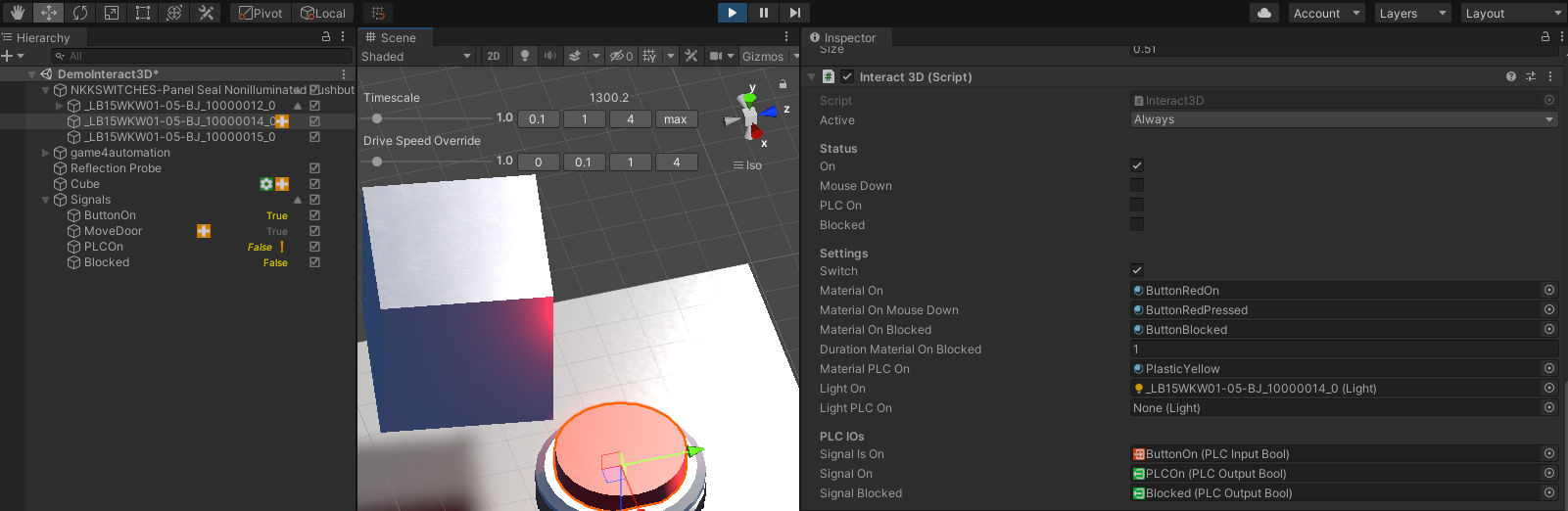
Properties
Section titled “Properties ”You can set the following properties
Switch
True if interaction should work like a switch, if false it works like a button.
MaterialOn
Material which should be used for Mesh renderer for the ON status of the Switch or Button.
MaterialOnMouseDown
Material which should be used for the Mesh renderer on mouse down.
MaterialOnBlocked
Material which should be used if interaction is blocked by a PLCSignal
DurationMaterialOnBlocked
Duration of visual feedback with MaterialOnBlocked. If user is pressing button and it is blocked by PLC the blocked status will be visualized.
MaterialPLCOn
Material which should be used if PLC Output signal SignalOn is true.
LightOn
Optional light which is turned on on ON status.
LightPLCOn
Optional light which is turned on if PLC Output signal SignalOn is true.
SignalIsOn
PLCInput if button or switch status is on.
SignalOn
PLCOutput to turn PLCOn Status on.
SignalBlocked
PLCOutput to block interaction with button (e.g. for security doors).
© 2025 realvirtual GmbH https://realvirtual.io - All rights reserved. No part of this publication may be reproduced, distributed, or transmitted in any form or by any means, including printing, saving, photocopying, recording, or other electronic or mechanical methods, without the prior written permission of the publisher.