
Windmod Y200
Winmod, an application for virtual commissioning, seamlessly integrates with realvirtual.io. This collaboration enhances the simulation experience by leveraging high-performance 3D models from realvirtual.io and Winmod’s extensive component library.
Winmod and realvirtual.io communicate via shared memory, enabling efficient data exchange and synchronization. Both applications must run on the same Windows computer to ensure compatibility and optimal performance
Interface properties
Section titled “Interface properties”SharedMemoryName
Name of the Shared Memory used for communication. Enter the name of the shared memory corresponding to the Winmod Y200 setting.
Status
Status of the interface during simulation. This value is read-only and displays “SHM connected” when the interface is functioning properly.
DebugMode
Toggle debug mode for additional logging. Enable this option to activate debug mode and receive additional logging information.
SignalList
Path to the symbol table of Winmod (text file). Enter the path to the symbol table file (*.txt) containing the PLC signals for later on importing
CycleCounter
Counter of the current cycle. This value is read-only and indicates the current cycle counter.
TickCount
Current tick count. This value is read-only and indicates the current tick count.
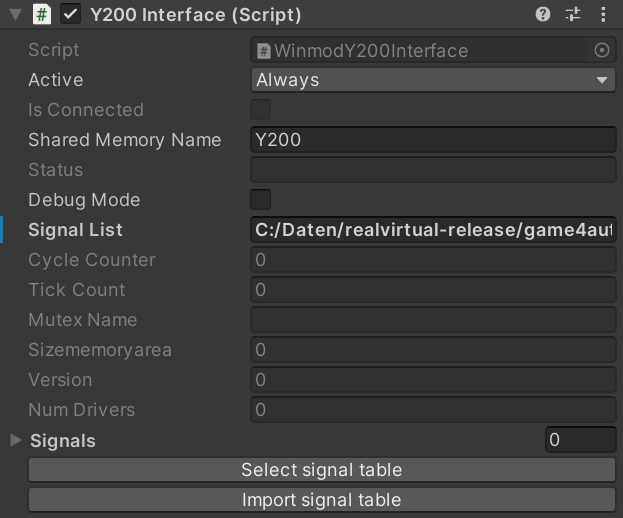
Winmod interface properties
Importing Signals
Section titled “Importing Signals”Manually Setting Up Signals
Section titled “Manually Setting Up Signals”To manually configure signals, it’s crucial to specify each signal’s position within the Shared Memory Area. This is accomplished by adding a memory position description to the signal name, adhering to the following standardized convention:
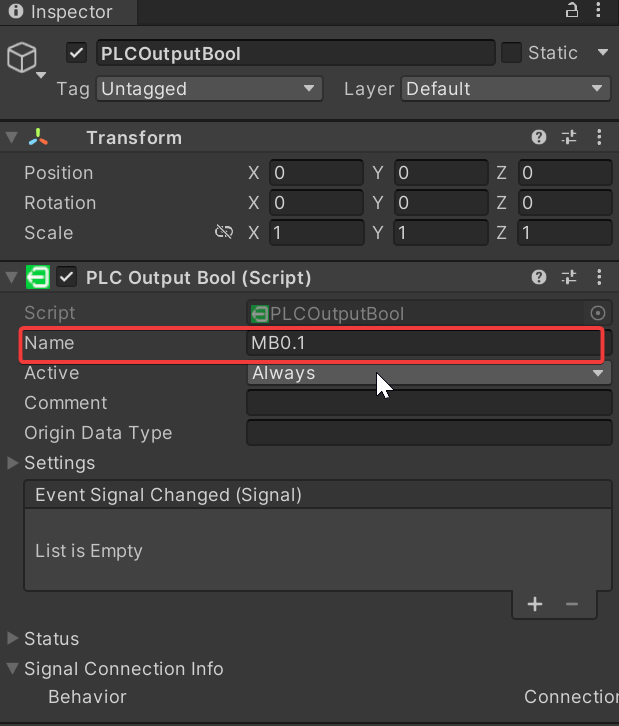
Defining the memory position for a signal
Boolean
- Description: Represents a boolean value (true or false).
- Syntax:
MB 13.6 - Explanation: Bit shared memory position 13, bit 6.
Integer
- Description: Represents a signed integer value (2 bytes).
- Syntax:
MI 100 - Explanation: Integer (2 bytes) at shared memory position 100.
Double Integer
- Description: Represents a signed integer value (4 bytes).
- Syntax:
MD 102 - Explanation: Double integer (4 bytes) at shared memory position 102.
Float
- Description: Represents a floating-point value (4 bytes).
- Syntax:
MF 106 - Explanation: Float (4 bytes) at shared memory position 106.