
CMC ViewR
CMC ViewR is an advanced immersive viewing application specifically designed for visualizing CAD data. It supports a variety of immersive experiences, including use with VR glasses and large 3D projections, providing an enhanced and interactive environment for users.
The application supports the import of scenes from realvirtual, allowing seamless integration and visualization of complex industrial digital twin scenes within the CMC ViewR platform.
Restrictions and Limitations
Section titled “Restrictions and Limitations”When exporting realvirtual scenes to CMC ViewR, please note the following restrictions:
Unsupported Components
Section titled “Unsupported Components”The following components are not supported as CMC ViewR provides its own interaction and navigation systems:
- SceneSelectables - Not working (CMC ViewR uses its own selection and interaction system)
- DebugConsole - Not working (replaced by CMC ViewR’s debugging and logging features)
- RealvirtualRuntimeUI - Not working (replaced by CMC ViewR’s interaction and scene navigation interface)
Custom Scripts Requirement
Section titled “Custom Scripts Requirement”- Custom scripts must be inside an Assembly Definition - Any custom scripts you’ve created need to be organized within an Assembly Definition file (.asmdef) to be properly included in the AssetBundle export. See the Preparing the Scripts section below for detailed instructions.
Overview
Section titled “Overview”CMC ViewR is an XR (extended reality) platform designed specifically for industrial applications, enabling professionals to work with digital twins in the industrial metaverse built directly from 3D data. The platform excels at real-time 3D visualization of CAD data and supports both VR headsets and large 3D projections.
Key CMC ViewR Capabilities
Section titled “Key CMC ViewR Capabilities”Virtual Engineering:
- Concept evaluation and validation on digital prototypes
- Virtual commissioning and industrial engineering
- Error reduction through early validation
- Digital twin applications for plant coordination
Virtual Showroom:
- Immersive product demonstrations without physical prototypes
- Reduced logistics and exhibition costs
- Maximum product customization flexibility
- Independent of physical product availability
Collaboration:
- Multi-user virtual project rooms
- Supports both VR headsets and desktop participants
- Real-time collaboration across distributed teams
- Point cloud integration with 3D data
Hannover Fair 2024 Demonstration
Section titled “Hannover Fair 2024 Demonstration”Here is a presentation of CMC ViewR and realvirtual on Hannover Fair 2024:
Integrating realvirtual AssetBundles into CMC ViewR
Section titled “Integrating realvirtual AssetBundles into CMC ViewR”The CMC AssetBundleBuilder enables the visualization of realvirtual Unity scenes in CMC ViewR with full functionality. This guide explains the necessary steps to export a Unity scene as an AssetBundle and load it into CMC ViewR.
Download CMC AssetBundleBuilder
Section titled “Download CMC AssetBundleBuilder”Download and import the CMC AssetBundleBuilder Unity package into your realvirtual project:
📎 CMC AssetBundleBuilder Unity Package
To install:
- Download the Unity package file using the download button above
- In Unity, go to Assets > Import Package > Custom Package…
- Select the downloaded
CMC_AssetBundleBuilder.unitypackage - Import all files in the package
1. Preparing the Unity Scene
Section titled “1. Preparing the Unity Scene”CMC ViewR uses its own user interface (UI) within the scene. You can keep your Unity cameras and UI elements active - CMC ViewR will handle the viewing environment.
2. Preparing the Scripts
Section titled “2. Preparing the Scripts”To ensure all scene functionalities are successfully transferred into the AssetBundle, the required scripts need to be placed in a specific directory and associated with an Assembly Definition.
For more information about Unity Assembly Definitions, see the official Unity documentation:
🔗 Unity Assembly Definition Files Documentation
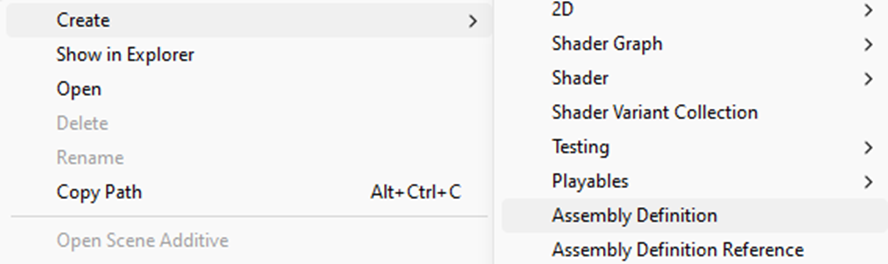
Unity context menu to create an Assembly Definition
All realvirtual scripts are already equipped with Assembly Definitions. However, if you have additional functionality, it’s important to include these in a corresponding Assembly Definition. The following figure shows an example.
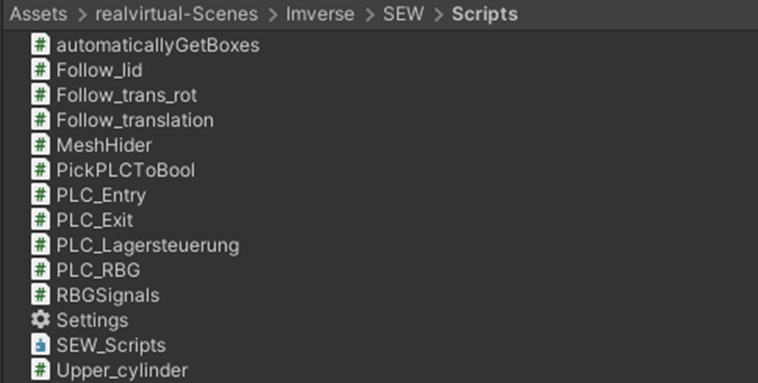
Example of an Assembly Definition for additional functionality
3. Creating the AssetBundle
Section titled “3. Creating the AssetBundle”Once the scene is prepared, the AssetBundle can be built. For this, the CMC AssetBundleBuilder is used. The main function of the AssetBundleBuilder is to convert the objects in the currently loaded scene, along with their scripts, into an AssetBundle, which can then be loaded into CMC ViewR.
To do this, open the AssetBundleBuilder window via the toolbar under the CMC tab. In this window, you need to provide two inputs:
- The storage location for the AssetBundle
- The name of the AssetBundle
After setting these values, click the Generate AssetBundle button to build the AssetBundle.
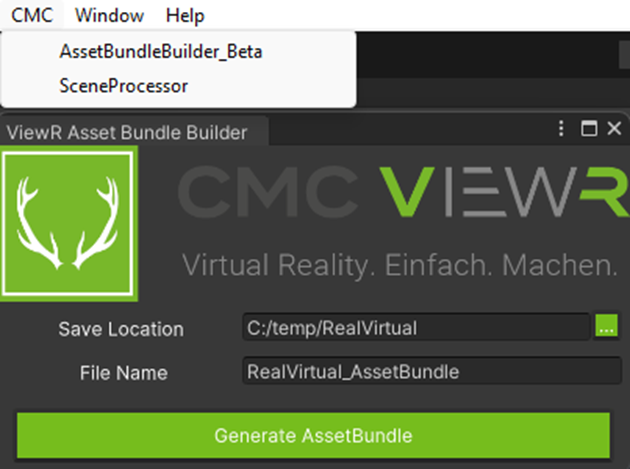
CMC AssetBundleBuilder window
4. Importing the AssetBundle into CMC ViewR
Section titled “4. Importing the AssetBundle into CMC ViewR”In CMC ViewR, Unity AssetBundles with the .unity3d format can be imported. To load an AssetBundle, open the Start tab and select the Import function.
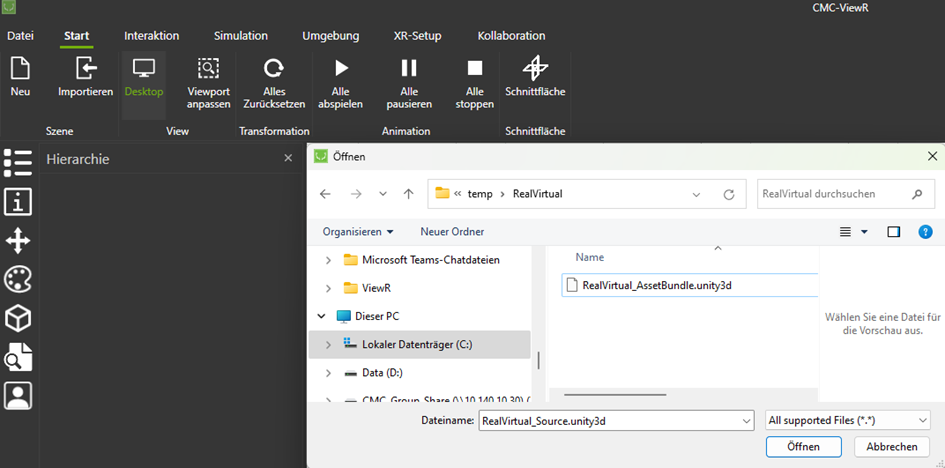
Import function in CMC ViewR
5. Using ViewR
Section titled “5. Using ViewR”After successfully importing the AssetBundle, the scene can be viewed in CMC ViewR.
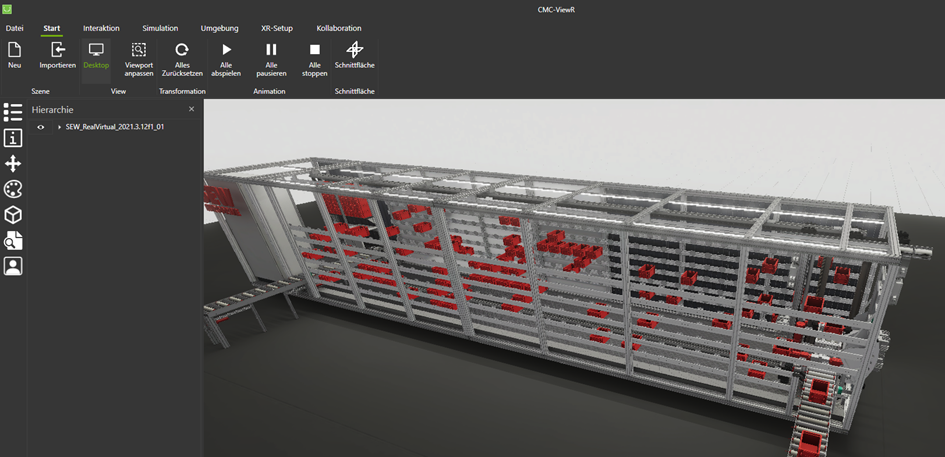
Loaded realvirtual AssetBundle in CMC ViewR
CMC ViewR launches with a default desktop configuration. You can rotate the camera using the right mouse button and navigate through the scene with the middle mouse button. More features of ViewR can be explored in the ViewR Manual, which is available at: ViewR Manual.
CMC ViewR Resources
Section titled “CMC ViewR Resources”For more information about CMC ViewR:
Related Publishing Options
Section titled “Related Publishing Options”- Windows Publishing - Create the Windows build first as a prerequisite
- WebGL Publishing - Browser-based deployment alternative
- Innoactive - Cloud streaming platform
- Mixed Reality with Meta Quest3 - Direct VR/AR deployment
See Also
Section titled “See Also”- VR Builder - Alternative VR development tools
- Industrial Metaverse - Multi-user VR/AR solutions
© 2025 realvirtual GmbH https://realvirtual.io - All rights reserved.