
Windows Publishing
Building for Windows allows you to distribute your Digital Twin as a standalone executable that runs on Windows machines without requiring Unity Editor or any special licenses.
Build Settings
Section titled “Build Settings”To build for Windows, select Windows as the target platform in Build Settings (File > Build Settings...).
Player Settings
Section titled “Player Settings”For building on Windows, the following settings are recommended in Player Settings.
Scripting Backend
Section titled “Scripting Backend”Mono compiles much faster than IL2CPP and is recommended for most Windows builds.
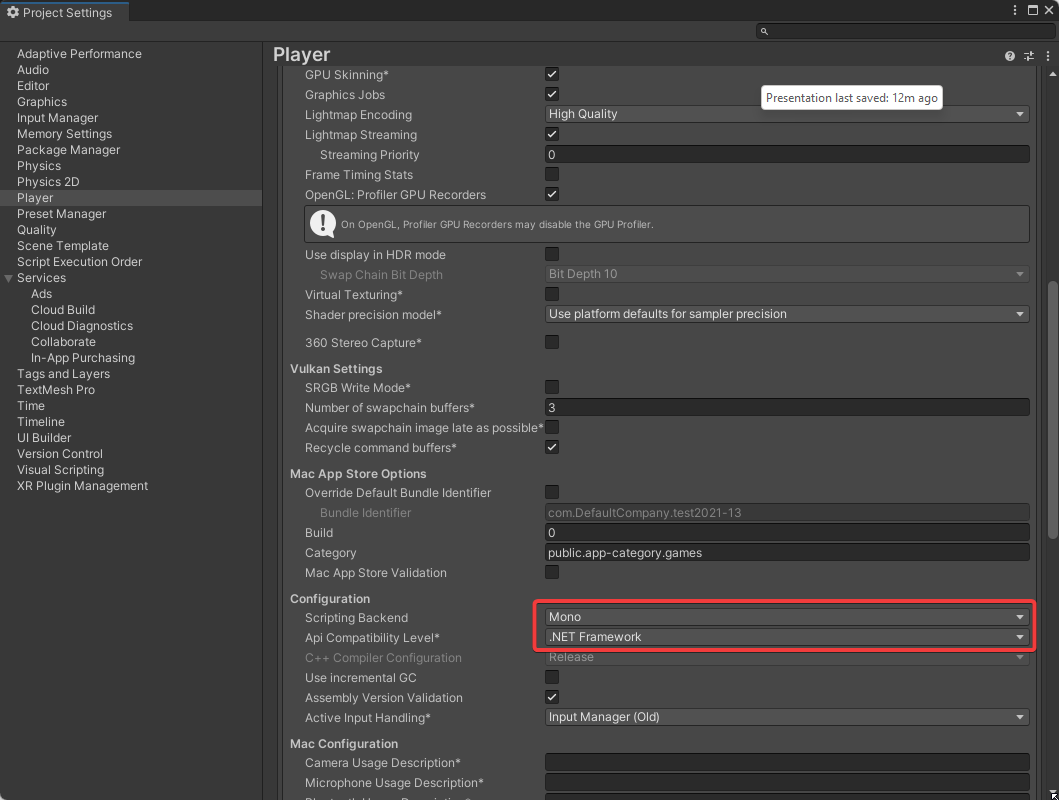
Mono and .Net Framework player build settings
Scripting Define Symbols
Section titled “Scripting Define Symbols”Please also make sure that Scripting Define Symbols are set as needed for your installation (see compiler-defines.md).
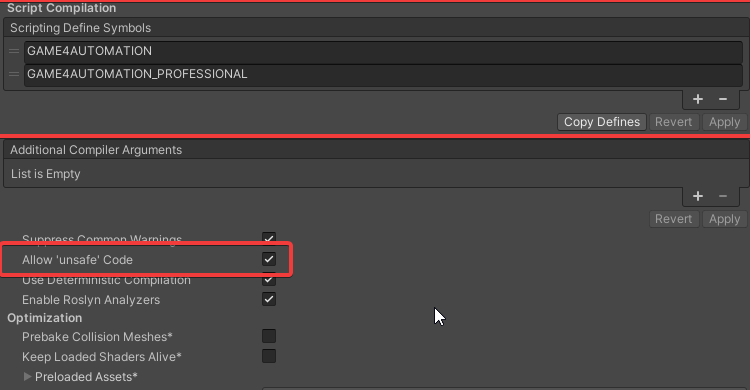
Scripting Define Symbols configuration
Build Process
Section titled “Build Process”- Open File > Build Settings
- Select Windows as the target platform
- Click Add Open Scenes to include your Digital Twin scene
- Configure Player Settings as described above
- Click Build and choose your destination folder
- Unity will create an executable and data folder
Distribution
Section titled “Distribution”After building, you will have:
- YourProjectName.exe - The executable file
- YourProjectName_Data folder - Required data and assets
- UnityPlayer.dll and other DLL files - Required Unity runtime libraries
Distribute all files together. The executable requires the data folder and DLLs to run properly.
Performance Considerations
Section titled “Performance Considerations”- Mono vs IL2CPP: Mono compiles faster and has similar runtime performance for most scenarios
- Graphics API: Windows supports DirectX 11 and DirectX 12
- Architecture: Target x86_64 for modern 64-bit Windows systems
- Optimization: Use IL2CPP for production builds if startup time is not critical
Interface Support
Section titled “Interface Support”Windows builds support all realvirtual interfaces including:
- OPC-UA
- S7 TCP/IP
- Modbus
- TwinCAT ADS
- MQTT
- Shared Memory
- And all other platform-specific interfaces
For interface limitations on other platforms, see supported-platforms.md.
See Also
Section titled “See Also”- WebGL Publishing - Browser-based deployment
- Supported Platforms - Platform compatibility matrix
- Compiler Defines - Configuration symbols
© 2025 realvirtual GmbH https://realvirtual.io - All rights reserved.