
Festo AX Controls (PLCnext) (Pro)
Overview
Section titled “Overview”The Festo AX Controls interface connects realvirtual directly to Festo AX Controls controllers running PLCnext Technology — the open IEC 61131-3 runtime platform developed by Phoenix Contact and adopted by Festo for their AX Controls series.
Communication uses Festo’s RSC (Remote Service Call) library over TCP port 41100, providing direct access to PLCnext Global Data Space (GDS) variables. The interface supports two data exchange modes: subscription mode, where the controller pushes variable updates at a configurable sample rate, and polling mode, where realvirtual reads all output variables each cycle.
Both Boolean, integer, float, and string variable types are supported. An editor button connects to the controller at design time to import variables and create realvirtual signal objects automatically.
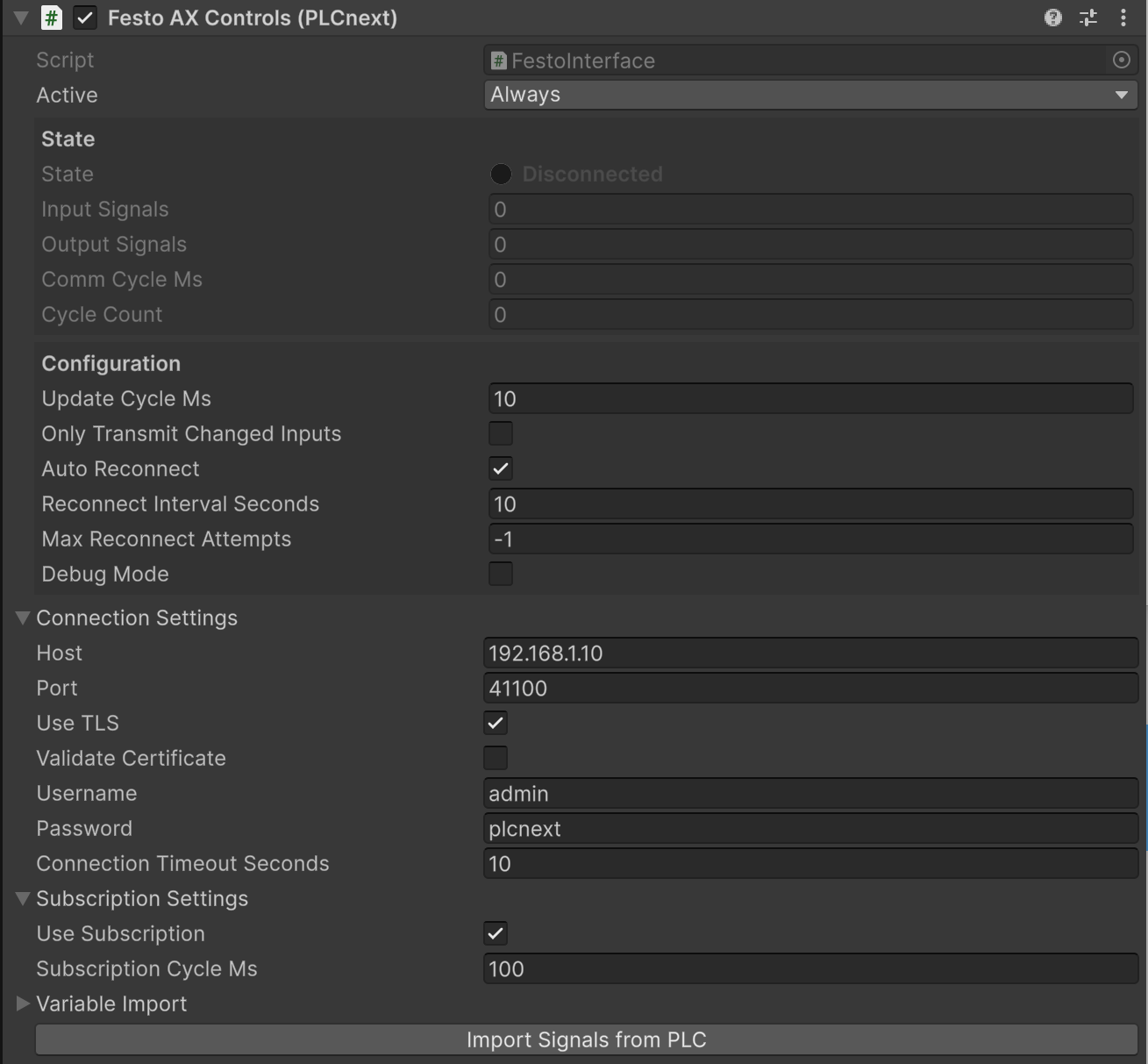
Festo AX Controls (PLCnext) interface Inspector showing connection, subscription, and variable import settings
Prerequisites
Section titled “Prerequisites”- realvirtual Professional — The Festo interface and RSC DLLs are included in the Professional package.
- Network connectivity — Your development PC must be able to reach TCP port 41100 on the Festo controller.
- PLCnext firmware — The controller must be running PLCnext firmware with RSC services enabled (standard on all AX Controls firmware releases).
Properties
Section titled “Properties”Connection Settings
Section titled “Connection Settings”| Property | Description |
|---|---|
| Host | IP address or hostname of the Festo PLCnext controller (default: 192.168.1.10) |
| Port | RSC service TCP port (default: 41100) |
| Use TLS | Enable TLS encryption for the RSC connection. Recommended for production deployments |
| Validate Certificate | Validate the server’s TLS certificate. Disable this for self-signed certificates in test environments |
| Username | PLCnext authentication username (default: admin) |
| Password | PLCnext authentication password (default: plcnext) |
| Connection Timeout Seconds | Timeout in seconds for connection and read/write operations (default: 10) |
Subscription Settings
Section titled “Subscription Settings”| Property | Description |
|---|---|
| Use Subscription | Use PLCnext real-time subscription mode for output signals. When disabled, polling is used instead |
| Subscription Cycle Ms | Sample rate in milliseconds for subscription mode. Lower values give higher update rates. Minimum effective value is 10 ms (default: 100) |
Variable Import
Section titled “Variable Import”| Property | Description |
|---|---|
| Import Root Path | Root component path on the PLCnext to browse for variables during signal import (default: Arp.Plc.Eclr for the IEC 61131-3 runtime). Leave empty to browse all components |
| Default Import Direction | Default signal direction assigned to imported variables (Input or Output) |
Button:
- Import Signals from PLC — Connects to the controller from the Unity Editor, browses variables under the Import Root Path, and creates or updates realvirtual signal objects as children of the interface component.
Quick Start
Section titled “Quick Start”- Add the Festo AX Controls (PLCnext) component to a GameObject in your scene via Add Component > realvirtual > Interfaces > Festo AX Controls (PLCnext)
- Add
REALVIRTUAL_FESTOto Edit > Project Settings > Player > Scripting Define Symbols and recompile - Set Host to the IP address of your Festo controller
- Enter your Username and Password
- Configure Import Root Path to point to your PLC program (e.g.
Arp.Plc.Eclr) - Click Import Signals from PLC — the interface connects, browses variables, and creates signal objects
- Review the imported signals and set Input direction on any variables that Unity should write to the PLC
- Press Play — the interface connects automatically and signal exchange starts
Signal Address Format
Section titled “Signal Address Format”Each signal stores its PLCnext variable path in the Address metadata field. The path format follows the PLCnext GDS convention:
ComponentName/ProgramName.VariableNameExamples:
| Signal | Address |
|---|---|
| Boolean motor status | Arp.Plc.Eclr/MainInstance.Motor1_Running |
| Integer counter | Arp.Plc.Eclr/MainInstance.PartCounter |
| Array element | Arp.Plc.Eclr/MainInstance.ConveyorSpeeds[0] |
| Array slice | Arp.Plc.Eclr/MainInstance.ConveyorSpeeds[0:9] |
| Struct field | Arp.Plc.Eclr/MainInstance.DriveState.ActualPosition |
The component name for the standard IEC 61131-3 (Eclr) runtime is Arp.Plc.Eclr. Your program instance name is the name assigned to the program in the PLCnext Engineer project.
Communication Modes
Section titled “Communication Modes”Subscription Mode (default)
Section titled “Subscription Mode (default)”When Use Subscription is enabled, the interface registers all output signals with the PLCnext subscription service. The controller pushes updated values at the configured Subscription Cycle Ms rate. This is the recommended mode for real-time simulation as it minimizes latency and reduces network overhead.
If the PLCnext firmware does not support the subscription service, the interface automatically falls back to polling mode and logs a warning.
Polling Mode
Section titled “Polling Mode”When Use Subscription is disabled, the interface performs a batched read of all output signal addresses each communication cycle. This mode is compatible with all PLCnext firmware versions but has higher latency than subscription mode.
Input signals (Unity writing to the PLC) always use batched write operations regardless of which mode is selected. On the first cycle after connection, all input values are sent to initialize the PLC state.
Importing Signals from PLC
Section titled “Importing Signals from PLC”The Import Signals from PLC editor button provides one-click signal discovery:
- The interface connects to the controller using the configured credentials
- Variables are browsed from Import Root Path using the PLCnext variable browse service
- For each discovered variable, a realvirtual signal object is created as a child of the interface component
- The
Addressmetadata field is set to the full PLCnext instance path - All imported signals receive the Default Import Direction — change individual signals to
Inputfor variables that Unity should write back to the PLC
Supported PLCnext data types map to realvirtual signal types as follows:
| PLCnext Types | realvirtual Signal Type |
|---|---|
BOOL | Bool |
INT, UINT, SINT, DINT, UDINT, BYTE, WORD, DWORD | Int |
REAL, LREAL | Float |
STRING, WSTRING | Text |
Variables with unsupported types are skipped and a warning is logged to the Unity console.
See Also
Section titled “See Also”- Interfaces Overview — All available interfaces
- Signal Manager — Managing PLC signals
- Custom Interfaces — How to build your own interface
- Compiler Defines — Adding scripting define symbols
- Keba Interface (Pro) — Similar RSC-based controller interface
- TwinCAT (Pro) — Another IEC 61131-3 based interface
© 2025 realvirtual GmbH https://realvirtual.io - All rights reserved. No part of this publication may be reproduced, distributed, or transmitted in any form or by any means, including printing, saving, photocopying, recording, or other electronic or mechanical methods, without the prior written permission of the publisher.