
Measurement (Pro)
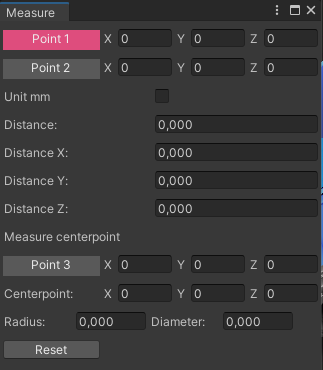
The Measurement tool, designed for use within the Unity Editor’s scene window, facilitates the precise measurement of distances between two points in a scene. It extends its functionality by calculating the center point upon selecting a third point, drawing the circle that intersects these points, and providing the circle’s diameter and radius.
Measure tool in unity editor mode
Accessing the Tool
Section titled “Accessing the Tool”- Navigate to
Tools > realvirtual > Measurement (Pro)in the main menu to open the tool.
How to Use
Section titled “How to Use”- Initial Point Selection: Upon opening, the tool automatically sets to select the first point. After choosing the first point, it transitions to selecting the second point.
- Measuring Distance: After the second point is selected, the tool calculates and displays the distance between the two points, including distance breakdowns on each axis. Optionally, distances can be displayed in millimeters.
- Determining a Circle:
- Click the ‘Point3’ button to enter the selection mode for a third point.
- Selecting the third point draws the circle defined by the three points and shows the circle’s diameter and radius in the tool’s window.
- Resetting Selections: The ‘Reset’ button clears all selections, enabling the user to start anew with the selection process.