
Denso Cobotta 1300
The robot in this ModelZoo scene can be controlled via WincAPS III.
Please refer to our Denso Interface Documentation for detailed information about prerequisites and setup.
Interface Configuration
Section titled “Interface Configuration”To connect the simulation with the DENSO robot (via WincCAPS III), you need to configure the IP address and project path.
- Click the ⚙️ Settings icon in the top menu bar.
- Enter the following parameters:
| Field | Description |
|---|---|
DensoCobotta1300.ipAdress | IP address of the robot or virtual controller |
DensoCobotta1300.WincapsProject | Full path to your local WincAPS III project folder |
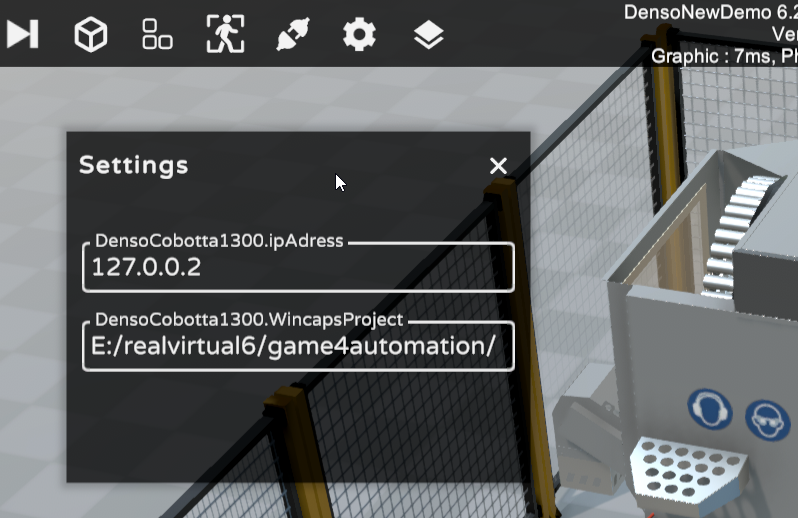
Denso Wincaps Interface configuration
Signal Mapping in WincAPS Project
Section titled “Signal Mapping in WincAPS Project”onfigure the following I/O signals in your WincAPS project to enable interaction between the robot and the simulation:
| Signal Name | Type | Address | Description |
|---|---|---|---|
| Close Gripper | Output | EA 64 | Command from the robot to close the gripper |
| Gripper Closed | Input | EA 48 | Feedback from simulation that the gripper has fully closed |
| Load Cell | Input | EA 49 | Signal from simulation to robot: start the loading sequence |
| Robot Is Loading | Output | EA 65 | Signal from robot to simulation: robot has started loading |
| Unload Cell | Input | EA 50 | Signal from simulation to robot: start the unloading sequence |
| Robot Is Unloading | Output | EA 66 | Signal from robot to simulation: robot has started unloading |
These signals provide a handshake between the robot program and the simulation, enabling synchronized operation.
ℹ️ The PLC logic controlling the entry and exit conveyors is fully simulated inside the scene and does not require an external controller.