
Overview
Section titled “Overview”Use MC function blocks to command simulated single axes and straight Cartesian paths. MotionGroup and its child MotionAxis components configure the PLC’s motion task. The task writes position signals; drive behaviours such as Drive_FollowPosition consume those signals. It never directly moves a Drive.
The implemented subset follows PLCopen Motion Control Part 1 v2.0 and Part 4 v1.0, with the limits described below.
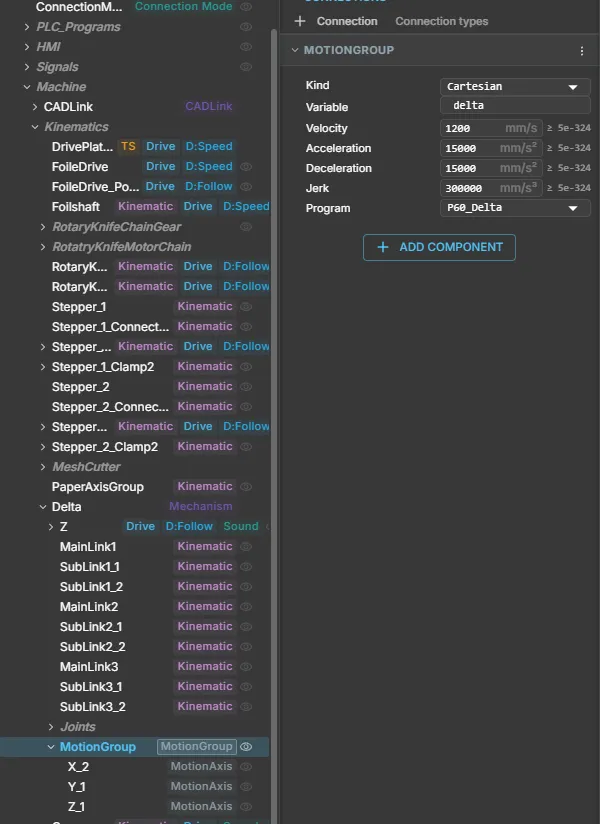
Properties
Section titled “Properties”| MotionGroup property | Type / unit | Default |
|---|---|---|
| Kind | enum | Cartesian |
| Program | ComponentReference to owning PLCProgram | unbound; required |
| Variable | string, program handle variable name | empty; required |
| Velocity | number, mm/s | 500 |
| Acceleration | number, mm/s² | 5000 |
| Deceleration | number, mm/s² | 5000 |
| Jerk | number, mm/s³ | 100000 |
Profile defaults must be finite and strictly positive. Add MotionAxis components to child nodes; nested groups own their own descendants.
| MotionAxis property | Type / unit | Default |
|---|---|---|
| Name | string; unique X, Y or Z | empty; required |
| Setpoint | PLCOutputFloat signal slot, mm | unbound; required |
| Feedback | PLCInputFloat signal slot, mm | unbound; optional |
| Min / Max | number, logical mm | -1000000 / 1000000 |
| Offset | number, mm | 0 |
| Sign | enum 1 / -1 | 1 |
Min and Max must be finite with Min < Max. The signal value is
Offset + Sign × logical position; feedback uses the inverse. Without Feedback, readers
use the simulated set-position. A configured invalid feedback produces an error.
The inspector uses the standard reference picker, signal slot rows, selects and number/string editors. Runtime position and command state are read-only. Redeploy after changing motion configuration.
Quick start
Section titled “Quick start”- Add a PLCProgram and a MotionGroup.
- Add one to three child MotionAxis nodes, configure coordinate names and bounds, and bind each Setpoint to a PLCOutputFloat position signal.
- Configure each drive’s position-following behaviour to consume the matching signal.
- Enter the program below. Set MotionGroup.Program to that PLCProgram and Variable
to
motion. - Deploy, then Run in continuous simulation. Raise Start after enablement.
PROGRAM PositioningVAR motion : AXES_GROUP_REF; enable : MC_GroupEnable; move : MC_MoveLinearAbsolute;END_VARVAR_EXTERNAL Start : BOOL; END_VAR enable(AxesGroup := motion, Execute := TRUE); move(AxesGroup := motion, Execute := enable.Done AND Start, PositionX := 100.0, PositionY := 50.0, PositionZ := 0.0);END_PROGRAMZero profile inputs select group defaults. Hold Start through completion, then release and raise it for another move. Use AXIS_REF and Axis for a group containing exactly one MotionAxis. Handles belong only in PROGRAM VAR, are required on every MC call and cannot be assigned, calculated or passed through user POUs.
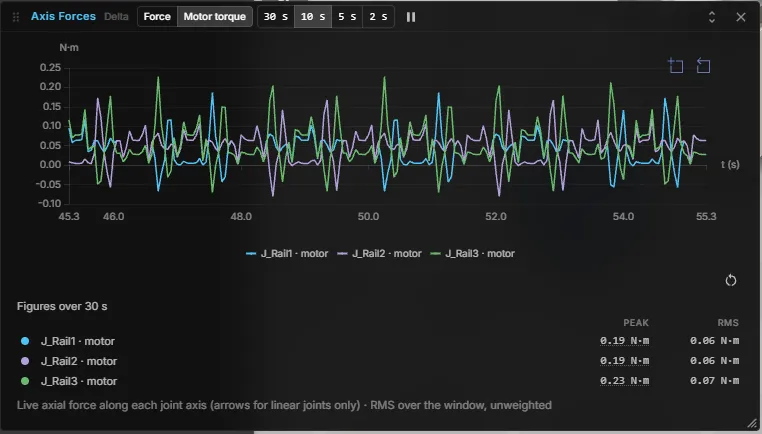
To check the profile on a running machine, open Axis forces for the mechanism and switch to Motor torque. Jerk-limited moves show smooth, repeating peaks without spikes:
Available function blocks
Section titled “Available function blocks”| Single axis | Purpose |
|---|---|
| MC_Power | Level-sensitive logical enable; Status/Valid |
| MC_Reset | Clear a resolved fault at standstill |
| MC_ReadActualPosition | Enable → Valid/Busy/Position |
| MC_MoveAbsolute | Absolute Position |
| MC_MoveRelative | Signed Distance from position at activation |
| MC_MoveVelocity | Continuous Velocity; InVelocity when speed is reached |
| MC_Halt | Interruptible controlled stop |
| MC_Stop | Controlled stop with held-Execute interlock |
| Cartesian group | Purpose |
|---|---|
| MC_GroupEnable / MC_GroupDisable | Enable coordination / immediately cancel and hold |
| MC_GroupReset | Clear a resolved fault at standstill |
| MC_MoveLinearAbsolute | Straight move to PositionX/Y/Z |
| MC_GroupStop | Controlled stop with held-Execute interlock |
| MC_GroupReadActualPosition | Enable → Valid/Busy/PositionX/Y/Z |
Execute commands trigger on a rising edge; falling Execute does not cancel the motion. Call instances cyclically to observe completion. Positional moves expose Done, Busy, Active, CommandAborted, Error and ErrorID. Stop has no Active port; MoveVelocity has InVelocity instead of Done. Readers use Enable, Valid and Busy, plus Error/ErrorID.
Only the first call of one MC instance per scan evaluates inputs; later calls return cached values. Use separate instances for scan-order arbitration. Direction constants are mcPositiveDirection (1), mcShortestWay (2), mcNegativeDirection (3) and mcCurrentDirection (4). Absolute linear moves accept but ignore a valid Direction; MoveVelocity rejects shortest-way. Zero Velocity selects the default, not a stop.
Axis states are Disabled, Standby, DiscreteMotion, ContinuousMotion, Stopping and ErrorStop. Group states are GroupDisabled, GroupStandby, GroupMoving, GroupStopping and GroupErrorStop. Enable reaches standby; completed moves return to standby; faults require reset after the cause clears.
Ownership and lifecycle
Section titled “Ownership and lifecycle”A group has exactly one owning PLCProgram occurrence. Many FB instances can share its handle, but one handle cannot bind two groups. Missing/duplicate bindings and competing program/group or group/group set-point writers refuse deployment with Problems entries.
Live controller values override local motion; the task writes nothing to live-bound or forced set-points. Authority loss suspends the group until authority returns and it is reset. Reconnect resynchronises without replaying commands. External operation/jog must enter the PLC as signals.
Runner Stop, scan error, COLD redeploy and group removal brake and hold under local authority. Simulation/PLC Reset is immediate, even while paused, and clears motion before the viewer resets drives. Power off/GroupDisable cancel immediately; use Stop first for a controlled stop.
Errors, limits and use cases
Section titled “Errors, limits and use cases”| ErrorID | Meaning |
|---|---|
| 16#8001 | Invalid binding |
| 16#8002 | Disabled |
| 16#8003 | Axis bounds exceeded |
| 16#8004 | Invalid parameters |
| 16#8005 | Owner/writer conflict |
| 16#8006 | Forced/external authority |
| 16#8007 | Invalid BufferMode/Direction |
| 16#8008 | State/interlock refusal |
| 16#8009 | Invalid feedback |
| 16#800A | Profile provider failure |
These are realvirtual-specific positive DINT values. Parameter errors reject that request without disturbing healthy motion. Kernel faults latch ErrorStop/GroupErrorStop.
Use this subset for Cartesian handling, positioning and single-axis speed control. PositionX/Y/Z replace PLCopen position arrays; orientation, robot kinematics, homing, synchronisation and coordinate-system selection are absent. Acceleration/deceleration share the conservative limit min(A,D). Every replacement brakes first, including a collinear move. Done reports profile completion, with no hardware settling monitor. An unavailable protected profile core uses a warned trapezoid fallback without a jerk guarantee.
Continuous simulation and DES
Section titled “Continuous simulation and DES”PLCopen motion runs only in continuous simulation. A motion profile is integrated at a fixed step, and DES has no fixed step.
| Continuous simulation | DES (event-driven) | |
|---|---|---|
MC_ blocks | Run; the motion task advances the profile every simulation tick | Not supported |
Program with MC_ blocks | Runs normally | The editor shows finding D5 and the badge not DES-ready. At its first DES scan the program goes into error |
Suppress with (* @des: allow *) | — | Not possible for D5 |
| Experiment batches | — | Refuse the model |
| Snapshots | Not possible for a program that declares MC_ blocks, even when it is stopped or the instance is never called | Not possible |
Run models with motion programs in continuous simulation. For DES and experiments, use
LogicSteps or ST programs without MC_ blocks.