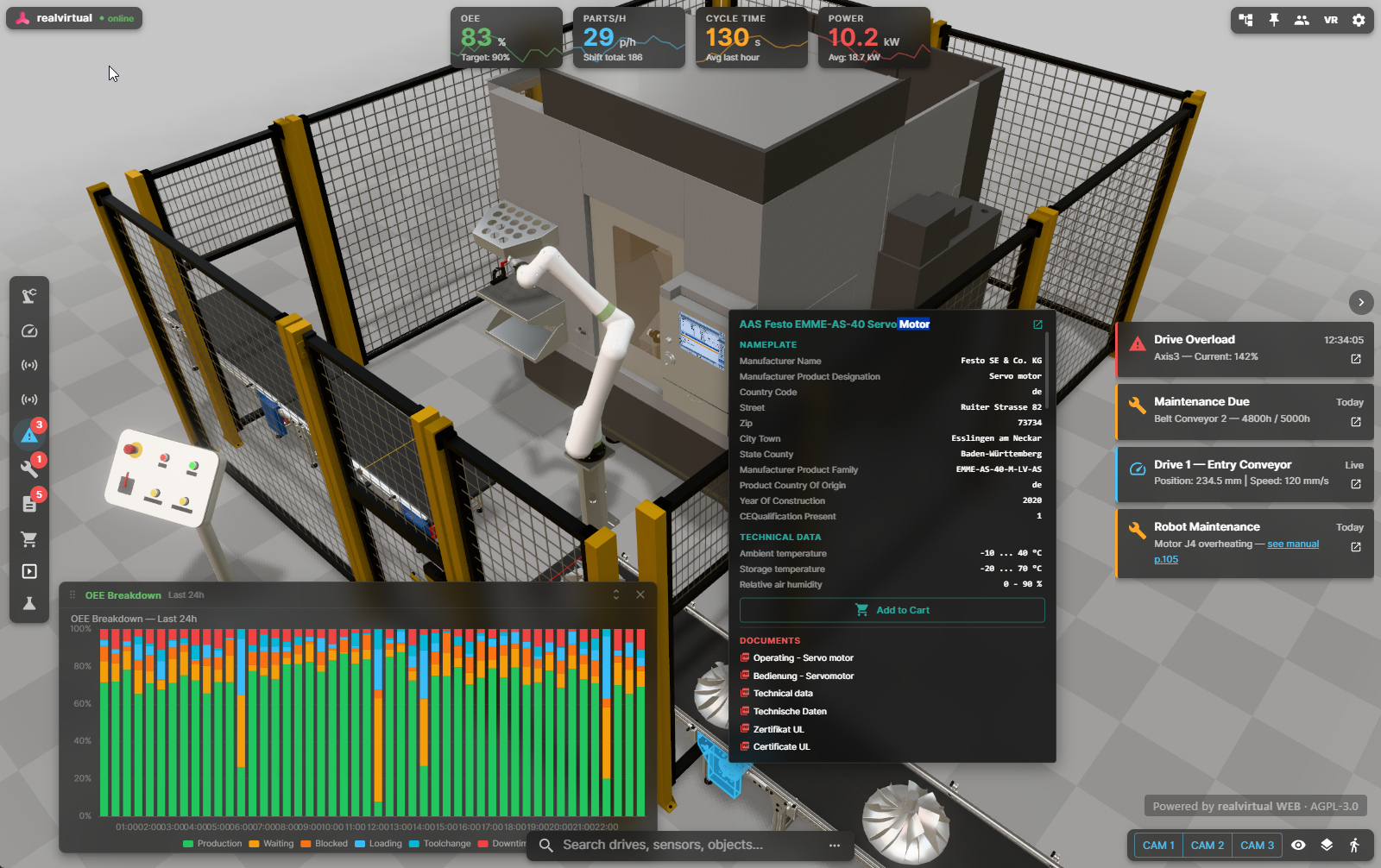
Your machine — live in the browser. realvirtual WEB replaces traditional desktop HMI and SCADA visualization with a modern 3D experience. Connect to real PLCs via WebSocket or MQTT and see live machine states in 3D: drive positions, sensor readings, alarms, KPIs. Attach maintenance guides, technical drawings, and spare part lists directly to 3D components. Technicians click a part and see everything they need — documentation, live status, and maintenance history — on any device, without installing anything. Unlike flat panel HMIs, operators see what is happening, where it is happening, and why.
Three products in one platform — 3D HMI for operations, Digital Twin Viewer for sales, Machine Information System for service. All browser-based.
Replace desktop HMI applications with a browser link. Real-time PLC signal visualization via WebSocket or MQTT. Drive monitoring, sensor states, KPI overlays, alarm dashboards, and production charts powered by Apache ECharts. Faster fault diagnosis, better situational awareness.
Attach documents, maintenance guides, spare part lists, and manuals directly to 3D components. Technicians click a part and see its documentation in context. The EU Machinery Regulation 2023/1230 (effective January 2027) now enables fully digital machine documentation — realvirtual WEB is ready.
Full in-browser simulation at 60 Hz: conveyor surfaces, sources, sinks, sensors with collision, grippers, and material flow.
Serial/parallel containers, signal conditions, delays, drive commands — compatible with realvirtual.io Professional. Use it for interactive sales demonstrators or step-by-step maintenance instructions.
Runs on all AR and XR devices out of the box — Meta Quest, Apple Vision Pro, HTC Vive, Android/iOS AR. No native builds, no app store submissions, no device-specific compilation. One URL works everywhere.
Real-time collaboration with avatars, shared camera views, role management, and late-join state sync.
Extend with custom plugins for project-specific HMI, KPI dashboards, maintenance workflows, and industrial interfaces.
Embed interactive 3D digital twins directly in Teams meetings and channels.
Built-in Model Context Protocol bridge lets AI assistants inspect, control, and debug the running viewer through natural language.
Web-based HMI connected to real PLCs. Live signal visualization, KPI overlays, drive monitoring — replacing desktop HMI applications with a browser link. Remote monitoring and support from anywhere. Kiosk mode for shopfloor panels.
Operators learn machine behavior interactively before touching the real system. No software installation, no VPN, no IT department.
Interactive 3D models in the browser. More convincing than slides, more accessible than installed software. Share a link — done.
Build browser-based 3D configurators where customers select options, variants, and accessories — rendered in real time.
Technicians open a link on their tablet, click on a motor or valve, and see documentation, maintenance history, and real-time status — all in 3D context. The EU Machinery Regulation 2023/1230 (January 2027) enables digital-only documentation — realvirtual WEB delivers it with version control via Gitea and 10+ year availability.
Share virtual commissioning models with customers for review and sign-off — worldwide, instantly.
Use realvirtual WEB with or without Unity — both paths are fully supported.
Full Digital Twin Pipeline
No Unity License Required
3D HMI · Digital Twin Viewer · Machine Information System
A complete infrastructure for live 3D HMI, historical data, and document management
Connects all PLC controllers (Siemens, Beckhoff, OPC UA, …) with realvirtual WEB via WebSocket. Central gateway for all machine signals.
Historical data storage for trends, KPI analysis, and predictive maintenance. Query and visualize machine history directly in the 3D HMI.
Version control for HMI configurations, machine documentation, and maintenance guides. Track changes, roll back, and audit all modifications.
Online AAS registry and local AASX file import. Industry 4.0 standard for interoperable digital twins and machine metadata.
Import component metadata from custom PDM systems. Link 3D components to your existing product data management.
Link your full machine documentation — PDFs, technical drawings, spare part lists — directly to 3D components and failure messages. Technicians click a part or alarm and see the relevant document instantly.
Bidirectional PLC signal streaming — direct connection without Unity in the loop
IoT and cloud connectivity for distributed systems
Direct ctrlX CORE integration
realvirtual WEB is fully AI-enabled through the Model Context Protocol (MCP). AI assistants can design, build, test, and debug digital twins end-to-end.
The realvirtual MCP Server connects AI assistants to the running browser scene — list drives, read/write PLC signals, query the scene hierarchy, inspect sensor states, and automate testing through natural language.
realvirtual WEB includes a full Claude Code setup: CLAUDE.md with architecture guidelines, slash commands for common workflows (/dev, /debug, /test, /build), and MCP tools reference. Prompt your Web Digital Twin.
Your digital twin infrastructure is too important for vendor lock-in, surprise price hikes, or black-box dependencies.
Complete source code under AGPL-3.0. Audit every line. No hidden telemetry, no call-home, no black boxes. Fork it if you ever need to.
Self-host on your own infrastructure. Sensitive machine data, production layouts, and IP never leave your network. No mandatory cloud accounts.
We guarantee: no license condition changes and no price increases beyond the official inflation rate — ever — for existing contracts.
Built from the ground up for AI coding agents. MCP integration, Claude Code skills, structured metadata — your digital twin is prompt-ready, not retrofitted.
Even if we cease to exist — your investment is safe. The full source code is AGPL-licensed and publicly available on GitHub. You can always fork, maintain, and develop it further. No vendor dependency, ever.



Developed by realvirtual GmbH in Baden-Württemberg, Germany — the heart of European machine and plant engineering. Same region, same standards, same language as your automation team.
git clone https://github.com/game4automation/realvirtual-WEB.git
cd realvirtual-WEB
npm install
npm run dev
Requirements: Node.js >= 20.19 or >= 22.12. Drop .glb files into public/models/ — they appear automatically in the model selector.