
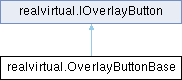
Base class for creating custom overlay buttons. More...
Public Member Functions | |
| void | OnClicked () |
| Called when the button is clicked. | |
| virtual bool | ShouldShow (GameObject selectedObject) |
| Optional: Determines if the button should be shown based on current selection selectedObject: Currently selected GameObject (can be null) Returns true if button should be visible. | |
| virtual bool | ShouldEnable () |
| Optional: Determines if the button should be enabled Returns true if button should be interactable. | |
| virtual VisualElement | CreateButton () |
| Creates the visual element for this button This is called by the overlay when constructing the UI. | |
Protected Member Functions | |
| Texture | LoadIcon (string path) |
| Helper method to load an icon from the project path: Path to the icon file (e.g., "Assets/MyIcons/icon.png" or "Icons/icon" for Resources folder) | |
| VisualElement | CreateIconElement (Texture icon, int size=16) |
| Helper method to create an icon element. | |
Properties | |
| virtual string | ButtonText [get] |
| Text displayed on the button (can be null if using icon only) | |
| virtual string | Tooltip [get] |
| Tooltip text shown on hover. | |
| virtual Texture | Icon [get] |
| Icon texture for the button (can be null if using text only) | |
| virtual string | CssClass [get] |
| Additional CSS class names to apply to the button (for custom styling) | |
| virtual bool | IconOnly [get] |
| Whether this button uses icon only (no text) | |
Detailed Description
Base class for creating custom overlay buttons.
Inherit from this class to create simple action buttons that execute code when clicked.
Example usage:
Member Function Documentation
◆ CreateButton()
|
virtual |
Creates the visual element for this button This is called by the overlay when constructing the UI.
Implements realvirtual.IOverlayButton.
◆ CreateIconElement()
|
protected |
Helper method to create an icon element.
◆ LoadIcon()
|
protected |
Helper method to load an icon from the project path: Path to the icon file (e.g., "Assets/MyIcons/icon.png" or "Icons/icon" for Resources folder)
◆ OnClicked()
|
abstract |
Called when the button is clicked.
◆ ShouldEnable()
|
virtual |
Optional: Determines if the button should be enabled Returns true if button should be interactable.
Implements realvirtual.IOverlayButton.
◆ ShouldShow()
|
virtual |
Optional: Determines if the button should be shown based on current selection selectedObject: Currently selected GameObject (can be null) Returns true if button should be visible.
Implements realvirtual.IOverlayButton.
Property Documentation
◆ ButtonText
|
get |
Text displayed on the button (can be null if using icon only)
◆ CssClass
|
get |
Additional CSS class names to apply to the button (for custom styling)
◆ Icon
|
get |
Icon texture for the button (can be null if using text only)
◆ IconOnly
|
get |
Whether this button uses icon only (no text)
◆ Tooltip
|
get |
Tooltip text shown on hover.